
miniConvert
macrumors 68040
My increased tracking speed doesn't work in WoW - anyone know why? It seems to revert to Apple's (slow) maximum.



This is great, I have downloaded the software for this but it's just taking a while to load up. I opened it like 5 minutes ago and I still see it nowhere on my computer.
Is this normal?

I trashed the program and restarted, and it's still not working. Does anybody know how to fix this?
So frustrating. I'm sorry I downloaded it.
Did you check your Preferences for your mouse? I think it may disable the default settings for back and forward and uses it's own. You may have to re-enable them.
Yes. Two-finger swiping is enabled in sys prefs. Also the zoom feature isn't working properly now. What a disaster.

Yes. Two-finger swiping is enabled in sys prefs. Also the zoom feature isn't working properly now. What a disaster.
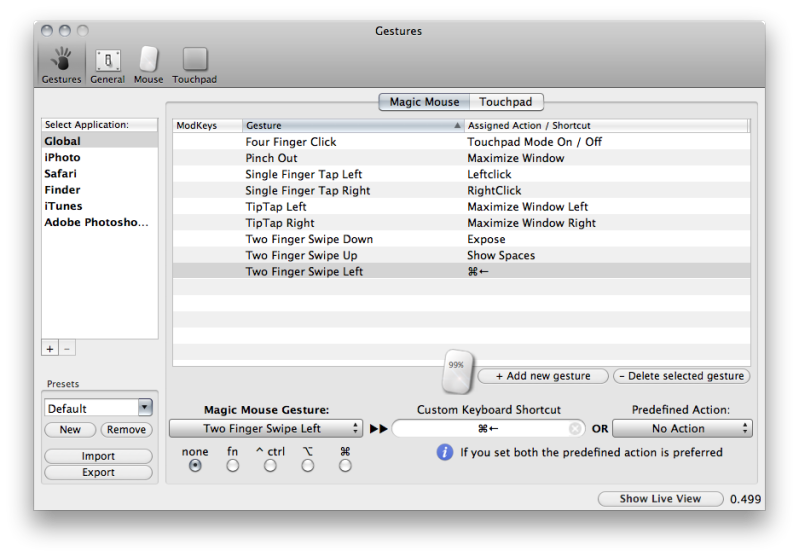

Ok, quick question about this...
When you look at the main preference screen, does BTT see your mouse? I check for this by looking at the mouse tab, it should show you a battery percentage.
See my 99%? That implies to me that it sees my mouse.
i dont think youve attached the right screeny lol.?
I shouldve zoomed in on that part. The battery level is actually on the little icon of the MM. Before I updated that said 0% even though it has full life. As if it didn't see it there. I'll post a better screen cap when I get home.
oh wow!!! thats sick! mybad 🙁 mine says 35% lol
iMerlin said:oh wow!!! thats sick! mybad 🙁 mine says 35% lol
LOL, Youre about due DoF. Break out the wallet because batteries are a RIP OFF!!
I wonder if someone can help me with a workflow Im trying to set up. I want to show all my open Photoshop windows with a gesture. So I set a gesture to show application Expose, that showes me the same thing regular expose shows me, open apps. Anyone know how I can get just my open Photoshop windows to show/???
EDIT: I just realized I was trying to do it in Maximize screen mode in Photoshop. I was able to use Expose when in regular screen mode. Problem solved I guess.

[I have rechargable duracell batteries. They don't last as long but are cheaper in the long run.
Eneloop are rechargeable batteries made by Sanyo here in Japan.
I use them as well. They are excellent quality. I should think you can get them in Australia as well. 🙂
do you know how they compare to the duracell ones? i use the 2650mAh duracells.
Loa said:Hello,
Eneloops are low self-discharge batteries, perfect for low power (like the mouse) appliances. They're rated at 2000MAh, but once I started using them, even in high-drain devices like photography speed-lights, I threw all my 2500MAh rechargeable batteries away. The chemistry is different and even with 500 less MAh, I found that they recharged my flashes faster than regular NiMH batteries.
For me it's Eneloops or nothing. 🙂
Loa
P.S. You can find them cheap on sites like dealextreme.com (free worldwide shipping).
I just got a magic mouse today and installed better touch tool, lovin it so far 😀. Question though, how do i set up actions within specific programs; like for example in Firefox, if i want to set up a gesture to close tabs or something. I didnt see an option for this..just the pre-defined actions... 😕
In the main preference pane under the Gestures section you should see a section on the left labeled "Select Application". Click the + sign and select the app you want to create a gesture for. Thats it. Let us know if you need more help.