
Got a tip for us?
Let us know
Become a MacRumors Supporter for $50/year with no ads, ability to filter front page stories, and private forums.
Resolved Block any MacOs connection at night time
- Thread starter katbel
- Start date
- Sort by reaction score
You are using an out of date browser. It may not display this or other websites correctly.
You should upgrade or use an alternative browser.
You should upgrade or use an alternative browser.

Bigwaff
Contributor
Turn off your router.I usually turn wifi off when I’m not at my computer.
I just discovered some Apple traffic at night time
How to block that? Beside shutting down my computer..

Alas I share the router with other people that don’t have my same scheduleTurn off your router.

DeltaMac
macrumors G5
What do you think this "Apple traffic" means? (what type of traffic?)
If your internet connection is solely your wifi connection, and you already said that you turn that off when you are not at your computer, then that Apple traffic must be for those "other people that don't have your same schedule", and not of any interest to you
If your internet connection is solely your wifi connection, and you already said that you turn that off when you are not at your computer, then that Apple traffic must be for those "other people that don't have your same schedule", and not of any interest to you


mblm85
macrumors 6502
I usually turn wifi off when I’m not at my computer.
Why?
I have to ask: why?I usually turn wifi off when I’m not at my computer.
That may not do what you think it does. I suspect that the Wi-fi turns on again at times - either because macOS wants to do something or because it detects network traffic. Putting it sleep may help a bit, but really if you don't want the Mac doing stuff, turn it off.I usually turn wifi off when I’m not at my computer.
What Mac model?

M.Brane
macrumors regular
Create a location in network settings where everything is turned off. Easy peasey.

Slartibart
macrumors 68040
maybe also relevant: do you disconnect from WLan, or do you disable Wifi? Other than that: why not configure the router to block the MAC of your Mac during whatever timeinterval starting at x ending at y o’clock? then you do not even have to bother setting an automation on your Mac.

bogdanw
macrumors G3
Why not shut it down? Nowadays, Macs don’t need to stay up overnight to perform defragmentationHow to block that? Beside shutting down my computer..
🙂


Fishrrman
macrumors Nehalem
If you don't want ANYTHING going on with the computer at night, just shut it down and be done with it.
I go even further.
My desktop Mac is plugged into a surge suppressor (with various peripherals). When I'm done at night, I shut down the Mac and then reach down and SWITCH OFF the power strip as well. NO power gets to any of my devices at night.
Been doing things this way for 40 years.
Won't be changing now.
I go even further.
My desktop Mac is plugged into a surge suppressor (with various peripherals). When I'm done at night, I shut down the Mac and then reach down and SWITCH OFF the power strip as well. NO power gets to any of my devices at night.
Been doing things this way for 40 years.
Won't be changing now.
bogdanw
macrumors G3
Picking up from @Slartibart's question, there are two ways to turn Wi-Fi on/off:
- just like the button in System Settings or Menu bar
networksetup -setairportpower en0 on
networksetup -setairportpower en0 off
From the manual:
“-setairportpower hardwareport on | off
Set Wi-Fi power to either <on> or <off>.”
- disable Wi-Fi completely
networksetup -setnetworkserviceenabled Wi-Fi on
networksetup -setnetworkserviceenabled Wi-Fi off
From the manual:
“-setnetworkserviceenabled networkservice on | off
Use this command to turn the specified network service on or off (enable or disable).”
With -setnetworkserviceenabled Wi-Fi off, even if -setairportpower en0 on, the Internet still doesn’t work, the message is “Please note: Wi-Fi is currently disabled”.
AppleScript, that can be saved as an app, that turns airportpower on if it’s off, and off if it’s on
AppleScript, that can be saved as an app, that disables Wi-Fi if it’s enabled, and enables Wi-Fi if it's disabled
I use networksetup -setnetworkserviceenabled Wi-Fi on/off on my MBA M1.
- just like the button in System Settings or Menu bar
networksetup -setairportpower en0 on
networksetup -setairportpower en0 off
From the manual:
“-setairportpower hardwareport on | off
Set Wi-Fi power to either <on> or <off>.”
- disable Wi-Fi completely
networksetup -setnetworkserviceenabled Wi-Fi on
networksetup -setnetworkserviceenabled Wi-Fi off
From the manual:
“-setnetworkserviceenabled networkservice on | off
Use this command to turn the specified network service on or off (enable or disable).”
With -setnetworkserviceenabled Wi-Fi off, even if -setairportpower en0 on, the Internet still doesn’t work, the message is “Please note: Wi-Fi is currently disabled”.
AppleScript, that can be saved as an app, that turns airportpower on if it’s off, and off if it’s on
AppleScript:
if (offset of "Off" in (do shell script "networksetup -getairportpower en0")) > 0 then
    do shell script "networksetup -setairportpower en0 on"
else
    do shell script "networksetup -setairportpower en0 off"
end if
AppleScript, that can be saved as an app, that disables Wi-Fi if it’s enabled, and enables Wi-Fi if it's disabled
AppleScript:
if (offset of "disabled" in (do shell script "networksetup -getinfo Wi-Fi")) > 0 then
    do shell script "networksetup -setnetworkserviceenabled Wi-Fi on"
else
    do shell script "networksetup -setnetworkserviceenabled Wi-Fi off"
end if
I use networksetup -setnetworkserviceenabled Wi-Fi on/off on my MBA M1.
Thanks @bogdanw 🥰 I already have a script that turns Wi-Fi on and off automatically assigned to a keystrokePicking up from @Slartibart's question, there are two ways to turn Wi-Fi on/off:
- just like the button in System Settings or Menu bar
networksetup -setairportpower en0 on
networksetup -setairportpower en0 off
From the manual:
“-setairportpower hardwareport on | off
Set Wi-Fi power to either <on> or <off>.”
- disable Wi-Fi completely
networksetup -setnetworkserviceenabled Wi-Fi on
networksetup -setnetworkserviceenabled Wi-Fi off
From the manual:
“-setnetworkserviceenabled networkservice on | off
Use this command to turn the specified network service on or off (enable or disable).”
With -setnetworkserviceenabled Wi-Fi off, even if -setairportpower en0 on, the Internet still doesn’t work, the message is “Please note: Wi-Fi is currently disabled”.
AppleScript, that can be saved as an app, that turns airportpower on if it’s off, and off if it’s on
AppleScript:if (offset of "Off" in (do shell script "networksetup -getairportpower en0")) > 0 then do shell script "networksetup -setairportpower en0 on" else do shell script "networksetup -setairportpower en0 off" end if
AppleScript, that can be saved as an app, that disables Wi-Fi if it’s enabled, and enables Wi-Fi if it's disabled
AppleScript:if (offset of "disabled" in (do shell script "networksetup -getinfo Wi-Fi")) > 0 then do shell script "networksetup -setnetworkserviceenabled Wi-Fi on" else do shell script "networksetup -setnetworkserviceenabled Wi-Fi off" end if
I use networksetup -setnetworkserviceenabled Wi-Fi on/off on my MBA M1.
...probably learned from one of your older messages
I will try the full network 🙂

Apathist
macrumors member
AppleScript, that can be saved as an app, that turns airportpower on if it’s off, and off if it’s on
AppleScript:if (offset of "Off" in (do shell script "networksetup -getairportpower en0")) > 0 then do shell script "networksetup -setairportpower en0 on" else do shell script "networksetup -setairportpower en0 off" end if
Thanks for posting this. I've always toggled Wi-Fi with a shortcut (based on IP addr. value), but this is more robust.
It works as an application, but would it be possible to add it as a service in SystemSettings-Keyboard shortcuts-Services as I did with the older Wifi workflow I made long time ago in Sonoma? I even assigned a function key and it still works.Picking up from @Slartibart's question, there are two ways to turn Wi-Fi on/off:
- just like the button in System Settings or Menu bar
networksetup -setairportpower en0 on
networksetup -setairportpower en0 off
From the manual:
“-setairportpower hardwareport on | off
Set Wi-Fi power to either <on> or <off>.”
- disable Wi-Fi completely
networksetup -setnetworkserviceenabled Wi-Fi on
networksetup -setnetworkserviceenabled Wi-Fi off
From the manual:
“-setnetworkserviceenabled networkservice on | off
Use this command to turn the specified network service on or off (enable or disable).”
With -setnetworkserviceenabled Wi-Fi off, even if -setairportpower en0 on, the Internet still doesn’t work, the message is “Please note: Wi-Fi is currently disabled”.
AppleScript, that can be saved as an app, that turns airportpower on if it’s off, and off if it’s on
AppleScript:if (offset of "Off" in (do shell script "networksetup -getairportpower en0")) > 0 then do shell script "networksetup -setairportpower en0 on" else do shell script "networksetup -setairportpower en0 off" end if
AppleScript, that can be saved as an app, that disables Wi-Fi if it’s enabled, and enables Wi-Fi if it's disabled
AppleScript:if (offset of "disabled" in (do shell script "networksetup -getinfo Wi-Fi")) > 0 then do shell script "networksetup -setnetworkserviceenabled Wi-Fi on" else do shell script "networksetup -setnetworkserviceenabled Wi-Fi off" end if
I use networksetup -setnetworkserviceenabled Wi-Fi on/off on my MBA M1.
Now the same process for the network doesn’t work in Sequoia
I tried to add it- as a workflow-in the folder Services, in my User/Library/Services giving it full access but it doesn’t work or even appear in the Services settings, where I would like to assign another function.key
Of course I restarted but still ...
Am I missing something?
bogdanw
macrumors G3
In Sequoia 15.7.4
Automator – New – Quick Action – Workflow receives no input – in any application – Run AppleScript - Save as Wi-Fi
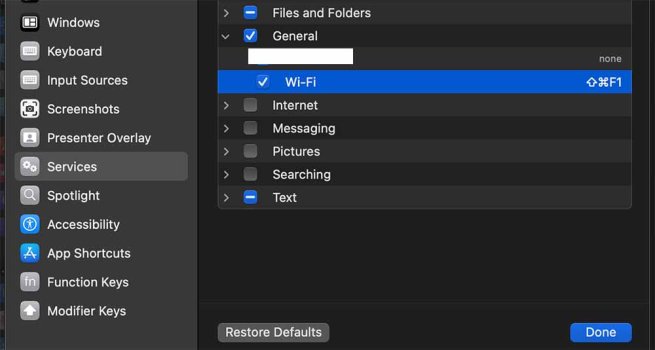
then System Settings- Keyboard – Keyboard Shortcuts – Services – General – I set the shortcut for Wi-Fi to Command+Shift+F1 (⌘⇧F1)
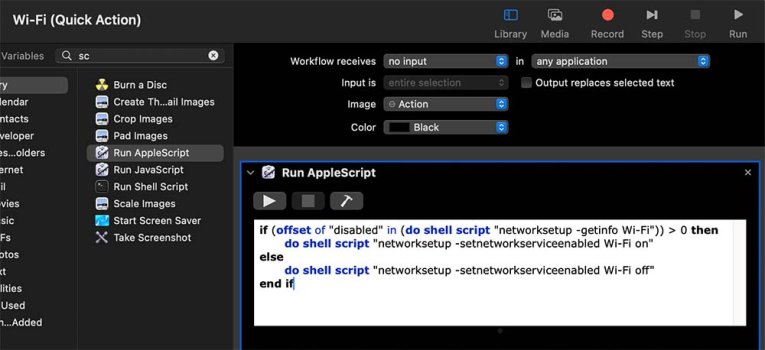
Automator – New – Quick Action – Workflow receives no input – in any application – Run AppleScript - Save as Wi-Fi
then System Settings- Keyboard – Keyboard Shortcuts – Services – General – I set the shortcut for Wi-Fi to Command+Shift+F1 (⌘⇧F1)