I'm curious if anyone out there has one of the LG UH12LS28 internal blu ray drives. I bought one from OWC (for the Mac Pro).
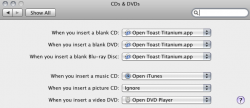
I installed it and everything seemed fine. My MP sees it, tray opens and closes and it plays DVD's. But when I try to burn something to a blank blu ray disc (tried both Memorex and Sony) I keep getting a message that tells me to insert a "blank" disc! I tried doing a burn in Toast 10 (w/ blu ray plug in) and after inserting the "blank" blu ray disc I get the same message. Same thing when I tried to burn a photo in iPhoto. Says to insert a "blank" disc and rejects the blu ray one...
I'm starting to think my MP doesn't see it as a BLU RAY drive, only a DVD one because it's not accepting blank blu rays! I'm waiting to hear back from OWC. LG doesn't even have it listed on their site but I sent them an email asking if they have any updates for this drive - which I believe came out only last year. Just in case...
If it helps to know this, I replaced the stock Superdrive with this one and then installed the Superdrive in the second bay as a back up. My MP is a 1,1 2.66GHz (dual core) with 10 GB of RAM and over 2TB of storage and I'm running OSX 10.6.8. From what I could see on the OWC page, this drive is perfectly compatible with my MP. Am I missing something here??
Sure could use some help in figuring out why I can't seem to use a blank blu ray disc to burn my photos and videos! 😕
I installed it and everything seemed fine. My MP sees it, tray opens and closes and it plays DVD's. But when I try to burn something to a blank blu ray disc (tried both Memorex and Sony) I keep getting a message that tells me to insert a "blank" disc! I tried doing a burn in Toast 10 (w/ blu ray plug in) and after inserting the "blank" blu ray disc I get the same message. Same thing when I tried to burn a photo in iPhoto. Says to insert a "blank" disc and rejects the blu ray one...
I'm starting to think my MP doesn't see it as a BLU RAY drive, only a DVD one because it's not accepting blank blu rays! I'm waiting to hear back from OWC. LG doesn't even have it listed on their site but I sent them an email asking if they have any updates for this drive - which I believe came out only last year. Just in case...
If it helps to know this, I replaced the stock Superdrive with this one and then installed the Superdrive in the second bay as a back up. My MP is a 1,1 2.66GHz (dual core) with 10 GB of RAM and over 2TB of storage and I'm running OSX 10.6.8. From what I could see on the OWC page, this drive is perfectly compatible with my MP. Am I missing something here??
Sure could use some help in figuring out why I can't seem to use a blank blu ray disc to burn my photos and videos! 😕