Become a MacRumors Supporter for $50/year with no ads, ability to filter front page stories, and private forums.

Macak

macrumors member
Original poster
My MacBook Neo doesn’t allow me to use a proper 1440p resolution on my LG 4K monitor. The resolution seems to work, but the image is not sharp (it looks blurry).

The only available options are 1080p or 4K, and neither of them works well for me.

Is there any way to work around this and get a sharp 1440p display on a 4K monitor?

This is the only issue I’m experiencing with the Neo—otherwise, everything works perfectly. It's a real bummer.
 
I understand that 1440p isn’t an integer multiple of 4K, but macOS usually handles this well with HiDPI scaling.
The issue is that I’m not getting a sharp “looks like 1440p” option—only native 4K or 1080p.

What’s confusing is that I can use the same 1440p scaling on this exact monitor with my MacBook Air and Mac mini without any issue—it looks perfectly sharp there.

So it seems specific to the MacBook Neo rather than a limitation of the resolution itself.

I was hoping there might be a way to force proper HiDPI scaling for 1440p.
 
I understand that 1440p isn’t an integer multiple of 4K, but macOS usually handles this well with HiDPI scaling.
The issue is that I’m not getting a sharp “looks like 1440p” option—only native 4K or 1080p.

What’s confusing is that I can use the same 1440p scaling on this exact monitor with my MacBook Air and Mac mini without any issue—it looks perfectly sharp there.

So it seems specific to the MacBook Neo rather than a limitation of the resolution itself.

I was hoping there might be a way to force proper HiDPI scaling for 1440p.
You should be able to force HiDPI with BetterDisplay: https://github.com/waydabber/BetterDisplay
 
No it doesn't.

I run my 4k monitor on my Mac at 3840x2160 where as on windows windows and Linux, I get better results.
Some displays do better with Mac's than others in terms of image quality and color accuracy.

This is especially true with docks that can output full 4k/60 Hz and not drop to 30 Hz.

The AOC U2790B (DP 1.4) 4k 163 PPI display that I use does exceptionally well connected using DP to a CalDigt TS3+ and Studio TB3 port compared to direct HDMI connection from the display to my Mac.
 
My MacBook Neo doesn’t allow me to use a proper 1440p resolution on my LG 4K monitor. The resolution seems to work, but the image is not sharp (it looks blurry).

The only available options are 1080p or 4K, and neither of them works well for me.

Is there any way to work around this and get a sharp 1440p display on a 4K monitor?

This is the only issue I’m experiencing with the Neo—otherwise, everything works perfectly. It's a real bummer.
Same issue with you. I just got the Neo and the scaling is terrible. Even my 12-inch MacBook from 10 years ago had better and sharp scaling options.

You should be able to force HiDPI with BetterDisplay: https://github.com/waydabber/BetterDisplay
@Macak @scotty91

Did either of you manage to get 1440p HiDPI specifically on the Neo via BetterDisplay? Thanks a ton. Considering getting BetterDisplay or returning the Neo. This is tragic indeed.

why not just run it in native 4k?
Coz tiny UI.
 
This is a well-documented issue with MacOS - scaling and its relative distaste for 4k displays. Read about 4k vs 5k.

That said, I was surprised to find my Neo driving a 5k 1st gen Studio Display scaled to 1440p without any issue.

BetterDisplay should work. I use it regularly to scale older family members I have running Thunderbolt displays down to 1080p for them to see better. You may have to create a custom scaled resolution - that's what usually works for me. I don't have a 4k display to try with my Neo, however.
 
  • Like
Reactions: uacd
This is a well-documented issue with MacOS - scaling and its relative distaste for 4k displays. Read about 4k vs 5k.
Yes, but it's not about 4K vs. 5K, it's about pixel density. A 21-22" 4K display works perfectly in "looks like 1920x1080", same retina pixel density as a 27" 5K. The problems are with the common 140ppi and 160ppi displays.
 
  • Like
Reactions: edubfromktown
No it doesn't.

I run my 4k monitor on my Mac at 3840x2160 where as on windows windows and Linux, I get better results.
I have never had issues running my 4k displays at “looks like 1440". I wish we would stop spreading this misinformation. I’m not sure if the Neo specifically has other issues. But every pro-level Mac I have used runs just fine and looks just as well as my Windows does. And the OP reports as such too except for the Neo.
 
  • Like
Reactions: Jumpthesnark
I have never had issues running my 4k displays at “looks like 1440". I wish we would stop spreading this misinformation.
I have communicated that macos scaling is inferior as others, so its not misinformation, and I will not stop. I think its important to provide accurate details, which I have.

Windows you can easily set the scaling to 150% of 4k, which is 2560 × 1440 - razor sharp.
macos the best you can do 2048x1152 HiDPI, which is NOT 1440p. You certainly can choose 1440p, but it lacks clarity and sharpness given it not HiDPI.

Comparing the two resolutions, 1440P and what macos can cleanly provide, you get less screen real estate, basically about 25% width and 25% vertical.

So you where is the misinformation?
 
I have communicated that macos scaling is inferior as others, so its not misinformation, and I will not stop. I think its important to provide accurate details, which I have.

Windows you can easily set the scaling to 150% of 4k, which is 2560 × 1440 - razor sharp.
macos the best you can do 2048x1152 HiDPI, which is NOT 1440p. You certainly can choose 1440p, but it lacks clarity and sharpness given it not HiDPI.

Comparing the two resolutions, 1440P and what macos can cleanly provide, you get less screen real estate, basically about 25% width and 25% vertical.

So you where is the misinformation?
If you need to pixel peep to see the difference, then it’s not that bad that people are saying. I can literally NOT see a difference between my Mac and windows scaling and clarity. And I can look very close to my display and STILL not see it. While it might be “technically’ accurate, it gives users misinformation on how “bad” it is. I held off for the longest time getting a 4k display because people on this site reported it was “horrible on macOS”. I literally do not see a difference at my monitor distance between a 4k and 5k display on macOS when it’s configured for 1440.

And something else you mentioned, I have it literally on my display that “looks like 2560x1440” is HiDPI. Text and everything has just as much clarity at appropriate distance as my Windows system does. Maybe you use the wrong setting?
 
Last edited:
  • Like
Reactions: Jumpthesnark
If you need to pixel peep to see the difference,
I'm not pixel peeping, I don't need too.

I can literally NOT see a difference between my Mac and windows scaling and clarity.
Ok.

While it might be “technically’ accurate, it gives users misinformation on how “bad” it is
So you're saying technically correct is misinformation.
Gotcha

it was “horrible on macOS”.
correct, it is

I literally do not see a difference at my monitor distance between a 4k and 5k display on macOS when it’s configured for 1440.
You're experience does not seem to be what many other folks have reported. I mean the OP created a thread stating that running his 4k monitor at 1440p looks blurry.

More technical information
Integer Scaling Requirement: macOS is optimized for (HiDPI) scaling, where one UI pixel is rendered using
physical pixels. When you pick a "scaled" resolution (e.g., setting a 4K display to look like 1440p), macOS renders at a higher resolution (e.g., 5K) and then shrinks it to fit the 4K panel, causing scaling artifacts.

Lack of Subpixel Antialiasing: Since macOS Mojave, Apple removed subpixel antialiasing (font smoothing). While not noticeable on high-density Retina displays (PPI), it makes text look blurry or pixelated on standard DPI screens or when using non-native scaling.

No matter how hard you try to justify that running 1440p on macos is exactly the same as windows, the math is simply not mathing. You can call the technical details, misinformation if you want, but its clear you're fighting from a position lacking any logical reason
 
  • Like
Reactions: klasma
You're experience does not seem to be what many other folks have reported. I mean the OP created a thread stating that running his 4k monitor at 1440p looks blurry.
He said it was blurry ONLY ON THE NEO. Not on other devices. I don’t have a Neo to try, but in no way is my M3 Ultra system blurry on my 4k display. It looks just as sharp as my display looks on Windows.

Well guess what? 8k is even more sharp and clear than 4k. But the misinformation is about how “bad” 4k looks on macOS. Not that 5k is more clear. 8k is more clear than 5k. 16k is more clear than 8k etc.

And this is why spreading this in threads like this does not improve the conversation. The second post from OP even states that MacBook Air looks perfectly clear but the Neo doesn’t. Sounds like a different issue to me than just the normal narrative on this site that “4k is bad”
 
And this is why spreading this in threads like this does not improve the conversation.
And yet I will continue to post my opinions. Take that for what's worth, I not only provided my opinion but also the technical reasons why, what you do with that information is up to you. I'll continue to be active in this thread either way.
 
That’s expected — macOS uses scaling, not true 1440p, so it looks soft on 4K. Try “Looks like 2560x1440” in Display settings .
 
What’s confusing is that I can use the same 1440p scaling on this exact monitor with my MacBook Air and Mac mini without any issue—it looks perfectly sharp there.
I think what’s happening is that the MacBook Air and Mac mini are rendering the 1440p scaling as 2880p internally, and downscale that to 4K for the monitor, resulting in a still relatively sharp image. The MacBook Neo, on the other hand, doesn’t have the capability to render 2880p (5K), hence only renders that scaling as 1440p internally, which becomes quite blurry when upscaled to 4K.
 
I think what’s happening is that the MacBook Air and Mac mini are rendering the 1440p scaling as 2880p internally, and downscale that to 4K for the monitor, resulting in a still relatively sharp image. The MacBook Neo, on the other hand, doesn’t have the capability to render 2880p (5K), hence only renders that scaling as 1440p internally, which becomes quite blurry when upscaled to 4K.
I think this is the first real answer. macOS renders larger than your screen resolution. Sounds like the Neo doesn’t have the performance to do this.
 
My MacBook Neo doesn’t allow me to use a proper 1440p resolution on my LG 4K monitor. The resolution seems to work, but the image is not sharp (it looks blurry).

The only available options are 1080p or 4K, and neither of them works well for me.

Is there any way to work around this and get a sharp 1440p display on a 4K monitor?

This is the only issue I’m experiencing with the Neo—otherwise, everything works perfectly. It's a real bummer.

Sounds like you are telling the Neo to set the display resolution of your monitor to 1440p, so the monitor is doing the scaling to its 4k panel native res (which usually is very bad when the monitor does this scaling).

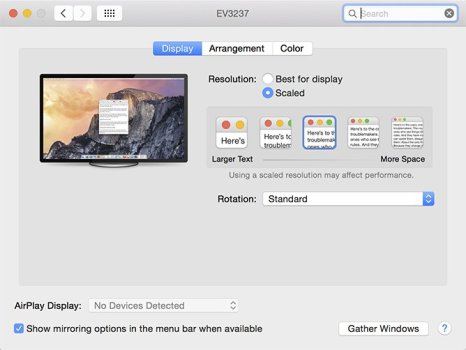
What you should be doing is setting the display resolution of the monitor to 4k, *AND* then tell macOS to scale it so it "looks like 1440p", should be available in Display Settings (see screenshot).

Still won't be as sharp as 4k, but macOS will do a way better job at the scaling, and your UI elements will look not-tiny.
 

Attachments

  • image01.jpg
    image01.jpg
    43.8 KB · Views: 64
I think what’s happening is that the MacBook Air and Mac mini are rendering the 1440p scaling as 2880p internally, and downscale that to 4K for the monitor, resulting in a still relatively sharp image. The MacBook Neo, on the other hand, doesn’t have the capability to render 2880p (5K), hence only renders that scaling as 1440p internally, which becomes quite blurry when upscaled to 4K.
This will definitely save me a Neo purchase if the case.
 
have you tried better display to force it to render a larger resolution?

you want "looks like 2560x1440" or "2560x1440x2"

edit: or I guess yeah, maybe the chip just can't do it. iPhone maxes out at 874x402x3 so......
 
Last edited:
Register on MacRumors! This sidebar will go away, and you'll see fewer ads.