Become a MacRumors Supporter for $50/year with no ads, ability to filter front page stories, and private forums.

kolax

macrumors G3
Original poster
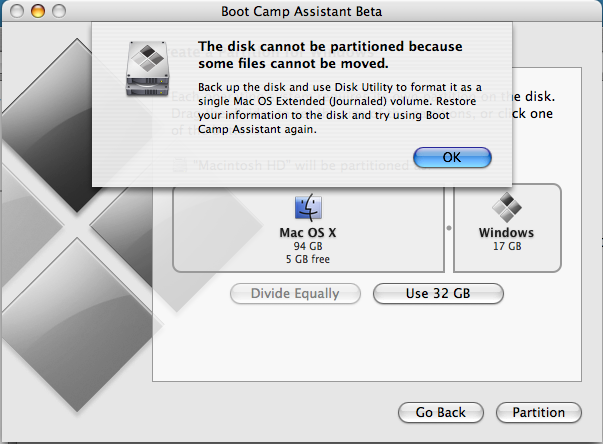
I can't seem to be able to partition my drive using Boot Camp; I was able to produce the Mac Window's Drivers CD no problem, just get an error each time I partition.

bootcamp.png


I've closed all open programs and restarted, still no luck.


Anyone got any ideas?

Ta.
 
I had this problem the first time I installed Boot Camp, back when it was first released. First, perhaps obviously, make sure you have the latest firmware. Then, insert your Tiger Install Disk 1, quit the install, and I think it's under Utilities, open Disk Utility. Repair disk.

That solved the problem for me, so many months ago. Hopefully it will help you, too.

EDIT: Okay, I guess I didn't read the warning close enough. Because OSX didn't tell me I had multiple volumes on the drive. Maybe repairing the disk would still be worth it though, before having to back up and reformat the whole drive?
 
How full is your drive, or how long have you been using it. You may need to use a defragmentation program like iDefrag to move your files into a contiguous space. OS X is good at file fragmentation but not Disk fragmentation. It's possible your drive doesn't have 17 gigs of continuous space on the drive to make the partition. iDefrag has a mode to just move files to the front of the drive, I suspect this will solve your problem.
 
Had the computer since early February - there is 21GB's free.

I noticed however that I'm allocating Virtual Memory 10GB's though, coukd this could possibly cause a conflict?
 
Register on MacRumors! This sidebar will go away, and you'll see fewer ads.