
Got a tip for us?
Let us know
Become a MacRumors Supporter for $50/year with no ads, ability to filter front page stories, and private forums.
MP All Models BootCamp releases/updates tracking thread (MP7,1 BootCamp)
- Thread starter tsialex
- Start date
- Sort by reaction score
You are using an out of date browser. It may not display this or other websites correctly.
You should upgrade or use an alternative browser.
You should upgrade or use an alternative browser.
Just came across this and thought I'd share - A new fork of Brigadier with bug fixes and enhancements - https://github.com/corpnewt/brigadier


Re-issued MP5,1 BootCamp version 1.0.1.1293150744, from 2015-02-09, re-signed with the new certificates, is Product-ID 041-84868.
I'll update the first post later.
I'll update the first post later.
My 'Boot Camp Control Panel' (6.1, UEFI Windows Install) wanted to update automatically, and I let it.
On the new version now, I can choose to boot between my Mojave SATA SSD and my Windows SSD, but my PCIE Catalina HD is no longer listed.
I might jump around a couple different versions and see if this gets resolved or if I can roll back.
On the new version now, I can choose to boot between my Mojave SATA SSD and my Windows SSD, but my PCIE Catalina HD is no longer listed.
I might jump around a couple different versions and see if this gets resolved or if I can roll back.
On the new version now, I can choose to boot between my Mojave SATA SSD and my Windows SSD, but my PCIE Catalina HD is no longer listed.
I've experienced the same thing (on a CSM Windows install) and went back to 041-88815.
tommy chen
macrumors 6502a
Anyone have a 041-88815 link or do I need to scavenge my hard drives for my old files? Does Brigadier allow you to select older versions?
https://forums.macrumors.com/threads/bootcamp-releases-updates-tracking-thread.2177384/post-27272830
Bummer, thanks.
- Please note that Apple remove previous released versions, so you can only download the most recent one for each Mac, exception of this case is iMac Pro that we can download two BootCamps for now.
I think the download is still available. You can search for it in SUS Inspector.
Apple removes it from the SUCatalog and from the SU server, if it was like you are thinking the URLs from the first post still worked.I think the download is still available. You can search for it in SUS Inspector.
BootCamp releases are not like iOS firmwares where you had to keep the full history available for updates, just the most recent one.
Last edited:


Demigod Mac
macrumors 6502a
Weirdly, both updates are not on the SUS updates list. Not by name or version.
Apple released a new BootCamp for 2019 Mac Pro:
Btw, BootCamp for MacBook Air 2020 was released too, 041-84890.
| Original Release Date: | Version number: | ProductID: | Size: | Mac: |
|---|---|---|---|---|
| 2020-03-18 | 1.0.0.0.1.1580283400 | 061-51424 | 708,5 MB | MacPro7,1 |
Btw, BootCamp for MacBook Air 2020 was released too, 041-84890.

startergo
macrumors 603
I am using iMacPro1,1's 041-88815 drivers. I see all my drives:
HFS+, APFS Windows (EFI)
I used GPT Fdisk to rename the boot entries in the Boot Camp Control Panel for Windows. HFS+ volume reads correctly the boot entry too, but all APFS volumes (Catalina and Mojave) always read "Mac macOS" no matter how I set them up in GDISK. Has anybody successfully renamed an APFS boot entry?
HFS+, APFS Windows (EFI)
I used GPT Fdisk to rename the boot entries in the Boot Camp Control Panel for Windows. HFS+ volume reads correctly the boot entry too, but all APFS volumes (Catalina and Mojave) always read "Mac macOS" no matter how I set them up in GDISK. Has anybody successfully renamed an APFS boot entry?
I am using iMacPro1,1's 041-88815 drivers. I see all my drives:
HFS+, APFS Windows (EFI)
I used GPT Fdisk to rename the boot entries in the Boot Camp Control Panel for Windows. HFS+ volume reads correctly the boot entry too, but all APFS volumes (Catalina and Mojave) always read "Mac macOS" no matter how I set them up in GDISK. Has anybody successfully renamed an APFS boot entry?
I've been looking for a way to do this. However, I wouldn't be surprised if the "Mac" name is hardcoded for APFS.
startergo
macrumors 603
I wonder where is the actual location of the bootcamp panel in Windows? This is really inconvenient as if you have multiple APFS boot entries you can't properly boot.I've been looking for a way to do this. However, I wouldn't be surprised if the "Mac" name is hardcoded for APFS.
This is really inconvenient as if you have multiple APFS boot entries you can't properly boot.
What's more, if you have multiple MacOS installations in the same APFS container, the Bootcamp software in Windows only detects one!
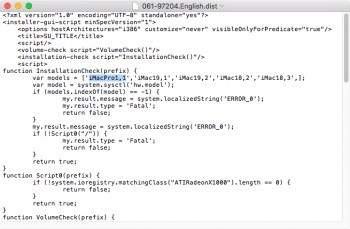
Apple released an updated BootCamp for iMac Pro today, first post table updated.
| Original Release Date: | Version number: | ProductID: | Size: | Mac: |
|---|---|---|---|---|
| 2020-04-16 | 1.0.0.0.1.1586398929 | 061-97204 | 695,4 MB | iMacPro1,1 |
Attachments

Hello, thanks for this thread;
had trouble installing Windows 10 Bootcamp software on a MP4,1>MP5,1; the downloaded software via Brigadier and else always complained that it must be run for Windows 7;
with the help of this guide here
https://crystalidea.com/blog/classic-mac-pro-and-windows
it finally functioned, after i found this thread here and was able to download the next newer .pkg after
had trouble installing Windows 10 Bootcamp software on a MP4,1>MP5,1; the downloaded software via Brigadier and else always complained that it must be run for Windows 7;
with the help of this guide here
https://crystalidea.com/blog/classic-mac-pro-and-windows
it finally functioned, after i found this thread here and was able to download the next newer .pkg after
which seems no longer downloadable (so i just took the next on the list which gave the proper driver package aswell).BootCamp-041-55643
Last edited:

Rastafabi
macrumors 6502
I usually install bootcamp completely manually these days. To do so (you would get a more current BOOTCAMPO support package via brigadierHello, thanks for this thread;
had trouble installing Windows 10 Bootcamp software on a MP4,1>MP5,1; the downloaded software via Brigadier and else always complained that it must be run for Windows 7;
with the help of this guide here
https://crystalidea.com/blog/classic-mac-pro-and-windows
it finally functioned, after i found this thread here and was able to download the next newer .pkg after
which seems no longer downloadable (so i just took the next on the list which gave the proper driver package aswell).
Code:
brigadier.exe -m iMacPro1,1
Code:
brigadier.exe -m iMacPro1,1 -o BOOTCAMP_DRV
Code:
C:\Users\[user_name]\Downloads\BOOTCAMP_DRV
Code:
msiexec /install C:\path\to\BOOTCAMP.msiI hope all those information are correct as I recalled them from memory. Another tip is to install 7zip manually beforehand as brigadier might error out downloading it automatically to unpack the driver.