
Got a tip for us?
Let us know
Become a MacRumors Supporter for $50/year with no ads, ability to filter front page stories, and private forums.
Resolved Brand new Air 13", low battery
- Thread starter Akarin
- Start date
- Sort by reaction score
You are using an out of date browser. It may not display this or other websites correctly.
You should upgrade or use an alternative browser.
You should upgrade or use an alternative browser.


Yes, it's out of the box. I installed iStats and Sublime Text 2 (for my Python dev) and that's about it.
I charged it to 100% out of the box before working with it the first time. Then, because it was reporting low battery remaining at 100%, I let it drain until it shut down with nothing running on it. I took about 3 hours to completely drain it and shut down.
Charged it the whole night for the 2nd time and took the screenshot now. It's reporting 3h35 remaining. It will shut down in that time.
Since posting this, I installed coconut battery and here is the screenshot:
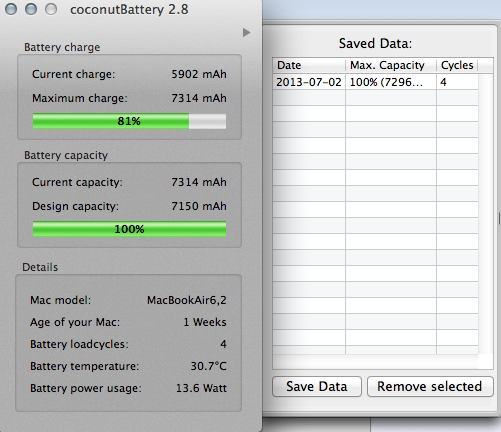
You can see it lost about 20% already between now and since I started this thread.
----------
Thanks. See reply above.
I charged it to 100% out of the box before working with it the first time. Then, because it was reporting low battery remaining at 100%, I let it drain until it shut down with nothing running on it. I took about 3 hours to completely drain it and shut down.
Charged it the whole night for the 2nd time and took the screenshot now. It's reporting 3h35 remaining. It will shut down in that time.
Since posting this, I installed coconut battery and here is the screenshot:
You can see it lost about 20% already between now and since I started this thread.
----------
Just to be clear, this is out of the box? You didn't touch any settings? What apps were open at the time you took this screenshot? Also, don't trust the time estimate. It's usually not very accurate.
You can't rely on the battery Prediction the first time you charge it to 100%. Just use it for about a week and run the battery down a few times and then if it still is predicting 3:35 you should take it in for another one. You should be seeing about 10-12 hours on the estimated time after the computers battery has been use pd for a few cycles.
Thanks. See reply above.
tylerwatt12
macrumors regular
check your cpu usage.
Normal usage. No crazy processes. Idle around 90%.
jasonbrent
macrumors newbie
That battery app should also be showing the current draw in mAh. That's the important bit... time left is a function of mAh draw (which is a function of current running apps/CPU utilization/etc) divided into the current mAh in the battery.
My version of that app shows the draw.... My nominal draw is ~300-800mAh with what you listed running... if your's is higher, then you need to look for things like indexing or backups (crashplan), etc running...
anyway, that screenshot, while interesting, leaves off the important bits to help you analyze.
-jbl
My version of that app shows the draw.... My nominal draw is ~300-800mAh with what you listed running... if your's is higher, then you need to look for things like indexing or backups (crashplan), etc running...
anyway, that screenshot, while interesting, leaves off the important bits to help you analyze.
-jbl

GGJstudios
macrumors Westmere
If it's just out of the box, it's possible that Spotlight is indexing, which can consume some system resources and cause the battery to drain faster. Follow every step of the following instructions precisely. Do not skip any steps.Normal usage. No crazy processes. Idle around 90%.
- Launch Activity Monitor
- Change "My Processes" at the top to "All Processes"
- Click on the "% CPU" column heading once or twice, so the arrow points downward (highest values on top). (If that column isn't visible, right-click on the column headings and check it, NOT "CPU Time")
- Click on the System Memory tab at the bottom.
- Take a screen shot of the entire Activity Monitor window, then scroll down to see the rest of the list, take another screen shot
- Post your screenshots.
GGJstudios
macrumors Westmere
Are you sure you're not confusing current charge level with battery health level? Where exactly are you getting the percentage figures?I'm confused by what is being reported in that battery app (CoconutBattery). I just loaded it on my 2013 MBA. It's showing a charge left of 92% but my MBA itself is showing 97% left.
Which one is correct, if either?

ApplNat
macrumors member
Are you sure you're not confusing current charge level with battery health level? Where exactly are you getting the percentage figures?
I am sure I am not confusing battery health (which btw is at 100% because my MBA is 2 weeks old) with current charge level (which is showing at 92%). The little chart with coconutbattery is quite clear.
The % of battery time left on this charge that the MBA reports is on the status line at the top, right next to the battery icon. As I said up stream it was showing 97% The % of battery time left on the charge, as reported by CoconutBattery, is in the chart and it was showing 92%. See the posting above by the other person who is reporting their CoconutBattery status--it shows exactly what the chart looks like.
What is interesting is you are consuming 13.6 watts of power according to Coconut Battery, which is 3X the amount of my 2013 MBA i7. Considering the battery life is up to 12 hours, you are going to see your battery be consumed 3X more than normal too.. which would be around 4 hours. And I believe that is the battery life you are getting, just under 4 hours of consumption. You need to check whats causing that extra watt usage, your battery temperature is also half a degree celsius greater than mine.

Mlrollin91
macrumors G5
I'm confused by what is being reported in that battery app (CoconutBattery). I just loaded it on my 2013 MBA. It's showing a charge left of 92% but my MBA itself is showing 97% left.
Which one is correct, if either?
Same, on the 2012 Airs. According to Apple it is by design. The Air will automatically discharge and recharge when plugged in in order to keep the battery active. So instead of watching the percent go down from 100 down to 95 then back up to 100, there is a 5% leeway between what the Apple readout is and what any program says so it always says 100%. As the battery drops below 50% the Apple readout and any software readout will be almost identical.
Hope that makes sense.
ApplNat
macrumors member
Same, on the 2012 Airs. According to Apple it is by design. The Air will automatically discharge and recharge when plugged in in order to keep the battery active. So instead of watching the percent go down from 100 down to 95 then back up to 100, there is a 5% leeway between what the Apple readout is and what any program says so it always says 100%. As the battery drops below 50% the Apple readout and any software readout will be almost identical.
Hope that makes sense.
I'm not doing an "unplug and replug." When the MBA is fully charged I unplug and leave it unplugged. I don't plug it in again until the battery is down to 10% or less. So there is nothing but discharge of battery happening from 100% down to 10% or less.
{Why can't posters just answer question(s) asked? I notice this all the time in these forums. A poster will ask what appears to be a fairly straightforward question and then others will chime in with opinions or info that either don't relate at all or that don't provide an answer. Then threads go round 'n round.}
GGJstudios
macrumors Westmere
There is no need to unplug and run on batteries once your battery is fully charged, unless there is no AC power available. Run on battery whenever you need to and plug it in whenever you can. You can plug or unplug any time you need to, regardless of the charged percentage, and you never need to completely drain your battery. Just make sure you don't run on AC power exclusively, as your battery needs to be used regularly to stay healthy.I'm not doing an "unplug and replug." When the MBA is fully charged I unplug and leave it unplugged. I don't plug it in again until the battery is down to 10% or less. So there is nothing but discharge of battery happening from 100% down to 10% or less.
ApplNat
macrumors member
There is no need to unplug and run on batteries once your battery is fully charged, unless there is no AC power available. Run on battery whenever you need to and plug it in whenever you can. You can plug or unplug any time you need to, regardless of the charged percentage, and you never need to completely drain your battery. Just make sure you don't run on AC power exclusively, as your battery needs to be used regularly to stay healthy.
What I'm describing is my typical usage model. I charge the MBA when it needs it (usually at night) and then I unplug and take my MBA to work. I work all day and don't bring the charger with me. I may go somewhere after work and use the MBA (again unplugged). I never completely drain my battery--I've never allowed it to get that low. The lowest I think my MBA has ever gotten is 9% before I was able to get it back on the charger. Why is this turning into a discussion of what should be done/not done with powering the MBA?
The question is really simple and straightforward: which one is correct -- the CoconutBattery estimate of time left OR the MBA estimate of time left when the MBA is unplugged and has been unplugged? They can't both be correct because they report different estimates. Can ANYONE just answer that (and only that) question?
GGJstudios
macrumors Westmere
The question is really simple and straightforward: which one is correct -- the CoconutBattery estimate of time left OR the MBA estimate of time left when the MBA is unplugged and has been unplugged? They can't both be correct because they report different estimates. Can ANYONE just answer that (and only that) question?
The fact is, they are both simply constantly changing estimates, based on your current workload at any given point in time, and they are not entirely accurate.
Mlrollin91
macrumors G5
The question is really simple and straightforward: which one is correct -- the CoconutBattery estimate of time left OR the MBA estimate of time left when the MBA is unplugged and has been unplugged? They can't both be correct because they report different estimates. Can ANYONE just answer that (and only that) question?
Coconut is technically more correct, until the battery reaches 50%, then they are the same. As I stated, the Apple readout if 5% off by design to it doesn't look like its constantly dropping then recharging on its own. The 5% readout difference is only while the battery is above 50%. This started with 2012 MBAs.
solved
All in all, my issue was a process issue, namely Dropbox. I describe the complete issue and resolution on my blog here: Dropbox will kill your insane MacBook Air 2013 battery
Thanks for the help, everyone.
Aside from that, I love my Air. It's by far the best machine I've ever owned.
All in all, my issue was a process issue, namely Dropbox. I describe the complete issue and resolution on my blog here: Dropbox will kill your insane MacBook Air 2013 battery
Thanks for the help, everyone.
Aside from that, I love my Air. It's by far the best machine I've ever owned.