mrmacuser69 macrumors member Original poster Feb 3, 2023 #1 https://forums.macrumors.com/threads/comprehensive-list-of-every-find-my-network-enabled-accessory.2379248/ On my WikiPost above, I'm trying to outline a list of products in bullet point format. All of the sections are formatted correctly except for the first, it is all skewed. Is this viewable for anyone else? How do I fix this issue?
https://forums.macrumors.com/threads/comprehensive-list-of-every-find-my-network-enabled-accessory.2379248/ On my WikiPost above, I'm trying to outline a list of products in bullet point format. All of the sections are formatted correctly except for the first, it is all skewed. Is this viewable for anyone else? How do I fix this issue?
WildCowboy Administrator/Editor Staff member Feb 3, 2023 #2 There were some extraneous size and alignment tags on those items that were messing up the formatting. I removed them and it should be good now. Reactions: icanhazmac
There were some extraneous size and alignment tags on those items that were messing up the formatting. I removed them and it should be good now.
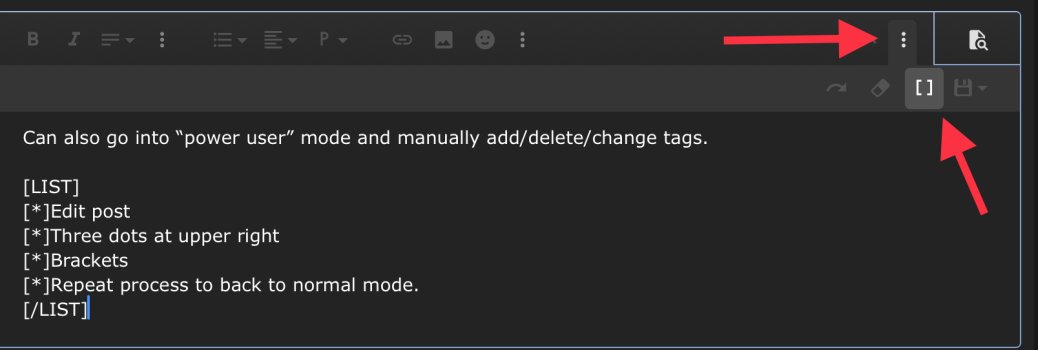
NoBoMac Moderator Staff member Feb 3, 2023 #3 Can go into “power user” mode and manually add/delete/change tags. Edit post Three dots at upper right Brackets Repeat process to go back to normal mode. Attachments 3D8E67C7-50AA-43CA-B32A-54AD74C6EA8D.jpeg 208.1 KB · Views: 232 Reactions: Weaselboy and maflynn
Can go into “power user” mode and manually add/delete/change tags. Edit post Three dots at upper right Brackets Repeat process to go back to normal mode.
maflynn macrumors Broadwell Feb 3, 2023 #4 NoBoMac said: Can go into “power user” Click to expand... There is no mode called power user and there's no need to do all of those steps. Just type in the BB Code and it will work bullet 1 bullet 2
NoBoMac said: Can go into “power user” Click to expand... There is no mode called power user and there's no need to do all of those steps. Just type in the BB Code and it will work bullet 1 bullet 2
mrmacuser69 macrumors member Original poster Feb 4, 2023 #5 WildCowboy said: There were some extraneous size and alignment tags on those items that were messing up the formatting. I removed them and it should be good now. Click to expand... Thank you sir I appreciate it Reactions: maflynn
WildCowboy said: There were some extraneous size and alignment tags on those items that were messing up the formatting. I removed them and it should be good now. Click to expand... Thank you sir I appreciate it