

Become a MacRumors Supporter for $50/year with no ads, ability to filter front page stories, and private forums.

MacRumors

macrumors bot
Original poster


If you installed the macOS 27 Golden Gate developer beta and have signed up to the Siri AI waitlist but are still waiting to be accepted, there's a Terminal command workaround that enables the new virtual assistant on your Mac immediately.
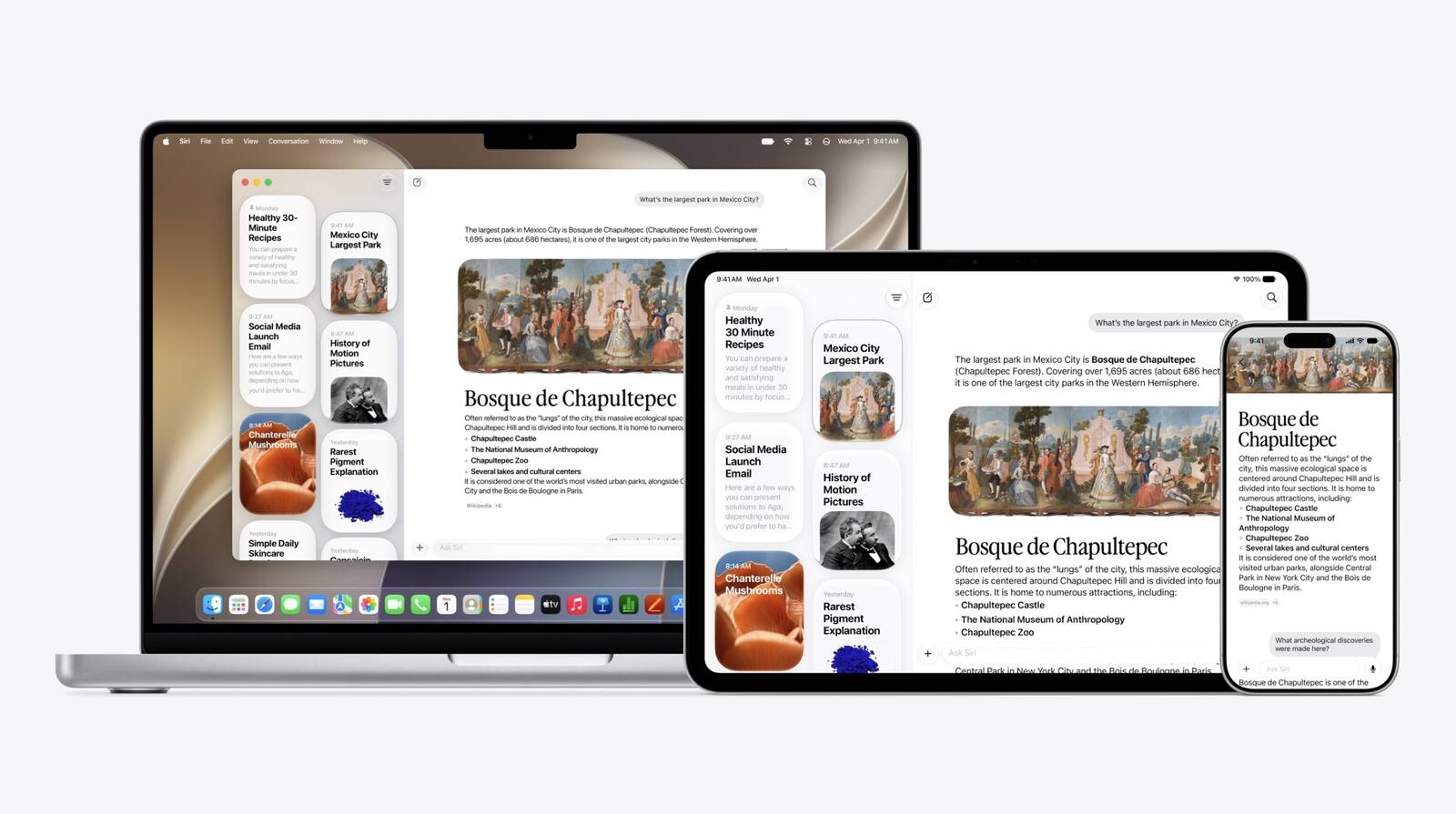
Siri-App.jpg

If you're still reading, since you're on the first macOS 27 developer beta, we're assuming you are running it on a test machine, and not on your primary Mac. We're also assuming you're comfortable with using the Terminal app. MacRumors cannot take responsibility for lost data. You should always have a backup.

With that said, early reports indicate the workaround is safe, and you won't need to reverse it once officially off the waitlist. Note that while Siri AI is not available in the EU for iPhone and iPad users due to the DMA rules, it is available on Mac and Vision Pro.

Here's how it's done.
  1. Open Terminal on your Mac running the macOS 27 beta.
  2. Input the following command at the prompt and press Enter: sudo defaults write "/Library/Preferences/FeatureFlags/Domain/GenerativeModels.plist" "EnhancedSiriWaitlist" -dict-add Enabled -bool NO
  3. Restart your Mac to apply the change.
After restarting, you can try it out right away. In the dedicated Siri app, for example, you can have back-and-forth conversations with Siri in text or voice modes, and your conversation history is synced across your devices via iCloud.

Siri AI can draw on personal context understanding to search across messages, emails, photos, and more, and get things done across apps with even more system-wide app actions.

On Mac, ‌Siri‌ is now also integrated into Spotlight and available via right-click context menus on any file or window. Note that Siri AI is initially only available in English. Let us know how you get on in the comments.

Correction: Article originally stated that Siri AI is not available in the EU. However, the limitation only applies to the iPhone and iPad, not the Mac. Apologies for the error.

Article Link: Bypass Siri AI Waitlist on macOS 27 Golden Gate Beta: Here's How
 
Last edited:
  • Like
  • Haha
Reactions: Z-4195 and Radeon85
Just be careful with this. The waitlist is there for a reason, likely because Apple is still building out the datacenter capacity and is rolling out the feature to more currently-waitlisted users only as additional capacity becomes available. By effectively skipping the line, you would be making unauthorized use of the system while making the experience worse/slower for other testers who have been granted legitimate access. That could put your developer account access or even your Apple account in jeopardy of suspension if Apple detects the unauthorized access.
 
Just be careful with this. The waitlist is there for a reason, likely because Apple is still building out the datacenter capacity and is rolling out the feature to more currently-waitlisted users only as additional capacity becomes available. By effectively skipping the line, you would be making unauthorized use of the system while making the experience worse/slower for other testers who have been granted legitimate access. That could put your developer account access or even your Apple account in jeopardy of suspension if Apple detects the unauthorized access.
The number of people who will try it is negligible one way or the other. Let's not make it more dramatic than it should be.
 
Just be careful with this. The waitlist is there for a reason, likely because Apple is still building out the datacenter capacity and is rolling out the feature to more currently-waitlisted users only as additional capacity becomes available. By effectively skipping the line, you would be making unauthorized use of the system while making the experience worse/slower for other testers who have been granted legitimate access. That could put your developer account access or even your Apple account in jeopardy of suspension if Apple detects the unauthorized access.
This message didn't stop me because I can't read
 
It worked for me right away (in EU). Thanks. Let's hope the early comments to be 'careful with this suggestion' are not based on actual experience
 
  • Like
Reactions: eSaF-Eddie
There is wrong information in the article. Siri AI is available in the EU if you have an Mac and/or a Vision Pro.

I live in Germany and got access through the waitlist today, on my Mac.

I tried writing German too, and it worked well. If you want I can proof it.
 
There is wrong information in the article. Siri AI is available in the EU if you have an Mac and/or a Vision Pro.

I live in Germany and got access through the waitlist today, on my Mac.

I tried writing German too, and it worked well. If you want I can proof it.
Yes I know. macOS does not have the marketshare to be on the list.
 
Nothing will happen. Why do you think that switch exists at all?
Yep! Does this suggest the waitlist is not purely server-side? If a local feature flag command immediately unlocked Siri AI on Mac, then Apple is also gating the feature with an on-device flag, not only with a remote approval list
 
Yep! Does this suggest the waitlist is not purely server-side? If a local feature flag command immediately unlocked Siri AI on Mac, then Apple is also gating the feature with an on-device flag, not only with a remote approval list
I think it's there for their own teams and certain 3rd party devs convenience. If the servers are the issue I bet it will be gone in next beta.
 
  • Like
Reactions: jacquesvfd and Pow!
Just be careful with this. The waitlist is there for a reason, likely because Apple is still building out the datacenter capacity and is rolling out the feature to more currently-waitlisted users only as additional capacity becomes available. By effectively skipping the line, you would be making unauthorized use of the system while making the experience worse/slower for other testers who have been granted legitimate access. That could put your developer account access or even your Apple account in jeopardy of suspension if Apple detects the unauthorized access.
or.....

someone could enable it and file a bug report to cover their tracks. "Hi, I was able to bypass the wait list for Siri AI. Should this be allowed?"

Also, if you get through, do you end up with Siri AI on all your devices?
 
  • Disagree
Reactions: jacquesvfd
How to Disable Apple Intelligence

Follow these steps to deactivate the features:
  1. Click the Apple menu :apple: in the top-left corner of your screen.
  2. Select System Settings.
  3. In the left sidebar, click Apple Intelligence & Siri.
  4. Toggle the Apple Intelligence switch to the OFF position.
  5. Click Turn Off Apple Intelligence to confirm your choice.
Your welcome!
 
or.....

someone could enable it and file a bug report to cover their tracks. "Hi, I was able to bypass the wait list for Siri AI. Should this be allowed?"

Also, if you get through, do you end up with Siri AI on all your devices?
Guy has very vanilla overview. Apple surely did not expect this to be a secret for long since people devour these betas while looking for interesting information.
 
5. Click Turn Off Apple Intelligence to confirm your choice.
6. Delete the local model(s) (which unfortunately can only be done in Recovery mode with Terminal) if you want to recover the 8-15GB storage space on a 256GB Neo or other Mac.
 
Last edited:
  • Like
Reactions: opeter
6. Delete the local model(s) (which unfortunately can only be done in Recovery mode with Terminal) if you want to recover the 8-15GB storage space, say, on a 256GB Neo.
That is true. Totally forgot about this.

There is also a script for this on GitHub:
 
  • Like
Reactions: dumiku and Pow!
6. Delete the local model(s) (which unfortunately can only be done in Recovery mode with Terminal) if you want to recover the 8-15GB storage space, say, on a 256GB Neo.
The problem with deleting assetsv2 folder is that Dictionary app no longer has any dictionaries when you do that.
 
  • Like
Reactions: ipedro
There is wrong information in the article. Siri AI is available in the EU if you have an Mac and/or a Vision Pro.

I live in Germany and got access through the waitlist today, on my Mac.

I tried writing German too, and it worked well. If you want I can proof it.
Does it do useful things on the Mac? Genuine question, I never used the old (or current) Siri on the Mac.
 
The problem with deleting assetsv2 folder is that Dictionary app no longer has any dictionaries when you do that.
You don't delete the whole assetsv2 folder but rather some stuff inside it.

Code:
/Library/Apple/System/Library/AssetsV2/com_apple_MobileAsset_UAF_FM_GenerativeModels
/Library/Apple/System/Library/AssetsV2/com_apple_MobileAsset_UAF_FM_Visual
/Volumes/Data/System/Library/AssetsV2/com_apple_MobileAsset_UAF_FM_GenerativeModels
/Volumes/Data/System/Library/AssetsV2/com_apple_MobileAsset_UAF_FM_Visual

Cache locations:

Code:
/private/var/db/MobileAsset/AssetsV2/com_apple_MobileAsset_UAF_FM_GenerativeModels
/private/var/db/MobileAsset/AssetsV2/com_apple_MobileAsset_UAF_FM_Visual
 
Interesting to know about this. Anyway not going to do this or install the beta. Hopefully by the time the final OS is available, there will not be any wait list or expecting the waiting time to be minimal.
 
  • Like
Reactions: mganu
That worked great, have the new Siri on the MacBook Air M5. Still on the damn wait list for my 17 PM despite installing just a few hours after release. At least this workaround lets me play with it.
 
How to Disable Apple Intelligence

Follow these steps to deactivate the features:
  1. Click the Apple menu :apple: in the top-left corner of your screen.
  2. Select System Settings.
  3. In the left sidebar, click Apple Intelligence & Siri.
  4. Toggle the Apple Intelligence switch to the OFF position.
  5. Click Turn Off Apple Intelligence to confirm your choice.
Your welcome!
Jokes on you, there is no Apple Intelligence and Siri panel within macOS Golden Gate.
There’s no Apple Intelligence toggle either.
 
Jokes on you, there is no Apple Intelligence and Siri panel within macOS Golden Gate.
There’s no Apple Intelligence toggle either.
Not yet, but there will be. That's why hackers and advanced users are for.
This information is for the actual macOS systems, especially Tahoe.
 
Register on MacRumors! This sidebar will go away, and you'll see fewer ads.