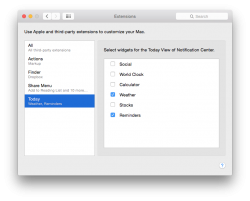
sflomenb macrumors 6502a Original poster Oct 25, 2014 #1 Updated my iMac to Yosemite, and there is no Calendar widget to be found. Works fine on my MacBook Air but not iMac. Attachments Screen Shot 2014-10-25 at 8.54.00 AM.png 123.1 KB · Views: 213
Updated my iMac to Yosemite, and there is no Calendar widget to be found. Works fine on my MacBook Air but not iMac.
N NoHo macrumors 6502 Oct 25, 2014 #2 Try pressing the green + button next to the calendar. It should move it from the right column to the left column. EDIT: My bad, thought calculator said calendar. Try opening notifications in preferences and mess with the settings there. Last edited: Oct 25, 2014
Try pressing the green + button next to the calendar. It should move it from the right column to the left column. EDIT: My bad, thought calculator said calendar. Try opening notifications in preferences and mess with the settings there.
dhlizard macrumors G4 Oct 25, 2014 #3 NoHo said: Try pressing the green + button next to the calendar. It should move it from the right column to the left column. Click to expand... Uhh. 🙄 If you looked at the graphic he posted the Calendar widget is not available to add. Open System Preferences > Notifications Hopefully you can enable it there and it will then show up to be added.
NoHo said: Try pressing the green + button next to the calendar. It should move it from the right column to the left column. Click to expand... Uhh. 🙄 If you looked at the graphic he posted the Calendar widget is not available to add. Open System Preferences > Notifications Hopefully you can enable it there and it will then show up to be added.
sflomenb macrumors 6502a Original poster Oct 25, 2014 #4 dhlizard said: Uhh. 🙄 If you looked at the graphic he posted the Calendar widget is not available to add. Open System Preferences > Notifications Hopefully you can enable it there and it will then show up to be added. Click to expand... Tried it, no luck. Attachments Screen Shot 2014-10-25 at 3.39.17 PM.png 75.5 KB · Views: 122 Screen Shot 2014-10-25 at 3.39.25 PM.png 140 KB · Views: 157
dhlizard said: Uhh. 🙄 If you looked at the graphic he posted the Calendar widget is not available to add. Open System Preferences > Notifications Hopefully you can enable it there and it will then show up to be added. Click to expand... Tried it, no luck.
theSeb macrumors 604 Oct 25, 2014 #5 sflomenb said: Tried it, no luck. Click to expand... That is really odd. You should have calendar in the Extensions settings. I have no idea how to fix it.
sflomenb said: Tried it, no luck. Click to expand... That is really odd. You should have calendar in the Extensions settings. I have no idea how to fix it.