
Got a tip for us?
Let us know
Become a MacRumors Supporter for $50/year with no ads, ability to filter front page stories, and private forums.
Can I modify my 2018 Mac mini?
- Thread starter dkupras
- Start date
- Sort by reaction score
You are using an out of date browser. It may not display this or other websites correctly.
You should upgrade or use an alternative browser.
You should upgrade or use an alternative browser.

redheeler
macrumors G3
You bought a 2014 Mac mini, not a 2018 Mac mini. It has literally gone without a hardware update of any kind for almost four years.I know back in 2014 you were able to upgrade the machine. Can I still perform memory and hard drive upgrades on this year's model or is it not possible?
[doublepost=1533910712][/doublepost]The memory is soldered (and 4 GB really isn't enough by today's standards), but an SSD upgrade is possible and will make a big difference in performance, though it's not as easy as it was with the 2012 models.
Last edited:


DeltaMac
macrumors G5
So, answering your question...
You can replace the hard drive with a standard SATA SSD-
https://www.ifixit.com/Guide/Mac+mini+Late+2014+Hard+Drive+Replacement/32815
Review those disassembly steps to see if you will be comfortable inside that small space. Lots of potential to accidentally damage some of the tiny connectors - but still doable when you take your time.
The RAM is soldered to the logic board, so no upgrades are possible there.
(Replacing the spinning hard drive with an SSD will do wonders for the speed, and that may be all you need to do. You COULD also leave the hard drive in place, and use an external USB 3 SSD for your booting drive, which will give you most of the speed of an internal SSD upgrade
You can replace the hard drive with a standard SATA SSD-
https://www.ifixit.com/Guide/Mac+mini+Late+2014+Hard+Drive+Replacement/32815
Review those disassembly steps to see if you will be comfortable inside that small space. Lots of potential to accidentally damage some of the tiny connectors - but still doable when you take your time.
The RAM is soldered to the logic board, so no upgrades are possible there.
(Replacing the spinning hard drive with an SSD will do wonders for the speed, and that may be all you need to do. You COULD also leave the hard drive in place, and use an external USB 3 SSD for your booting drive, which will give you most of the speed of an internal SSD upgrade

AndyMacAndMic
macrumors 65816
Hi All - I just purchased a 2018 Mac mini with the 1TB 5,400 RPM drive which I find slow. I know back in 2014 you were able to upgrade the machine. Can I still perform memory and hard drive upgrades on this year's model or is it not possible?
Thanks!
There is no 2018 Mac Mini. There is no this years model. The Mac Mini you bought has 4 year old technology and is the 2014 Mac Mini. It has not changed since. In essence you have answered your own question. See post #3 for what you can modify. Basically Apple is selling old outdated stuff here for (still) the premium price when it was new.
Maybe Apple will release a new upgraded Mac Mini this year, but don't hold your breath. There are lots of threads on MacRumors speculating when the Mac Mini finally will be updated (if ever).
If I where you I would return it (if you are still in the return window) and wait for the upgraded Mac Mini or buy something else.
See also the buyer's guide advice here on MacRumors. It says: don't buy.
Last edited:


So, answering your question...
You can replace the hard drive with a standard SATA SSD-
https://www.ifixit.com/Guide/Mac+mini+Late+2014+Hard+Drive+Replacement/32815
Review those disassembly steps to see if you will be comfortable inside that small space. Lots of potential to accidentally damage some of the tiny connectors - but still doable when you take your time.
The RAM is soldered to the logic board, so no upgrades are possible there.
(Replacing the spinning hard drive with an SSD will do wonders for the speed, and that may be all you need to do. You COULD also leave the hard drive in place, and use an external USB 3 SSD for your booting drive, which will give you most of the speed of an internal SSD upgrade
I noticed the machine is INCREDIBLY slow....not sure if its because of the 5,400RPM drive because when I use my SSD MB Pro I run into literally no speed issues. Thanks everyone for the kind info.
AndyMacAndMic
macrumors 65816
I noticed the machine is INCREDIBLY slow....not sure if its because of the 5,400RPM drive because when I use my SSD MB Pro I run into literally no speed issues. Thanks everyone for the kind info.
I don't know how much RAM you have, but 4 Gb would be a bit low for todays standards and you can not upgrade that.
Also the CPU is of an old generation and not the fastest anymore.
But replacing the (slow) hard drive with a SSD would definitely make the biggest impact.
I don't know how much RAM you have, but 4 Gb would be a bit low for todays standards and you can not upgrade that.
Also the CPU is of an old generation and not the fastest anymore.
But replacing the (slow) hard drive with a SSD would definitely make the biggest impact.
Agree...have the Core-i5 8GB ram but the 1Tb 5,400 RPM is dragging. Im running Mojave on it too and don't know if there are any such tools, programs that could help boost my performance until I order the kit and new SSD.
DeltaMac
macrumors G5
There's several reasons that the 2014 mini will seem slower than virtually any SSD MBPro.
hamstring CPU (you can't do anything about that)
slow GPU/video (also nothing you can do)
low RAM (maybe), and still no fix that you can do when it "needs more RAM"
Not JUST a spinning hard drive, but a slow one at that.
All those add up to handicap the mini (for some users, anyway)
The hard drive is the one choice that you can make, that can help in any significant way, either by completely replacing the internal hard drive with SSD (best choice) or adding an external SSD, and use THAT for the system boot drive.
(Your MBPro will still likely seem speedier, but the SSD in the mini will help close that gap.)
hamstring CPU (you can't do anything about that)
slow GPU/video (also nothing you can do)
low RAM (maybe), and still no fix that you can do when it "needs more RAM"
Not JUST a spinning hard drive, but a slow one at that.
All those add up to handicap the mini (for some users, anyway)
The hard drive is the one choice that you can make, that can help in any significant way, either by completely replacing the internal hard drive with SSD (best choice) or adding an external SSD, and use THAT for the system boot drive.
(Your MBPro will still likely seem speedier, but the SSD in the mini will help close that gap.)
AndyMacAndMic
macrumors 65816
Agree...have the Core-i5 8GB ram but the 1Tb 5,400 RPM is dragging. Im running Mojave on it too and don't know if there are any such tools, programs that could help boost my performance until I order the kit and new SSD.
Well the 8 Gb RAM you have is sufficient (also for current standards). The Core-i5 (although not the newest generation and not the fastest) is fine for moderate purposes. The real bottleneck seems to be your 5400 RPM hard drive.
I exchanged an old 5400 RPM drive with an SSD on an old laptop of mine (admittedly running Windows) and the speed difference was day and night. The old laptop used to take 3 minutes to start up and that changed to around 20 seconds.
I am not aware of any tools to speed up your performance until your SSD arrives though. The most sites offering tips about speeding up your Mac are saying things like:
- replace your hard drive with an SSD
- add more RAM
- clean up your hard drive etc.
It seems you will have to be patient until your SSD arrives 😵
Last edited:
If you are still in the 14 days window get back to the store and get a refound

Agree...have the Core-i5 8GB ram
Is it the 1.4 ghz model? (it helps if you are very specific about what you have). I have the base 1.4ghz/4gb/500GB hard drive model. It's an incredibly slow machine, but I only use it as an iTunes server and it's fine for that. I'm sure having 8gb of RAM on yours helps though.
I have two Mini's setup to boot from external USB Samsung t3 SSD's and they are very fast. This is your easiest upgrade - just plug in the SSD, clone your internal drive to it, select it in the Startup Disk preference and re-boot. It should seem like a new machine, and you don't have to void your warranty by opening it. Do it now, and you can see if it's acceptable while you still have time to return the computer.
Samsung as replaced the T3 with the T5, which is a bit faster. You will get disk performance 4 to 5 times faster than your internal hard drive with the external SSD.
Just did some researching and was wondering if I went the route of having the Samsung T5 Portable as an external option would that be slower than internally installing....say the Crucial MX300 Model #: CT525MX300SSD1 listed on https://www.ifixit.com/Store/Mac/500-GB-SSD/IF107-142-1
Thanks again!
Thanks again!
This is what I get with the 1tb Samsung T3 - I also have 500gb T3 and the performance is the same. The T5 is supposed to be slightly faster but I don't know that it would make much difference on the Mini.
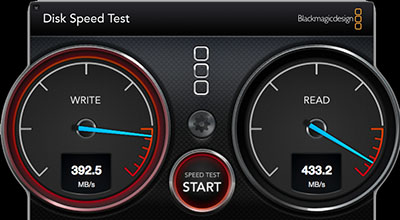
I have never installed an internal SSD on a Mini, but I'm sure someone else can comment on that. I think the 2014 Mini could get read speeds of around 700MB/sec (this is what I get on my 512gb 2013 MacBook Air) however that requires the correct kind of SSD and cable. I think these are more expensive than the one in the link you posted.
But you run the risk of damaging your Mini by opening it up - it was never designed to be user upgradeable. Even if you don't do any damage, you will void your Apple warranty. I wouldn't want to do that with a brand new machine.
I have never installed an internal SSD on a Mini, but I'm sure someone else can comment on that. I think the 2014 Mini could get read speeds of around 700MB/sec (this is what I get on my 512gb 2013 MacBook Air) however that requires the correct kind of SSD and cable. I think these are more expensive than the one in the link you posted.
But you run the risk of damaging your Mini by opening it up - it was never designed to be user upgradeable. Even if you don't do any damage, you will void your Apple warranty. I wouldn't want to do that with a brand new machine.
This is what I get with the 1tb Samsung T3 - I also have 500gb T3 and the performance is the same. The T5 is supposed to be slightly faster but I don't know that it would make much difference on the Mini.
I have never installed an internal SSD on a Mini, but I'm sure someone else can comment on that. I think the 2014 Mini could get read speeds of around 700MB/sec (this is what I get on my 512gb 2013 MacBook Air) however that requires the correct kind of SSD and cable. I think these are more expensive than the one in the link you posted.
But you run the risk of damaging your Mini by opening it up - it was never designed to be user upgradeable. Even if you don't do any damage, you will void your Apple warranty. I wouldn't want to do that with a brand new machine.
Pretty impressive....thanks for the benchmark 🙂!
[doublepost=1533990930][/doublepost]Does anybody know if the SSD that came with my 2017 13" MB Pro 512GB is faster than these read speeds? I never thought to check since I just gave the machine away (sigh)

The SSD in your Macbook Pro is faster than the Samsung T3.
Dang....is there any portable SSD out there that can match those speeds or not really?
Does anybody know if the SSD that came with my 2017 13" MB Pro 512GB is faster than these read speeds?
The newest Mac laptops have crazy fast SSD's. https://forums.macrumors.com/threads/disk-speed-bench-macbook-pro-mid-2017-15-tb-256-ssd.2054482/
You aren't going to get that with a Mini, and it would be sort of like "whipped cream on a t*rd" to even if you could. 😀
You can get faster external Thunderbolt SSD's, but they will cost a *lot* more and IMO they are not worth it. You can pay as much as $40 just for a thunderbolt cable itself! What are you doing with your Mini? Do you need a super-fast SSD?
The newest Mac laptops have crazy fast SSD's. https://forums.macrumors.com/threads/disk-speed-bench-macbook-pro-mid-2017-15-tb-256-ssd.2054482/
You aren't going to get that with a Mini, and it would be sort of like "whipped cream on a t*rd" to even if you could. 😀
You can get faster external Thunderbolt SSD's, but they will cost a *lot* more and IMO they are not worth it. You can pay as much as $40 just for a thunderbolt cable itself! What are you doing with your Mini? Do you need a super-fast SSD?
Good point just miss my MB Pro......take a look at these ultra-sad speeds lol
Attachments

Where are you getting those speed? Looks like a slow USB 2.0 flash drive. Inexpensive bus-powered USB hard drives get around 30-35MB/sec write speed. Bus powered USB 3.0 hard drives get around 100MB/sec. I get around 180MB/sec with inexpensive externally powered USB 3.0 hard drives. The internal 500gb hard drive on my base 2014 mini clocks around 100MB/sec write speed.
Where are you getting those speed? Looks like a slow USB 2.0 flash drive. Inexpensive bus-powered USB hard drives get around 30-35MB/sec write speed. I get around 180MB/sec with inexpensive externally powered USB 3.0 hard drives. The internal 500gb hard drive on my base 2014 mini clocks around 100MB/sec write speed.
Maybe it's the HD that came with this. Just picked it up about 4 days ago brand new (knowing its a 2014)