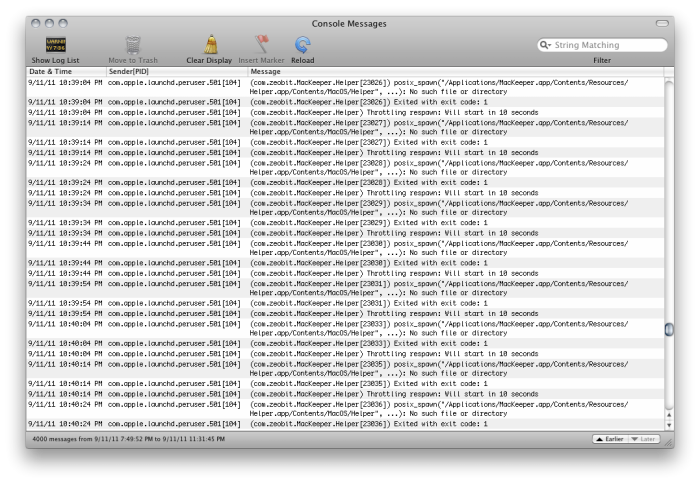
H Heateris macrumors member Original poster Sep 11, 2011 #1 i keep getting the same repeat message. should i be worried?
GGJstudios macrumors Westmere Sep 11, 2011 #4 Heateris said: mac keeper is uninstalled. Click to expand... You're saying you just now uninstalled it? Or you're getting those messages after you removed it?
Heateris said: mac keeper is uninstalled. Click to expand... You're saying you just now uninstalled it? Or you're getting those messages after you removed it?
H Heateris macrumors member Original poster Sep 11, 2011 #5 im sorry. im getting the messages after i removed it.
GGJstudios macrumors Westmere Sep 11, 2011 #6 Heateris said: im sorry. im getting the messages after i removed it. Click to expand... It looks like you didn't remove all of it. Launch Activity Monitor and change "My Processes" at the top to "All Processes". Then locate and Quit any Mackeeper processes that are running. Then completely remove all Mackeeper components using the following method: Best way to FULLY DELETE a program
Heateris said: im sorry. im getting the messages after i removed it. Click to expand... It looks like you didn't remove all of it. Launch Activity Monitor and change "My Processes" at the top to "All Processes". Then locate and Quit any Mackeeper processes that are running. Then completely remove all Mackeeper components using the following method: Best way to FULLY DELETE a program
H Heateris macrumors member Original poster Sep 11, 2011 #7 thanks man, still getting the same message. their must be some files hidden somewhere.
GGJstudios macrumors Westmere Sep 11, 2011 #8 Heateris said: thanks man, still getting the same message. their must be some files hidden somewhere. Click to expand... Did you follow the instructions I posted, including steps 4-6? That will show any system files that are hidden in a normal search.
Heateris said: thanks man, still getting the same message. their must be some files hidden somewhere. Click to expand... Did you follow the instructions I posted, including steps 4-6? That will show any system files that are hidden in a normal search.
H Heateris macrumors member Original poster Sep 11, 2011 #9 GGJstudios said: Did you follow the instructions I posted, including steps 4-6? That will show any system files that are hidden in a normal search. Click to expand... yep, just getting safari results. im also searching other sites. i see alot of people with this problem and no answers. macKeeper is evil!!!
GGJstudios said: Did you follow the instructions I posted, including steps 4-6? That will show any system files that are hidden in a normal search. Click to expand... yep, just getting safari results. im also searching other sites. i see alot of people with this problem and no answers. macKeeper is evil!!!
GGJstudios macrumors Westmere Sep 11, 2011 #10 Heateris said: yep, just getting safari results. im also searching other sites. i see alot of people with this problem and no answers. macKeeper is evil!!! Click to expand... If your search settings look like this, you should find everything. Have you tried restarting? Did you find anything related to Mackeeper as a running process on Activity Monitor?
Heateris said: yep, just getting safari results. im also searching other sites. i see alot of people with this problem and no answers. macKeeper is evil!!! Click to expand... If your search settings look like this, you should find everything. Have you tried restarting? Did you find anything related to Mackeeper as a running process on Activity Monitor?
H Heateris macrumors member Original poster Sep 11, 2011 #11 got it! i ran "launchctl remove com.zeobit.MacKeeper.Helper" in terminal. wOOt wOOt!! GGJstudios, thanks for your time man. Last edited: Oct 23, 2011
got it! i ran "launchctl remove com.zeobit.MacKeeper.Helper" in terminal. wOOt wOOt!! GGJstudios, thanks for your time man.