
Become a MacRumors Supporter for $50/year with no ads, ability to filter front page stories, and private forums.

brunozs

macrumors regular
Original poster
I don't know how to turn off two factor authentication. The option from the Apple ID site is GONE! It went on since I've updated to Mojave. I absolutely HATE this function. Say I'm out without my phone and need a contact number, It won't let me login to the iCloud site, so what's the purpose of the website anyways.

Anyway, does anybody know how to turn it of??? please
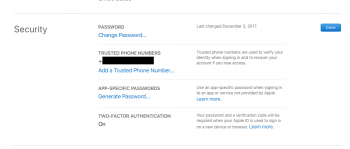
 

Attachments

  • Screen Shot 2018-11-27 at 20.57.46.png
    Screen Shot 2018-11-27 at 20.57.46.png
    62.6 KB · Views: 65
You can't turn 2FA off once it has been in effect for two weeks.
Can I turn off two-factor authentication after I’ve turned it on?
If you already use two-factor authentication, you can no longer turn it off. Certain features in the latest versions of iOS and macOS require this extra level of security, which is designed to protect your information. If you recently updated your account, however, you can unenroll for a period of two weeks. Just open your enrollment confirmation email and click the link to return to your previous security settings. Keep in mind, this makes your account less secure and means that you can't use features that require a higher level of security.
https://support.apple.com/en-us/HT204915
 
Register on MacRumors! This sidebar will go away, and you'll see fewer ads.