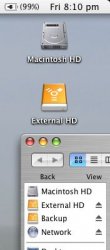
here is how the external works:
plug it in, it will mount on your desktop
so as posted before you will have the two hard drive icons, if you want to know about the space on each, in the finder view options or prefs (i cannot remember which) you can have it show the detailed info of items
once the external is connected you can format it in Disk Utility
after that is done, you just drag your files on there, and if you want to disconnect it, just click on it, hold and there will be an eject option like with cds
you can always connect it to another mac if you want, and if you format it in FAT32 you can connect it to PCs
this can be practical if you need the extra space, and it also allows for a good back up system as well
for iTunes all you have to do is make sure that iTunes knows that the folder is located on the External, you can do this by setting the path in iTunes prefs