Become a MacRumors Supporter for $50/year with no ads, ability to filter front page stories, and private forums.

Silly John Fatty

macrumors 68000
Original poster
Apparently you can, but I'm skeptic… doing a fresh install today, and since I use an SSD, I thought the name "Macintosh HD" would not be very fitting. Maybe "Macintosh SSD" would be better. I also have a normal hard drive in my Mac Pro bay, so that will be renamed in "Macintosh HDD" so I don't confuse them.

What's the best way of doing it? People say that renaming it in the info window or on the desktop is alright, is it true that I don't need to use Disk Utility or some app of some sort?
 
Apparently you can, but I'm skeptic… doing a fresh install today, and since I use an SSD, I thought the name "Macintosh HD" would not be very fitting. Maybe "Macintosh SSD" would be better. I also have a normal hard drive in my Mac Pro bay, so that will be renamed in "Macintosh HDD" so I don't confuse them.

What's the best way of doing it? People say that renaming it in the info window or on the desktop is alright, is it true that I don't need to use Disk Utility or some app of some sort?

You can.
You don't need any or a third party application for renaming, just do it in Finder, for instance.
 
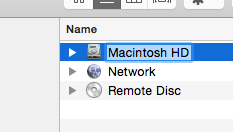
Not a problem at all. Just select it in Finder then hit the return key and the field will go onto edit mode where you can name it whatever you want.

TxO7Qr2.png
 
I also name the computer the same as my hard drive. I usually name the computer for what it is, like MacBook Pro and then name the hard drive "MacBook Pro HD". When I file share from one computer to the next I can easily tell which hard drive belongs to which computer after I mount the file share hard drive.
 
Register on MacRumors! This sidebar will go away, and you'll see fewer ads.