Become a MacRumors Supporter for $50/year with no ads, ability to filter front page stories, and private forums.

Mal

macrumors 603
Original poster
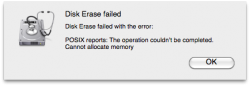
I've done this many times before, and I think it's just a failing drive, but I wanted to check and see if anyone had successfully worked around this problem before. I have a 16GB Transcend flash drive, and it stopped working last week. When I connect it to a computer, I get the message that I have inserted a disk that cannot be recognized. Disk Utility only recognizes the device, but no volumes (see attachment #2). When I try to format it, I get an error that says it Can't allocate memory (see attachment #1).

Anyone recognize this? I can send it back and get the drive replaced under warranty, just wanted to see if there were any other thoughts.

jW

 

Attachments

  • Screen shot 2009-09-25 at 11.44.31 AM.png
    Screen shot 2009-09-25 at 11.44.31 AM.png
    8.9 KB · Views: 2,191
  • Screen shot 2009-09-25 at 11.44.14 AM.png
    Screen shot 2009-09-25 at 11.44.14 AM.png
    30 KB · Views: 227
the soluce for posix problem !

OKi

THE SOLUCE:

Just have to reformat your hard drive with XP first (perharps again...) NTFS
then plug on your Mac WITH an FireWire, not USB
Open DiskUtility and re-format in HFS.

The problem with me come from a try of Paragon* application on my Mac, for instant access in read write delete on an external hard drive (coming from @#! XP user)

(*)a good good one but creating sometimes a message like read above forum when you want to use Disk Utilities to format.

After done, unmount your hard drive if you want to use USB connection or let Firewire in place.

😉
 
Register on MacRumors! This sidebar will go away, and you'll see fewer ads.