That is why you are having problems. Apple Watch can't connect to 5Ghz. You need to be using 2.4 Ghz to do your setup.5 Ghz all the way
Highly doubt that, I always had a connection with 5 GHz :/ Just tried it with 2.4, didn‘t work either. Gonna restart iPhone and Watch now!That is why you are having problems. Apple Watch can't connect to 5Ghz. You need to be using 2.4 Ghz to do your setup.
The Apple Watch Series 0 does not have a 5Ghz chip inside. Hence it cannot connect to the 5Ghz channel.Highly doubt that, I always had a connection with 5 GHz :/ Just tried it with 2.4, didn‘t work either. Gonna restart iPhone and Watch now!
Weird, I could swear I was having WiFi today on AW. Maybe because the iPhone was in range? Still in the process of forgetting the 5 GHz WiFi and making sure AW is connecting to the 2.4 GHz. One question though; I‘m searching for the update via iPhone. Why does it matter that the AW is connected to the WiFi? I have had this setup for years, and following this logic, I would never have been able to update my Watch in any way, right?That is why you are having problems. Apple Watch can't connect to 5Ghz. You need to be using 2.4 Ghz to do your setup.
Give the 2.4 Ghz a different name from the 5Ghz on your router, and you should be able to connect to the 2.4 Ghz
Per Apple, the Apple Watch needs to be connected to Wifi and plugged in to update. Some users have reported that they were able to update without being plugged in, by removing the watch from the charger once the update started. Your mileage may vary.Weird, I could swear I was having WiFi today on AW. Maybe because the iPhone was in range? Still in the process of forgetting the 5 GHz WiFi and making sure AW is connecting to the 2.4 GHz. One question though; I‘m searching for the update via iPhone. Why does it matter that the AW is connected to the WiFi? I have had this setup for years, and following this logic, I would never have been able to update my Watch in any way, right?
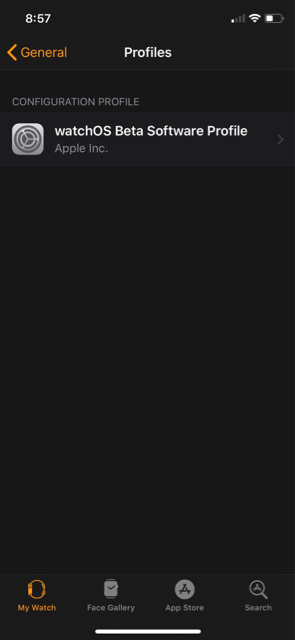
Yeah, I get it, this is for the installation itself. For me it doesn‘t even find the 4.3 beta - see attached image. And the 5 GHz WiFi never was a problem before, I guess it did proxy over the iPhone all the time.Per Apple, the Apple Watch needs to be connected to Wifi and plugged in to update. Some users have reported that they were able to update without being plugged in, by removing the watch from the charger once the update started. Your mileage may vary.
Is it definitely the watch profile you’ve installed?
Pony up the $100 and you can install. 😉You are on to something. Mine is called iOS Beta Profile 😵 Do I get the watchOS Profile on beta.apple.com as well? I find only macOS, iOS and tvOS
[doublepost=1520024943][/doublepost]For everyone: I do not have a paid Developer account, only a free one. That‘s why I don‘t get the AW beta Profile it seems 🙂 Thank you for the help!
You are on to something. Mine is called iOS Beta Profile 😵 Do I get the watchOS Profile on beta.apple.com as well? I find only macOS, iOS and tvOS
[doublepost=1520024943][/doublepost]For everyone: I do not have a paid Developer account, only a free one. That‘s why I don‘t get the AW beta Profile it seems 🙂 Thank you for the help!