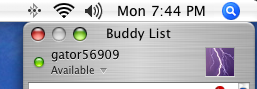
W wiggy4ever macrumors member Original poster Oct 31, 2005 #1 Sometimes a program won't let me minimize it using the yellow dash. This problem happens once or twice a week to some random programs, and the only way to fix it is to reboot my computer. Any idea what causes this?
Sometimes a program won't let me minimize it using the yellow dash. This problem happens once or twice a week to some random programs, and the only way to fix it is to reboot my computer. Any idea what causes this?
grapes911 Moderator emeritu Oct 31, 2005 #2 1. Make sure you update OS X. This was a problem in versions before 10.4.2. 2. I hear this is a side effect of illegally installing Front Row.
1. Make sure you update OS X. This was a problem in versions before 10.4.2. 2. I hear this is a side effect of illegally installing Front Row.
W wiggy4ever macrumors member Original poster Oct 31, 2005 #3 i dont have the illegal front row installed
alexstein macrumors 6502a Oct 31, 2005 #4 Like always try to verify/repair permissions. After that make sure your OS is up to date. Let us know what you find out.
Like always try to verify/repair permissions. After that make sure your OS is up to date. Let us know what you find out.
miloblithe macrumors 68020 Oct 31, 2005 #5 This problem remained for me in 10.4.2. I'm optimistic that they've fixed it in 10.4.3.
W wiggy4ever macrumors member Original poster Oct 31, 2005 #6 the problem still occurs for me in 10.4.3 and ive update/repaired everything
Whyren macrumors 6502a Oct 31, 2005 #7 I've had that happen before too...seems to occur when you switch between windows/applications a lot. No idea why.
I've had that happen before too...seems to occur when you switch between windows/applications a lot. No idea why.
fayans macrumors 6502a Oct 31, 2005 #8 If the yellow button is missing, ⌘+M does the job to minimize. 😀
miloblithe macrumors 68020 Nov 2, 2005 #9 fayans said: If the yellow button is missing, ?+M does the job to minimize. 😀 Click to expand... That's good to know (I was too lazy to figure that out). But I still think Apple should fix this.
fayans said: If the yellow button is missing, ?+M does the job to minimize. 😀 Click to expand... That's good to know (I was too lazy to figure that out). But I still think Apple should fix this.