
Become a MacRumors Supporter for $50/year with no ads, ability to filter front page stories, and private forums.

justinhu8

macrumors regular
Original poster
I've been trying to screen record my MacBook Pro recently. I edit the video with iMovie but the issue is I post most of them to YouTube so the 16:10 aspect ratio doesn't exactly suit me. I've been trying to change the aspect ratio on the screen,
 
Last edited:
System Preferences -> Displays

However, the built in display on an MBP does not support 16:9. You have the option of multiple 16:10 resolutions, as well as 4:3 (iPad/SD TV) and 3:2 (original iPhone) both stretched and un-stretched.
 
System Preferences -> Displays

However, the built in display on an MBP does not support 16:9. You have the option of multiple 16:10 resolutions, as well as 4:3 (iPad/SD TV) and 3:2 (original iPhone) both stretched and un-stretched.

Dang
 
However, the built in display on an MBP does not support 16:9.
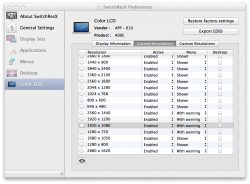
You need a SwitchResX, then you can select a 16:9 screen size (1280x720 or 1920x1080 according to what your Mac screen is capable of) and off you go.
Below a screenshot of SwitchResX from my rMBP:
 

Attachments

  • Untitled.png
    Untitled.png
    356.1 KB · Views: 242
Last edited:
Register on MacRumors! This sidebar will go away, and you'll see fewer ads.