Become a MacRumors Supporter for $50/year with no ads, ability to filter front page stories, and private forums.
Why would you want to do that? 24 FPS is smoother because it has more frames.

hmm maybe the footage he shot was non-drop frame 24fps which is 23.976.

just make a new project and drop your 23.976 (whatever you want to call it) on it and it should conform to that frame rate.

or create a new project and copy and paste from old project to new.

or just select the project in the project library, press command+4 for Inspector and click on the bottom wrench icon and make your change.
 
🙂
 

Attachments

  • Screen Shot 2012-09-26 at 21.44.22.png
    Screen Shot 2012-09-26 at 21.44.22.png
    30.3 KB · Views: 122
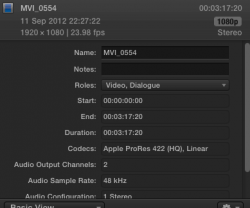
I was told the Canon 7D shoots 23.98 even though it says 24p? The files say 23.98 in the project which i set up at 24p, so i changed the project to match the files.

It's like 0.2p in difference, why not do it in 24p? It's not like there will be a huge difference.
 
Would this be an issue with audio sync or anything? With Magic Lantern I just use exact 24FPS (on my 550D).
 
I converted the original files from my 7D in MPEG Streamclip to Apple Pro Res422.

In the screenshot above, it says the mov files are 23.98

----------

It's like 0.2p in difference, why not do it in 24p? It's not like there will be a huge difference.

Would it not effect the audio sync seeing as it is a music video?
 
Register on MacRumors! This sidebar will go away, and you'll see fewer ads.