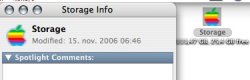
You can change the icon like this...
1. Select the icon you want to change your drive to.
2. Choose "Get Info" from the File Menu, or click command-I.
3. Click the icon in the upper left of the info window.
4. Choose "Copy" from the Edit menu (or type command-C).
5. Select your drive on the desktop and "Get Info" for it.
6. Click the icon in the upper left of the info window.
7. Select "Paste" (command-V) from the Edit Menu.
Easy as that and twice as simple. Changing an icon like this won't cause you any OS related problems, so don't fret.