Become a MacRumors Supporter for $50/year with no ads, ability to filter front page stories, and private forums.
In the long-term I do see declining support for HDD. At the application level and the filesystem level in Apple's case. Developers optimize their programs for the hardware they have and they tend not to have HDD these days. So the algorithms they use are not HDD-aware. Same thing happened decades ago with tape storage, which used to be dominant and people developed all sorts of algorithms optimized for sorting data assuming the performance characteristics of tapes. Those still worked on HDD but when people developed new algorithms assuming HDD, they were unusable on tapes. I saw the equivalent of that for SSD in a now several versions old update to MS SQL Server. They changed the default sorting algorithm to run more efficiently on SSD and/or in-memory but it's painful out-of-memory on HDD. Like 50x slower. There's a "secret" (hard to find) flag to use the old sort algorithm which restored performance to large databases stored on HDD in those situations, but you can see where things are going.
I've never used magnetic tape or database/SQL, but I would think, now that we're 1/4 of the way through the 21st Century, that developers would have learned to abstract their application code as far as possible away from any assumptions about the underlying hardware. Is that not the case?

Why would a Mac app developer need to know or care whether the files they're working on are stored on an HFS+ HDD, an APFS SSD, a NAS, a cloud service, or on the moon for that matter?
 
Be very careful with used HDDs.
Thus my advice to examine them with a utility that checks SMART status. (The same applies to SSDs, although they are trickier, and I've run into many that are functionally dead despite reporting rosy numbers.)
HDDs, even slower ones (5400 rpm), have spinning platters and moving heads that have to line up very accurately and repeatedly over years of continuous use. Personally, I don't use an HDD for more than 5-6 years for storing critical information, and that's with a 3-2-1 backup system (3 copies, 2 media types, 1 offsite). Maybe these drives are OK for archival storage, where you write it once and put it away in a box, but I wouldn't trust it for anything you'd be upset to lose.
The point of an hdd (aside from bytes per buck) is that you CAN "put it away in a box" for years, and it'll still be OK. I acquire vintage computers all the time with an inch of dust on them, and they fire right up so long as the circuitry isn't corroded. No SSD can maintain data integrity anywhere near that long unpowered.

Why would a Mac app developer need to know or care whether the files they're working on are stored on an HFS+ HDD, an APFS SSD, a NAS, a cloud service, or on the moon for that matter?
They shouldn't, because that's the job of the operating system...assuming you're still being offered one whose OEM gives a damn about your needs.
 
Last edited:
I have had no issues with my NAS drives. I have always used Enterprise Drives, originally WD Reds, but once they started doing SMR (Shingled, performance hits) I switched over to Seagate Iron Wolf or Exos drives.

I have upgraded from 2x 3 TB, to 2x 10 TB, to 2x 10 TB & 2x 14 TB (DS212J -> DS918+). The last upgrade, in the fall I went with used/certified Exos drives 2x26 TB & 2x28 TB. I upgraded hastily given where the market was going and decided to do it cheaper.

In my Synology NAS, I started out using Ext4 file system, but switched to BTRFS about 3 years ago. BTRFS has bitrot detection.

The 2x14 TBs are now in a OWC Mercury Elite Dual housing, APFS for Mac Studio slow storage, Time Machine, etc.
 
Last edited:
Thus my advice to examine them with a utility that checks SMART status. (The same applies to SSDs, although they are trickier, and I've run into many that are functionally dead despite reporting rosy numbers.)

The point of an hdd (aside from bytes per buck) is that you CAN "put it away in a box" for years, and it'll still be OK. I acquire vintage computers all the time with an inch of dust on them, and they fire right up so long as the circuitry isn't corroded. No SSD can maintain data integrity anywhere near that long unpowered.
I don't disagree. You clearly understand the risks and limitations of buying used HDDs on the cheap. Others may not be so well informed.

They shouldn't, because that's the job of the operating system...assuming you're still being offered one whose OEM gives a damn about your needs.
Correct. TBH, the last time I wrote a Mac app was around 1990, and even way back then, the OS took care of all the details. You just called the function to put up an "Open..." box, and it returned block of information including a volume reference number and a file name. The OS took care of connecting the volume reference number to the correct driver.
 
  • Like
Reactions: Minghold
Right now, I think the Seagate Expansion 8TB is a decent value.

Hard drive prices (and SSD) seem to be going up everywhere, so your value may vary.
 
Hard drive prices (and SSD) seem to be going up everywhere, so your value may vary.
I think we're in the middle of a materials speculation "chart spike" (i.e., similar to the silver pump & dump a few months ago), and prices will slump significantly as we head into spring (typically the tech doldrums). Currently, Fed rates are high, leading to a stronger-than-recently dollar, with commensurately lower costs in, say, groceries and gasoline, etc, than a year ago.
 
Last edited:
It's hard to beat 12TB for forty bucks (strip the 7200rpm drive out of its server-rack housing and plop it into a USB external case): https://boosthardware.com/dell/hard...ta-lff-7200rpm-512e-hdd?condition=refurbished
Agreed, especially for an Enterprise grade drive. I think Dell sources their server drives from Seagate.

So the link Ming provided was for a company that buys and sells used servers and storage. A couple others are here


Those are a couple links on Enterprise SATA 3 1.92 TB SSDs.

Over in an ArsTechnica forum, someone talked about a used server multibay SATA housing they were populating with SATA SSDs. So a faster than HDD RAID. He was using Micron 5100 Pro drives, and back in the summer/fall he got them for about $125. The second link above shows other Micron 1.92 TB models with current prices about 300% to 400% above that.

Just a benchmark, on used Enterprise SATA SSDs.

_____________

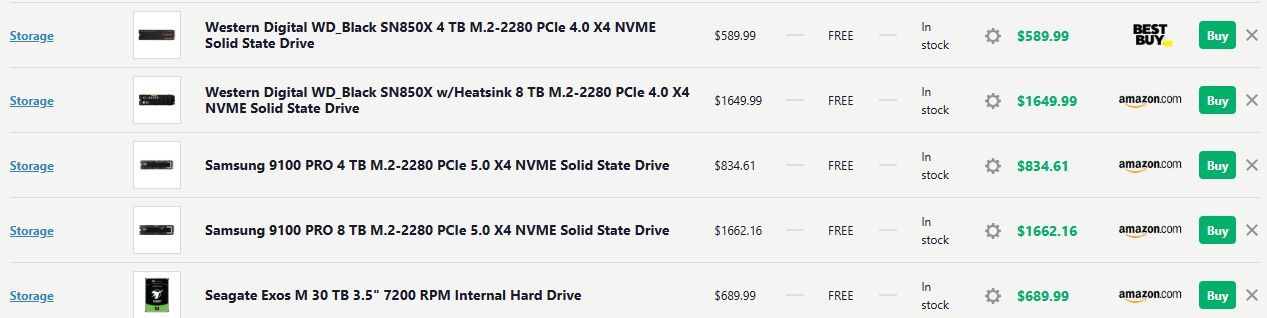
Another reference point. I picked up a WD Black 8 TB SN850X for about $620 from Microcenter (Listed $599, $30 off for signing up for Wells-Fargo card + tax). I chose it over a 9100 because the WD firmware on those models works really well with Macs and runs cooler.

I have had PC partpicker open since this crap started going down. I added some others. Todays (1/13/26) price point enlightenment:

1768322447220.png


And today's (2/25/26) PC Partpicker (note the Samsung 9100s are swapped in the lower image)

1772030724847.png
 

Attachments

  • 1772030564885.png
    1772030564885.png
    64.7 KB · Views: 36
Last edited:
md wrote:
"Whether or not it's a "bug" in the 26.4 beta, I think it's clear that the writing is on the wall for HFS+"

The problem with the 26.4 beta (wouldn't mount some hfs+ drives, and made ALL hfs+ drives "read only") appears to have been fixed with the second beta release.

I can now mount internal/external hfs+ volumes and partitions and read/write to them again.

But... you're right about "the writing on the wall".
At some point in the not-to-distant future, I sense that Apple will abandon hfs+ completely -- without regard to the many users who still have hfs+ drives.

I don't see where keeping support would really impact much re the progress of the Mac OS. Surely the resources and development time consumed must be trivial to retain hfs+ support...
 
I've never used magnetic tape or database/SQL, but I would think, now that we're 1/4 of the way through the 21st Century, that developers would have learned to abstract their application code as far as possible away from any assumptions about the underlying hardware. Is that not the case?

The OS and libraries do this but they can't abstract past the inherent performance limitations of the hardware. Within a performance envelope, things are generally fine. However once you get to 10-1000x performance differences, old assumptions no longer hold. Or conversely, if all you know is the new stuff, you aren't sensitive to the limitations of old stuff and unlikely to write algorithms optimized for them.

Why would a Mac app developer need to know or care whether the files they're working on are stored on an HFS+ HDD, an APFS SSD, a NAS, a cloud service, or on the moon for that matter?

They almost never do and to some extent that's the problem. There are inherent differences between such configurations that can't be abstracted away from a performance perspective.

For example, a cloud service on the moon would have a speed of light latency of at least 1.3 seconds. R/T that's 2.6 seconds. Compare that to a local SSD's microsecond-level latency. A programmer/etc is going to go through different heroics if they know every access to storage is 2.6 seconds away versus 26 milliseconds versus 26 microseconds. In some cases optimizations for good performance from moon-based storage become bottlenecks for the local SSD case.
 
  • Like
Reactions: Non-Euclidean
Over in an ArsTechnica forum, someone talked about a used server multibay SATA housing they were populating with SATA SSDs. So a faster than HDD RAID.
Oh there's no question that SSDs are *faster*, especially for server/raid purposes (which are diametrically opposed to the external/archival light-use market, for which even a heavily-flogged used hdd would essentially last forever).
Speaking of longevity: https://m.facebook.com/reel/1255627369778416/

Main problem with a SATA-SSD RAID, as I see it, would be extremely rapid wear-leveling in an application featuring massive and continuous write-cycling.
 
You can get an SLC-NAND SSD for greater longevity in rewrite-heavy applications, but they're extremely expensive enterprise equipment.
 
Register on MacRumors! This sidebar will go away, and you'll see fewer ads.