It's as detailed as it gets I believe. Someone else can chime in if they know of a more complete check. I think the only way to really check for bad sectors under OS X is to reformat the drive and write zeros to it, so Disk Utility will have to suffice. See http://www.macriot.com/article.php/20050430042907180
Thanks very much, my MBP got freezed when I plugged the iPod in and tried to start iTune, later on the harddisk icon was gone, then I tried to logoff/restart/quitting programs/press the power button, but still wouldn't restart, so had to press the power button for 10 sec to shut down the power, was afraid of causing harddisk problem
After reboot, got the harddisk verified and looks like that's the farthest I can go
a good disk-check utility for mac is the great DiskWarrior.. it defragment the disk and rebuild the index of the files... when your Mac goes slow, use it.. it works great!
Just to clarify - DiskWarrior does not defragment disks - it repairs the directory structure. It does nothing to the file structure of the disk itself.
Defragmentation is, for the most part, unnecessary in OS X. There are utilities such as Drive Genius and TechTool Pro that do offer defragmentation utilities, but I do not recommend them to my clients unless they are moving large files around, such as one might if they are doing video editing.
Otherwise, defragmentation of an OS X drive is pretty much a waste of time. Lots of time...
Just to clarify - DiskWarrior does not defragment disks - it repairs the directory structure. It does nothing to the file structure of the disk itself.
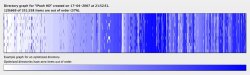
Yeah but the graph it does look exactly like a defragmentation 🙂 Look at the attached pic. This pic was taken -before- run DiskWarrior on my iBook G4 internal HD from my firewire disk.. just 37% of items out of order and my iBook was unusable.. then i run DiskWarrior 3.0.3 and all works fine now 🙂