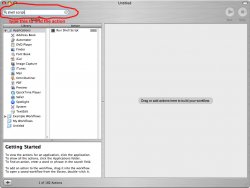
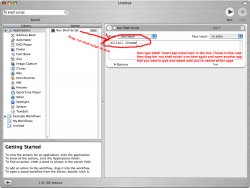
What you could do is create an automator workflow that can do this. What you'll do is open automator and drag the run shell script to the workflow and replace 'cat' with killall (insert program name here). Do this for all of the apps that you want quit and you have a workflow that you can run to accomplish what you want.
You'll need to install Extra Scripts plug-in in the Plug-ins panel (which might require you to select Enable advanced features in the Preferences panel)...once installed, it's just a matter of summoning Quicksilver and starting to type "Quit Visible Apps"...once you get to "Quit V" then you can hit return to run the script. It won't quit any apps you have hidden, though.
Well, I run about 6-10 apps at a time, and I'd like to be able to close them all at once before I go to bed.
iBookG4user said:
What you could do is create an automator workflow that can do this. What you'll do is open automator and drag the run shell script to the workflow and replace 'cat' with killall (insert program name here). Do this for all of the apps that you want quit and you have a workflow that you can run to accomplish what you want.
Im really clueless when it comes to automator. 😕 Where can I find the run shell script? also, how come only some of my apps pop up in the automator application folder?
Im really clueless when it comes to automator. 😕 Where can I find the run shell script? also, how come only some of my apps pop up in the automator application folder?
If I need to close everything, I just the Cmd+Tab to tab through each one. Once I'm on an app I want to quit, just hit (Cmd+) Q. Once you get used it, it's very quick.