
Got a tip for us?
Let us know
Become a MacRumors Supporter for $50/year with no ads, ability to filter front page stories, and private forums.
Compatible RAM for 8 GB upgrade
- Thread starter Swisha31
- Start date
- Sort by reaction score
You are using an out of date browser. It may not display this or other websites correctly.
You should upgrade or use an alternative browser.
You should upgrade or use an alternative browser.
the most popular brand would be corsair from wat ive been reading. If you were in the market earlier, it wouldve costed $73 versus the 83 on newegg. Coupon expired though
This should be the right one. 🙁
http://www.newegg.com/Product/Produ...5281&cm_re=corsair_8gb-_-20-145-281-_-Product
This should be the right one. 🙁
http://www.newegg.com/Product/Produ...5281&cm_re=corsair_8gb-_-20-145-281-_-Product

Hellhammer
Moderator emeritus
What MBP do you have in the first place? That determines whether you should go with 1066MHz or 1333MHz.
What MBP do you have in the first place? That determines whether you should go with 1066MHz or 1333MHz.
Well i'm getting a 15" i7 in a couple of weeks when i get back to the states. i just figure i could save my self $100 or so by getting my own RAM and installing it myself. the 1333 mhz should be the correct type tho
Hellhammer
Moderator emeritus
Well i'm getting a 15" i7 in a couple of weeks when i get back to the states. i just figure i could save my self $100 or so by getting my own RAM and installing it myself. the 1333 mhz should be the correct type tho
Then e.g. this will work.

-aggie-
macrumors P6
i appreciate the link. do you actually mess up the warranty/apple care by going in and putting in the RAM yourself?
Nope.
Then e.g. this will work.
Whats the difference in the two? i've noticed that the one u sent has higher and more positive ratings....And would this be good to get for a 17" as well?
Nope.
This is great to hear...
Hellhammer
Moderator emeritus
Whats the difference in the two? i've noticed that the one u sent has higher and more positive ratings....And would this be good to get for a 17" as well?
Well, you get a free 2GB USB flash drive with the one I linked 😀 Otherwise there is no noticeable difference. It is good for 17" as well.
Well, you get a free 2GB USB flash drive with the one I linked 😀 Otherwise there is no noticeable difference. It is good for 17" as well.
Awesome! i having to decide b/w 15" and 17" but i think im gonna go 15" and update with this RAM

thermodynamic
Suspended
Where are some of you getting your RAM to upgrade from 4 GB to 8 GB on MBP? I wouldn't wanna get the wrong type of RAM. Does any DDR3 do? Well, not just any but a good brand
Kingston HyperX 8GB
1600MHz. Haven't verified if the chips are being underclocked to 1333, but 'About this Mac' shows the RAM as being 1600MHz. (the i7 CPU in the 2011 models is said to be 1600MHz compatible, but what remains is to confirm any boost in speed. And if not, then I'm future-proofing. For $30 more, it's worth that gamble.)
As an Amazon Associate, MacRumors earns a commission from qualifying purchases made through links in this post.
Hellhammer
Moderator emeritus
Kingston HyperX 8GB
1600MHz. Haven't verified if the chips are being underclocked to 1333, but 'About this Mac' shows the RAM as being 1600MHz. (the i7 CPU in the 2011 models is said to be 1600MHz compatible, but what remains is to confirm any boost in speed. And if not, then I'm future-proofing. For $30 more, it's worth that gamble.)
30$ for something that you will never notice is waste of money. RAM bandwidth is very rarely the bottleneck so in most tasks, 1333MHz and 1600MHz will perform the same. This shows difference between single, dual and triple-channel memory and like you can see, the difference is negligible. Faster RAM behaves the same, it increases the maximum bandwidth.
As an Amazon Associate, MacRumors earns a commission from qualifying purchases made through links in this post.
I upgraded my new 15" MBP with this $83 Corsair RAM (seems to be the same as the Newegg link, but I got it from Amazon) and it's running absolutely great. Booting into Win 7 and running the Windows Index actually shows my memory as scoring higher than the CPU! Considering the higher score than any other hardware (and assuming no OC), I'm going to go ahead and assume that 1333MHz is an A-Ok choice, instead of paying more for the 1600MHz.
http://www.amazon.com/gp/product/B002YUF8ZG
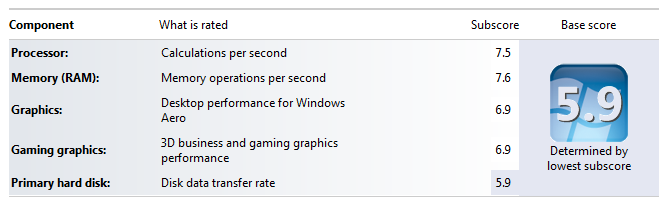
Obviously I should've sprung for an SSD 😛
http://www.amazon.com/gp/product/B002YUF8ZG
Obviously I should've sprung for an SSD 😛
Last edited:
As an Amazon Associate, MacRumors earns a commission from qualifying purchases made through links in this post.

Hitrate
macrumors 6502
Kingston HyperX 8GB
1600MHz. Haven't verified if the chips are being underclocked to 1333, but 'About this Mac' shows the RAM as being 1600MHz. (the i7 CPU in the 2011 models is said to be 1600MHz compatible, but what remains is to confirm any boost in speed. And if not, then I'm future-proofing. For $30 more, it's worth that gamble.)
Any speed gain confirmation, please let me know!
As an Amazon Associate, MacRumors earns a commission from qualifying purchases made through links in this post.

Prodo123
macrumors 68020
Where are some of you getting your RAM to upgrade from 4 GB to 8 GB on MBP? I wouldn't wanna get the wrong type of RAM. Does any DDR3 do? Well, not just any but a good brand
DDR3-1333Mhz and DDR3-1600Mhz with the CAS latency of 9 and the timing at 9-9-9-24 works best.
What this means is when you look at RAM, make sure in the details or specs you see either "CAS Latency: 9", "9-9-9-24", and/or 1333Mhz/1600Mhz on there.
Popular brands:
OWC
Corsair
Crucial
Kingston
Patriot
G.Skill
Mushkin
DO NOT FALL FOR THE "Mac Memory" THING. It's just memory that has been tested on a Mac. There's nothing different from normal RAM from a technical standpoint. It's just a way for chipset makers to rip off Mac users. In fact, a lot more people have trouble with Mac-only memory than normal memory.
*GROUND YOURSELF BEFORE TOUCHING RAM, OR ELSE YOU MAY HAVE JUST WASTED $100!*

dlimes13
macrumors 6502a
Damn, I was just going to suggest what I used for my 2011 MBP:
http://www.newegg.com/Product/Product.aspx?Item=N82E16820231266
Bought 2 of those a month ago, $79.98 shipped and work great. 1333 also.
http://www.newegg.com/Product/Product.aspx?Item=N82E16820231266
Bought 2 of those a month ago, $79.98 shipped and work great. 1333 also.
I tried Crucial from Newegg and is was faulty. Returned it, and got G.Skill the second time around (and for less money) and it's been working great.
That said, I used Crucial in my 2010 MBP and it was perfect. I probably just got some bad sticks. Though I used to use G.Skill when I built PCs and they always worked without issue.
That said, I used Crucial in my 2010 MBP and it was perfect. I probably just got some bad sticks. Though I used to use G.Skill when I built PCs and they always worked without issue.
cyclingsessions
macrumors newbie
the most popular brand would be corsair from wat ive been reading. If you were in the market earlier, it wouldve costed $73 versus the 83 on newegg. Coupon expired though
This should be the right one. 🙁
http://www.newegg.com/Product/Produ...5281&cm_re=corsair_8gb-_-20-145-281-_-Product
I upgraded with Corsair a while back and lately have been getting the black restart box when I am trying to back up with time machine. Put the original 4gb in and it works fine. Frustrating though! I thought it was a safe bet to get the Corsair memory. Macs seem so finicky with memory! Why is that?
RainCityMacFan
macrumors 6502a
I bought Team Group memory. Horrible support from what I hear but I heard the memory quality is pretty much the best in the OC club. Not that I'm ever going to OC my RAM.