
Got a tip for us?
Let us know
Become a MacRumors Supporter for $50/year with no ads, ability to filter front page stories, and private forums.
Contact posters not working as expected
- Thread starter Sir Ruben
- Start date
- Sort by reaction score
You are using an out of date browser. It may not display this or other websites correctly.
You should upgrade or use an alternative browser.
You should upgrade or use an alternative browser.

DomC
macrumors 6502
I don't understand how this got out of the beta (and the public) the way it works (doesn't) now.Apple needs to rethink their approach to this and sort out the back end so that 'it just works' because right now it's a mess. Definitely a feature that should not have been released yet.
The grey screen where contact photos use to work is an incredible upgrade?

Expos of 1969
Suspended
Apple was short of new features to highlight so they were grabbing anything they could. They have not yet clued into the fact that they come across looking more foolish and greedy by pushing out stuff that is far from ready than putting out less things that work correctly.I don't understand how this got out of the beta (and the public) the way it works (doesn't) now.
The grey screen where contact photos use to work is an incredible upgrade?
How does your own Nickname (if one’s set) propagate to other phones exactly? Can anyone test that? Do other phones show your full first- and last name instead? Do they show the nickname or full name that the other person has assigned to you in their phone book?
The whole feature is highly confusing:
The whole feature is highly confusing:
- Do Contact Posters only transfer to others when they already have you in their phone book? Or also when cold calling someone?
- Do they transfer to blocked contacts when phoning them?
- Do they automatically transfer and update others‘ phone books in the background or do they only transfer/show up when calling others?
- Who is a „friend“ that gets your Contact Poster exactly, are those all your contacts in your Address Book? That… maybe wouldn‘t be good when using a lot of business contacts.
- What if someone uses a highly inappropriate photo or a photo of a spam message (or, god forbid, a company logo) for their Contact Poster? The abuse potential, even phishing potential seems evident? Can you disable recieving incoming Contact Posters?
Last edited:
Thank you Apple for ruining my contacts. Before iOS17 I had every important person's photo, I added manually. I saw them full screen when they called. Now all of that is garbage. It only shows a tiny-tiny circular picture as long as I don't set up everyone AGAIN MANUALLY. It was completely fine before they ruined this. This was a solution in search of a problem.

dburkhanaev
macrumors 6502
Go into the contact card for the individual on the affected iPhone. Check “Contact Photo and Poster” and in the pop out, make sure it’s set for “latest photo”. If it is set for custom it may have an earlier version and it’s waiting to ask before applying a change.Ok so I’ve set up my contact poster and my wife has done the same on her phone. We have both set the option to accept them and can see they are available.
However when I phone my wife she gets a very zoomed in picture of me and a standard font for the name. Not the coloured font I set. Basically it’s not the contact poster I set.
When my wife phones me I see a mostly grey screen with her name and a small circular picture of her in the top corner.
Either way this feature is not working on both phones. Anyone else found the same?
This also lets the user manually modify the contact poster for the caller and keeps their contact from automatically updating their contact poster.
I do this because I don’t want the contact poster to go from top to bottom of the screen and even consume the space under the Phone app controls. So all of my contacts are Monogram (with the dumb monogram removed, because how stupid can it get) and just a pleasant blue.
So if it’s not set to auomatic an older version of your contact pic or poster can be in the settings. Or a manual setting may be overriding your contact poster.
Check that first. But the iPhone user can override your contact poster if they choose to.
dburkhanaev
macrumors 6502
That setting is there so that people can’t automatically update their photo or poster in your phone without you agreeing to the change.Agreed. There are too many specific conditions required to make it work reliably. People will soon get fed up. They simply do not have the time.
It has to be there or someone can send an inappropriate picture or they can send a poster if you don’t want one.
You can set it to automatic. I’ll probably do that for family and some friends. But I won’t do it for business contacts. They need to be vetted before I let them upload a pic of themselves to the contact card in my phone.
villageprince
macrumors newbie
I sadly have to take this back... It's gone back to being weird again.. I can see their photo in the info section of their contact.. I have set it to update automatically .. But when I call them .. I see the grey screen again.. and they don't see my photo either .. Even when they call me It won't show their photo even though we both see each others contact details with the photo in the info section..updated to 17.0.1 and it has fixed the issue for me.. I had to tap on my Friends photo from iMessage.. then click on 'Contact Poster' and click on 'update automatically' and it worked. Where are as before it didn't show me anything as such. Hope this is the fix!
I guess this will need their team to sit and go through it again as it's not working as seamlessly as Apple had hoped it would.
in their heads "they set their photo and it will appear on the other side"
in reality .. "this forum"! lol..

purdnost
macrumors 6502a
Previous versions of iOS would surface notifications within text threads alerting you if someone had a picture or name update, and you could choose to update one or both.
With iOS 17, it only alerts you that a new name is available, and selecting the “Update” button is the only way (in my experience) to update the photo/poster.
I only ever want to update the photo/poster, but I’m having to change the name as well and then revert any changes as I prefer to use full names vs nicknames.
Not sure if this is a bug, but I think we need both options back.
With iOS 17, it only alerts you that a new name is available, and selecting the “Update” button is the only way (in my experience) to update the photo/poster.
I only ever want to update the photo/poster, but I’m having to change the name as well and then revert any changes as I prefer to use full names vs nicknames.
Not sure if this is a bug, but I think we need both options back.
andrewstirling
macrumors 6502a
How does your own Nickname (if one’s set) propagate to other phones exactly? Can anyone test that? Do other phones show your full first- and last name instead? Do they show the nickname or full name that the other person has assigned to you in their phone book?
The whole feature is highly confusing:
- Do Contact Posters only transfer to others when they already have you in their phone book? Or also when cold calling someone?
- Do they transfer to blocked contacts when phoning them?
- Do they automatically transfer and update others‘ phone books in the background or do they only transfer/show up when calling others?
- Who is a „friend“ that gets your Contact Poster exactly, are those all your contacts in your Address Book? That… maybe wouldn‘t be good when using a lot of business contacts.
- What if someone uses a highly inappropriate photo or a photo of a spam message (or, god forbid, a company logo) for their Contact Poster? The abuse potential, even phishing potential seems evident? Can you disable recieving incoming Contact Posters?
Many of these concerns are also relevant to previous iOS releases. It’s was previously possible to have the contact photo updated automatically and at one point you can set them to auto download from Facebook
darthbane2k
macrumors 68020
They should use AI to block inappropriate imagesThat setting is there so that people can’t automatically update their photo or poster in your phone without you agreeing to the change.
It has to be there or someone can send an inappropriate picture or they can send a poster if you don’t want one.
You can set it to automatic. I’ll probably do that for family and some friends. But I won’t do it for business contacts. They need to be vetted before I let them upload a pic of themselves to the contact card in my phone.
My dad had set his own contact poster. He had it properly set up to share with contacts. Going into his contact card in the Contacts app, it wasn’t showing as an option to choose. I could only create my own contact poster for him. However, by going into his contact card via the Messages app it did show as an option then.
So if anyone is having issues with somebody’s contact poster which that person has created not showing as an option in the Contacts app, or updating on your phone, try this:
1. Open Messages.
2. Go into your message thread with that person.
3. Click on their profile photo at the top.
4. Click Info.
5. Contact Photo & Poster click on the automatically update one. Hopefully this option shows, it did on mine first time.
6. Click the back arrow in the top left of the screen.
7. Click Done.
8. Go back to the list of messages.
9. Kill the Messages app completely (swipe it closed from app switcher).
10. Reopen Messages app, the contact photo should now be updated to the one they’ve set to share on their own contact card, and this should also now show when they call you and you call them.
After doing the above, now when I go into his contact card in the Contacts app, the option is showing to either use my own profile photo/contact poster I’ve set for him, or to have it update automatically with his created contact poster.
So if anyone is having issues with somebody’s contact poster which that person has created not showing as an option in the Contacts app, or updating on your phone, try this:
1. Open Messages.
2. Go into your message thread with that person.
3. Click on their profile photo at the top.
4. Click Info.
5. Contact Photo & Poster click on the automatically update one. Hopefully this option shows, it did on mine first time.
6. Click the back arrow in the top left of the screen.
7. Click Done.
8. Go back to the list of messages.
9. Kill the Messages app completely (swipe it closed from app switcher).
10. Reopen Messages app, the contact photo should now be updated to the one they’ve set to share on their own contact card, and this should also now show when they call you and you call them.
After doing the above, now when I go into his contact card in the Contacts app, the option is showing to either use my own profile photo/contact poster I’ve set for him, or to have it update automatically with his created contact poster.

milhouse994
macrumors regular
Still having issues with this feature and none of the posted "fixes" work for me. When i go into a contact record and tap on Contact Photo & Poster I am just presented with a screen to create my own contact poster for that person. Part of the problem might be that those contacts haven't updated to iOS17 OR haven't created their own contact poster/photo yet, but even for those that I know have, it doesn't seem to sync or just randomly starts syncing with no rhyme or reason. Once it does sync, when i tap on Contact Photo & Poster i then see the Latest Photo/Custom Photo options.
I am hoping this is a bug that can be fixed and not just a poor design as this was one of the key features of iOS17 for me
I am hoping this is a bug that can be fixed and not just a poor design as this was one of the key features of iOS17 for me

James Godfrey
macrumors 68020
I am trying to work out a way to stop contacts being automatically updated with my contacts photo’s and posters that they have set… can anyone advise?
dburkhanaev
macrumors 6502
They have that option now. It's a new parental feature but it does work for this as well. I will always vet business contacts and acquaintances' photos. A photo might not be explicit and still be inappropriate.They should use AI to block inappropriate images
James Godfrey
macrumors 68020
Also noticed today that my families contact photos arn’t updating on Apple TV anymore, now every is just showing their initials
dburkhanaev
macrumors 6502
Do you think if you sign out of your iCloud account and sign back in, that it might force a re-sync? Just a thought if you upgraded in place.Also noticed today that my families contact photos arn’t updating on Apple TV anymore, now every is just showing their initials
purdnost
macrumors 6502a
Last night, I configured Contact Posters for my in-laws. However, this afternoon, their contact information didn't automatically update, even after they participated in a group text (which I thought might trigger the update). To resolve this, I opened one of the contacts, selected the Contact Photo & Poster button, and then chose "Latest Photo (Update Automatically)," which immediately updated their information. I repeated this for the other contact, and it worked as well. It seems that these "automatic updates" aren't functioning as expected right now. Hopefully, Apple will address this issue soon.
Additionally, I noticed that Contact Posters may not be visible unless you have enabled Settings > Phone > Incoming Calls > Full Screen. However, most people seem to prefer the "Banner" setting these days because Full Screen used to take over your phone.
Additionally, I noticed that Contact Posters may not be visible unless you have enabled Settings > Phone > Incoming Calls > Full Screen. However, most people seem to prefer the "Banner" setting these days because Full Screen used to take over your phone.
dburkhanaev
macrumors 6502
You know what's interesting? There is another post on this forum called "all the small things", it's talking about the iOS17 update generally. I mentioned these things over there (this is before I'm aware that there's a specific forum for that) and somehow my critiques of Contact Posters and their full-screen and potentially unprofessional nature, are just me making up rage.How does your own Nickname (if one’s set) propagate to other phones exactly? Can anyone test that? Do other phones show your full first- and last name instead? Do they show the nickname or full name that the other person has assigned to you in their phone book?
The whole feature is highly confusing:
- Do Contact Posters only transfer to others when they already have you in their phone book? Or also when cold calling someone?
- Do they transfer to blocked contacts when phoning them?
- Do they automatically transfer and update others‘ phone books in the background or do they only transfer/show up when calling others?
- Who is a „friend“ that gets your Contact Poster exactly, are those all your contacts in your Address Book? That… maybe wouldn‘t be good when using a lot of business contacts.
- What if someone uses a highly inappropriate photo or a photo of a spam message (or, god forbid, a company logo) for their Contact Poster? The abuse potential, even phishing potential seems evident? Can you disable recieving incoming Contact Posters?
But I am happy to see that I'm not the only one in the world who has questions about the nature of this so called "feature". Like if you don't want a contact poster but instead just want the small circle with the person's picture, ala iOS 16. Wouldn't it be great to have that as an option if you didn't want a full screen, in your face, picture or poster with whatever your contact thinks is great?
But maybe I'm just crazy.

timeislove
macrumors 6502a
Last night, I configured Contact Posters for my in-laws. However, this afternoon, their contact information didn't automatically update, even after they participated in a group text (which I thought might trigger the update). To resolve this, I opened one of the contacts, selected the Contact Photo & Poster button, and then chose "Latest Photo (Update Automatically)," which immediately updated their information. I repeated this for the other contact, and it worked as well. It seems that these "automatic updates" aren't functioning as expected right now. Hopefully, Apple will address this issue soon.
Additionally, I noticed that Contact Posters may not be visible unless you have enabled Settings > Phone > Incoming Calls > Full Screen. However, most people seem to prefer the "Banner" setting these days because Full Screen used to take over your phone.
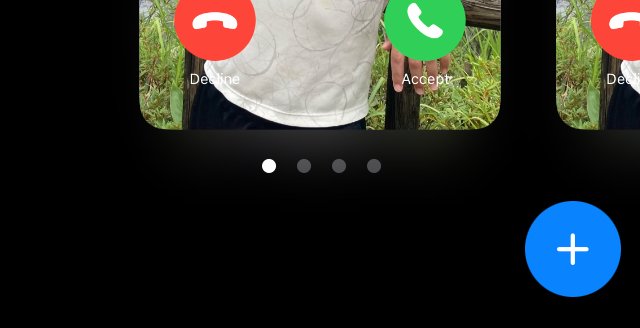
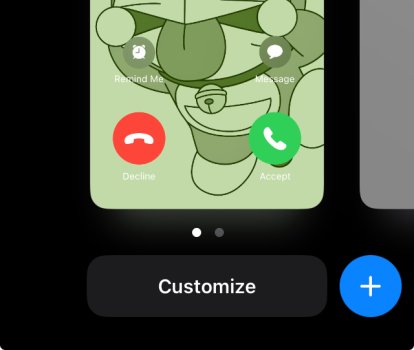
I found that cropping contact photo does not work. The cropped view did show briefly then a thumbnail view of the poster (or selected photo)
One more thing looks weird to me. For contacts other than my Card, there would ONE additional display of the poster shown at the leftmost, it looks like the view of current setting cos the view could not be deleted or customised. In the poster setting of my Card, there is no such a view.
Attached the screenshots, one showing two poster views (my card) the other one shows four poster views, the leftmost one could not be customised or deleted.
Attachments
Last edited:

contacos
macrumors 604
it finally started to work for me on 17.0.3 but it seems like I am the only one in my contacts to use this feature ... I am sure most people do not even know about this functionality
Edit: nevermind, still does not work 100% and people seem to have to open a contact multiple times in iMessage for the contact information to update like what is the point! No one is going to do that

Edit: nevermind, still does not work 100% and people seem to have to open a contact multiple times in iMessage for the contact information to update like what is the point! No one is going to do that
Last edited:
timeislove
macrumors 6502a
By any chance do you have Google syncing your contacts? I posted it as a bug and we troubleshooted it to be something with how Google is syncing the contacts. Once we turned it off and let iCloud handle the contacts, the Contact posters are now working.
Guess it is about contact syncing issues. I did use google contact sync.
Changed a contact photo to cropped view but the update not shown. Other the hand, did the same for my card and it works, noting that google contact would not sync My Card.
a member said the latest 17.0.3 fixed some contact poster/photo issues, but it did not help my issues ofncropped view!