
Got a tip for us?
Let us know
Become a MacRumors Supporter for $50/year with no ads, ability to filter front page stories, and private forums.
Contacts and facetime app?
- Thread starter eclipse01
- Start date
- Sort by reaction score
You are using an out of date browser. It may not display this or other websites correctly.
You should upgrade or use an alternative browser.
You should upgrade or use an alternative browser.


Gav2k
macrumors G3
what is the point of having these two as standalone apps?
don't they server their purpose by being integrated into the phone?
Do any of you use these?
Both offer less taps to perform the tasks and it offers uniformity across the iOS range as iPods and iPads lack the phone app 😉

Applejuiced
macrumors Westmere
Applejuiced
macrumors Westmere
If you get a missed FaceTime call (FaceTime Audio or regular) would you get a badge anywhere except the FaceTime app icon? Just curious.
Yes, the phone app will have a badge.
Good to know. I was never quite sure. Sounds like I can move that app off to a folder somewhere then.Yes, the phone app will have a badge.

ET iPhone Home
macrumors 68040
what is the point of having these two as standalone apps?
don't they server their purpose by being integrated into the phone?
Do any of you use these?
I actually use them independent of each other. I guess, once I FaceTime someone, it's easier to go to the FaceTime app to reconnect, rather than searching through Contacts, as I only, FaceTime family members.

mofunk
macrumors 68020
Yup. I use them both. My iPhone is like a mobile computer. At some time I need an address or directions. Sure I can use Siri but it saves time (money), when the addresses are in Contacts app. FaceTime, same thing. If I need a visual of what person is seeing on the other end, FaceTime comes in handy.
It's really a no brainer. For years Apple has made it a point to have stand alone Apps that also work with other Apple Apps. On their computers Pages work with Address Book. Mail works with Pages etc So why not have the same functionality on the iPhone?
It's really a no brainer. For years Apple has made it a point to have stand alone Apps that also work with other Apple Apps. On their computers Pages work with Address Book. Mail works with Pages etc So why not have the same functionality on the iPhone?
Well, I just had a chance to try it out between a couple of iOS devices and a missed FaceTime call (regular or Audio) didn't get a badge to show up on the Phone app icon, just on the FaceTime app icon.Yes, the phone app will have a badge.
----------
I think in this case the question is more because you pretty much have the exact same functionality of the Contacts app right in the Phone app, for example, so you can easily launch the Phone app and have all the parts of the Contacts app there without having to put a separate Contacts app icon on your home screen.Yup. I use them both. My iPhone is like a mobile computer. At some time I need an address or directions. Sure I can use Siri but it saves time (money), when the addresses are in Contacts app. FaceTime, same thing. If I need a visual of what person is seeing on the other end, FaceTime comes in handy.
It's really a no brainer. For years Apple has made it a point to have stand alone Apps that also work with other Apple Apps. On their computers Pages work with Address Book. Mail works with Pages etc So why not have the same functionality on the iPhone?
mofunk
macrumors 68020
Yeah that's true but I don't see the big deal. I was assuming when I read the OP post that "it seems to be overkill to have Contacts and FaceTime as separate apps."
FaceTime has the same layout that iOS 6.0 has. I guess what you are asking is that FaceTime should look more like the app that's on the computers where only the emails and phone numbers are listed. Basically a lot less cluttered.
Like I said before, Contacts/Address Book is the keeper of all the info. This info inside Contacts is used in Mail, Phone, FaceTime, Calendar, including Safari So one more app isn't gonna hurt.
For example, inside Contacts you can connect to Mail, and there is a mail app. Inside Contacts you can connect to Phone, and there is a PHone app.
FaceTime has the same layout that iOS 6.0 has. I guess what you are asking is that FaceTime should look more like the app that's on the computers where only the emails and phone numbers are listed. Basically a lot less cluttered.
Like I said before, Contacts/Address Book is the keeper of all the info. This info inside Contacts is used in Mail, Phone, FaceTime, Calendar, including Safari So one more app isn't gonna hurt.
For example, inside Contacts you can connect to Mail, and there is a mail app. Inside Contacts you can connect to Phone, and there is a PHone app.
Not really sure what you mean, the Contacts app doesn't provide all the features and functions of the Phone app, while the Phone app seems to have all the features of the Contacts app in it. Also not quite sure what's really iOS 6 about the FaceTime app.Yeah that's true but I don't see the big deal. I was assuming when I read the OP post that "it seems to be overkill to have Contacts and FaceTime as separate apps."
FaceTime has the same layout that iOS 6.0 has. I guess what you are asking is that FaceTime should look more like the app that's on the computers where only the emails and phone numbers are listed. Basically a lot less cluttered.
Like I said before, Contacts/Address Book is the keeper of all the info. This info inside Contacts is used in Mail, Phone, FaceTime, Calendar, including Safari So one more app isn't gonna hurt.
For example, inside Contacts you can connect to Mail, and there is a mail app. Inside Contacts you can connect to Phone, and there is a PHone app.

Why counterintuitive?To get to contacts through the phone app is counterintuitive although the phone app allows maintenance of contacts. Same as on my old blackberry.
mofunk
macrumors 68020
Not really sure what you mean, the Contacts app doesn't provide all the features and functions of the Phone app, while the Phone app seems to have all the features of the Contacts app in it. Also not quite sure what's really iOS 6 about the FaceTime app.
I have to go back a bit because in order to understand the concept you have to look at what was laid out in previous devices. The iPhone imo is basically a mobile computer. Apple, in the past, has stated that their Applications/Software works together. If you are familiar with Microsoft Office? Whenever you needed to use an address in Word, you had to take 3-4 steps to import an address into the letter you were composing. In Pages, Address Book is easily accessed because it was incorporated in the app (versus importing). When comparing the computer's functionality, it's the same on the iPhone. Again with computers This is the same as creating a Database (Contacts) which you export to another application. The export function is already complete so you don't have to do that.
So back to the phone. Instead of importing the Contacts information, FaceTime and Phone have the Contacts installed within the app. The same with Mail. Remember you are not saving any info in Phone, Mail, etc.. everything is saved in Contacts aka Address Book.
I mention iOS 6 because it looks like Apple did not update the app when ios7 came out. It would be a lot cleaner if Apple would only list what is needed in FaceTime, phone numbers and emails. When you open the FaceTime app on your Mac, only the phone numbers and emails have been exported from the Address Book.
At one time in Address Book, you could make call from the Address Book app on your computer. You would click on a phone number inside Address Book, that number was sent via bluetooth to your cellphone to make the call. Basically that is what you are doing now on your Phone.
 I wish they would bring that feature back. Its good to have if you work from home or use your computer for business.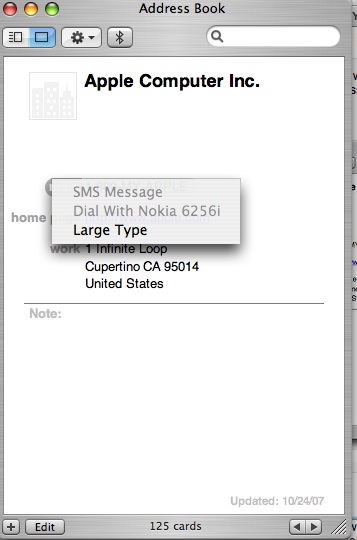
In iOS Mail does not contain the same features and functions that the Contacts app contains (even though it does being up contact information), same goes for some other similar apps like Messages. Phone and FaceTime apps do in fact contain a Contacts section which basically provides the same features and functions that the Contacts app provides.I have to go back a bit because in order to understand the concept you have to look at what was laid out in previous devices. The iPhone imo is basically a mobile computer. Apple, in the past, has stated that their Applications/Software works together. If you are familiar with Microsoft Office? Whenever you needed to use an address in Word, you had to take 3-4 steps to import an address into the letter you were composing. In Pages, Address Book is easily accessed because it was incorporated in the app (versus importing). When comparing the computer's functionality, it's the same on the iPhone. Again with computers This is the same as creating a Database (Contacts) which you export to another application. The export function is already complete so you don't have to do that.
So back to the phone. Instead of importing the Contacts information, FaceTime and Phone have the Contacts installed within the app. The same with Mail. Remember you are not saving any info in Phone, Mail, etc.. everything is saved in Contacts aka Address Book.
I mention iOS 6 because it looks like Apple did not update the app when ios7 came out. It would be a lot cleaner if Apple would only list what is needed in FaceTime, phone numbers and emails. When you open the FaceTime app on your Mac, only the phone numbers and emails have been exported from the Address Book.
At one time in Address Book, you could make call from the Address Book app on your computer. You would click on a phone number inside Address Book, that number was sent via bluetooth to your cellphone to make the call. Basically that is what you are doing now on your Phone.
Image
FaceTime app didn't exist in iOS 6 or basically before iOS 7. It seems to contain just what's needed for it, numbers and emails. However FaceTime calls can be easily made and seen/tracked from the Phone app itself as well.
