
Got a tip for us?
Let us know
Become a MacRumors Supporter for $50/year with no ads, ability to filter front page stories, and private forums.
Contacts not being added/ms exchange
- Thread starter mpossoff
- Start date
- Sort by reaction score
You are using an out of date browser. It may not display this or other websites correctly.
You should upgrade or use an alternative browser.
You should upgrade or use an alternative browser.

BrianBaughn
macrumors G4
For a start, need more info to help:
Email/contacts provider
Account setup type on phone
Contact sync settings in iTunes
Email/contacts provider
Account setup type on phone
Contact sync settings in iTunes
For a start, need more info to help:
Email/contacts provider
Account setup type on phone
Contact sync settings in iTunes
Email/contacts provider: Gmail
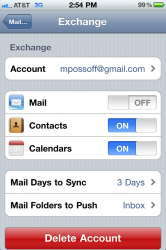
Account setup type on phone: see attached
Contact sync settings in iTunes: see attached
Attachments


Last edited:
BrianBaughn
macrumors G4
If you're syncing Gmail contacts on your phone you should uncheck all of the contact syncing in iTunes. Just causes problems. When you add a contact to the Gmail contact group on your phone it should update the contacts at Gmail.
See my tips post for setting up Address Book on the Mac. I haven't tested these settings in Lion, yet.
See my tips post for setting up Address Book on the Mac. I haven't tested these settings in Lion, yet.
blevins321
macrumors 68030
Deep down in your Mail, Contacts, and Calendar settings, there is an obscure option for Contacts - Default Account. Change it from On My iPhone to the name that you gave your Exchange account. Then it will add them to Exchange instead of just the local list. And like previous posters said, disable iTunes from syncing this, otherwise you'll get duplicates.
Deep down in your Mail, Contacts, and Calendar settings, there is an obscure option for Contacts - Default Account. Change it from On My iPhone to the name that you gave your Exchange account. Then it will add them to Exchange instead of just the local list. And like previous posters said, disable iTunes from syncing this, otherwise you'll get duplicates.
On my iPhone I have 2 accounts. A gmail account for mail and an exchange account for contacts. Under exchange account mail is off since I have account for mail.
I did what you said and changed default to exchange account. So now manually added contacts should be added to exchange account?
Also in my contacts app there's a groups which I'm confused about. All Contacts, All on My iPhone and Exchange. When I choose All Contacts manually added contacts show up. When I choose All on my iPhone I only see manually added contacts. When I choose Exchange I don't see manually added contacts?
blevins321
macrumors 68030
My method won't add the contacts currently on your phone. It will only upload the ones that you input from now on. You'll have to add them ones that have been missed manually.
Edit- Once you manually add the contacts either through Exchange online or through your phone with the new settings, the Exchange list will contain all of your Contacts.
Edit- Once you manually add the contacts either through Exchange online or through your phone with the new settings, the Exchange list will contain all of your Contacts.
blevins321
macrumors 68030
When I add a contact manually on my iPhone am I suppose to add it in the MS Exchange group?
If you're in the group called All Contacts, it'll automatically add it to your exchange account. Or you can be in just the Exchange group too.
If you're in the group called All Contacts, it'll automatically add it to your exchange account. Or you can be in just the Exchange group too.
I changed settings as per suggested bellow so hopefully this will solve my issue?
Deep down in your Mail, Contacts, and Calendar settings, there is an obscure option for Contacts - Default Account. Change it from On My iPhone to the name that you gave your Exchange account. Then it will add them to Exchange instead of just the local list.
How can I find out if manually added contacts are added/synced to Exchange?
blevins321
macrumors 68030
Only way to see if it's in the right group is to go back and forth between the groups to see what's missing. Or browse through your Contacts online and compare the list that way.
Only way to see if it's in the right group is to go back and forth between the groups to see what's missing. Or browse through your Contacts online and compare the list that way.
Google contacts online?
blevins321
macrumors 68030
They are showing up!!!!
I wonder if changing default to Exchange account did it.