Become a MacRumors Supporter for $50/year with no ads, ability to filter front page stories, and private forums.

Takeo

macrumors 6502a
Original poster
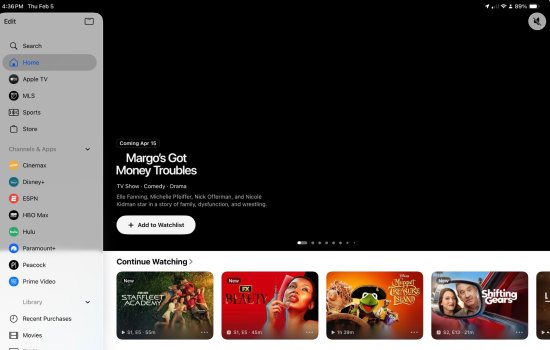
Just turned on my Apple TV after work and suddenly my watch list is showing dozens of shows I finished watching years ago! And many of the shows I’m currently watching have disappeared. The list is complete screwed up. Has anyone else experienced this today? Same on my iPad in the TV app. Not sure if there’s anything I can try or if Apple just messed something up. The really weird thing is they are almost all first episodes.

Also (update) it’s not just that the list has old shows in it, watch history is stopped working completely. If I start a new episode of any show it just doesn’t show up and doesn’t show the progress.

This is with the latest AppleTV 4K by the way. I’ve tried removing and re-adding the profile. Restarting. Unplugging for 10 seconds. And now I’m trying a full reset.
 
Last edited:
Ok a full reset did nothing. And the problem is on all my devices. Nothing works. Removing a show, marking a show as watched, watch progress, etc. All broken. I’m going to assume it’s an Apple thing but it that’s the case there should be others seeing the issue.

Update: Apple Supoort says it’s a known issue and they’re working on it.
 
Last edited:
I am having the same issue and it still has not been fixed. I assume this is not wide spread. But, it made me feel better that someone else is also experiencing the issue. Any updates or anyone found a fix on their own?
 
  • Like
Reactions: Takeo
Same here. I tried logging out of my account and then logging back in, but that still didn't fix it. Seems like an Apple server-side issue.
 
Having the same problem. I thought it was my Apple TV, but I tried on a a couple Macs, iPad and iPhone, same problem. I'm just not seeing the continue watching section at all on any device. Worked fine yesterday morning, disappeared in the evening.
 
Just curious, because it’s shutting down. How much of it is Hulu? Some reports suggest a Feb 5 shut off, but I can’t find anything definitive. I deleted it and was going to watch a movie today and it wanted me to install the app. Went to the Disney app and watched from there. Seems there is a disconnect for now with how AppleTV directs you to Hulu movies from the AppleTV app. This could be messy for a bit. That said, I don’t have old shows showing up.
 
I’m in Canada and I don’t have Hulu.

Anyway I did a whole thing with support where I replicated the various issues and captured logs and screenshots for them. If you want to help maybe get it fixed faster and have an hour to spare (it takes awhile) call Apple support and ask for a T2 (senior support) and get them to escalate your ticket to engineering. The engineers are apparently working on it but then need as many examples they can get.
 
  • Like
Reactions: AustinJerry
I’m having the same issue. The only thing in my continue watching is the Minecraft movie
 
My continue watching is empty except for one purchased show I have. I can’t remove it and I can’t add anything else.

Also all my channel connections are gone.
 
I found a thread on Reddit and what everyone seems to have in common is that they all merged apple accounts in the past
 
I found a thread on Reddit and what everyone seems to have in common is that they all merged apple accounts in the past

Yep. I also migrated my Apple account.

I called into support. The person I spoke to hasn’t heard of this problem, but she found an open engineering ticket about missing watch history which is open. My watch history is also gone, so at least Apple is aware of it.

I’d suggest calling in though as the more people who complain the higher the priority to fix the problem.
 
I found a thread on Reddit and what everyone seems to have in common is that they all merged apple accounts in the past

This is true for me. I had waited 20 years for this, and despite all the warnings, it actually went almost perfectly for me. I had to re-download a couple Apple Arcade games, but all my purchase history going back to the iPod days worked. Music files from the 90s and all my iTunes playlists made the transition with just a couple duplicate playlists, but nothing lost.

They obviously must have changed or upgraded something on the backend, hope they fix it soon. Other than the "continue watching" row being completely gone everywhere, I have no other problems, no purchases missing, and I can still resume shows from the library.
 
Just turned on my Apple TV after work and suddenly my watch list is showing dozens of shows I finished watching years ago! And many of the shows I’m currently watching have disappeared. The list is complete screwed up. Has anyone else experienced this today? Same on my iPad in the TV app. Not sure if there’s anything I can try or if Apple just messed something up. The really weird thing is they are almost all first episodes.

Also (update) it’s not just that the list has old shows in it, watch history is stopped working completely. If I start a new episode of any show it just doesn’t show up and doesn’t show the progress.

This is with the latest AppleTV 4K by the way. I’ve tried removing and re-adding the profile. Restarting. Unplugging for 10 seconds. And now I’m trying a full reset.

I am also having this issue that started yesterday. It happens on all devices - including non-apple devices like the ATV app on a FireTV 4k.

No amount or updating software, reinstalling makes a difference. The data seems to be gone from my iCloud account.

I've spoken to Apple support about the issue, they don't know what the problem is either. But they've escalated it. I strongly recommend contacting apple support via the online chat so they can identify that this is a wide-spread issue.
 
I found a thread on Reddit and what everyone seems to have in common is that they all merged apple accounts in the past
I merged accounts too! I will add that detail to my ticket. One weird thing is of the shows that actually show progress or an episode other than episode 1 (the first 20 shows in the list that I watched month or years ago are all set to e1 of whatever the last season was) are all from about a year ago. Like as well as no longer functioning, my watch list also jumped back in time.
 
Yep. I also migrated my Apple account.

I called into support. The person I spoke to hasn’t heard of this problem, but she found an open engineering ticket about missing watch history which is open. My watch history is also gone, so at least Apple is aware of it.

I’d suggest calling in though as the more people who complain the higher the priority to fix the problem.
I was told it IS a known issue and they have had multiple reports. The internal issue number I was told is Issue 534810.
 
I'll add that I have the same problems listed below and did call into support. Sent them a video showing all of the issues (across all software platforms (macOS, iOS, iPadOS, tvOS) and sent in diagnostic files. She mentioned there was an outage on Tuesday which may have started the issues. I have also merged my purchases from an old apple ID to my icloud ID as well. Glad to feel I am not going crazy and the only one with this issue.
 
I’m glad that I’m not the only one. My watch list randomly shows one of purchased tv series in it. I currently can’t remove it or mark it as watched. It’s just stuck there. Nothing else is showing up for me. The second episode of Shrinking should be there, but it’s not. Hoping this gets fixed soon!
 
I think there is some movement on this. Last night, my list showed up on one device. But not on the others. Now, it is showing on a different device. But the one that had it last night has had the row reset. Either way, it looks like they are working on the situation.
 
  • Like
Reactions: Takeo
I haven’t seen any changes at all since last night. I still have the one show in my list.

What I worry is that when I search for this issue I only find a handful of people complaining about it which means for most people it’s working. If it’s impacting less than a few dozen users Apple won’t spend much time looking into it.

I was told Apple opened the bug yesterday, but wasn’t given an ETA on the fix. Based on past experience I’m not expecting much for at least a week.
 
is anyone running 26.3RC? I am wondering if the issue is still there on that software
It still exists.

Briefly it worked on my work MacBook running 26.2 but now that is doing the same thing.

Here’s the Reddit thread I started: https://www.reddit.com/r/appletv/s/ovgHNWaU8T

I also emailed the MacRumors tip email in the hopes of upping exposure. Without a story about this I don’t think a lot of people will know about it so Apple will drag their feet.
 

Attachments

  • IMG_0002.jpeg
    IMG_0002.jpeg
    297.4 KB · Views: 68
Register on MacRumors! This sidebar will go away, and you'll see fewer ads.