
Got a tip for us?
Let us know
Become a MacRumors Supporter for $50/year with no ads, ability to filter front page stories, and private forums.
Cool Widgets to Download???
- Thread starter shuffles
- Start date
- Sort by reaction score
You are using an out of date browser. It may not display this or other websites correctly.
You should upgrade or use an alternative browser.
You should upgrade or use an alternative browser.


marykay9507
macrumors 6502a


dahcheet
macrumors regular
iStat Pro is a must. You can get it through the Dashboard "More Widgets" button.
Definitely a must have. You can get that and search for cool widgets on Apple's Site
ViperrepiV
macrumors regular
i'm not quite sure I understand what this does?
davidjearly
macrumors 68020
i'm not quite sure I understand what this does?
It doesn't do anything other than look like a lava lamp. A waste of resources IMO.
ViperrepiV
macrumors regular
It doesn't do anything other than look like a lava lamp. A waste of resources IMO.
oh...blah
i'd rather have useful stuff taking up dashboard real estate. how do you do a screenshot? It might be cool for people to post screenshots of their dashboard, so you can see how everything is laid out....just a thought
dahcheet
macrumors regular
oh...blah
i'd rather have useful stuff taking up dashboard real estate. how do you do a screenshot? It might be cool for people to post screenshots of their dashboard, so you can see how everything is laid out....just a thought
Actually, there's a widget to help you with that too. Screen Shot Plus. I'm not sure if that does screen shots of the Dashboard but I'll try when I get home and back on my MBA (I have it here but I'm leaving soon).

Bobioden
macrumors 68000
I like - Delivery Status. You can put in tracking info from Amazon, DHL, USPS, UPS etc.. and it will keep it up to date.
http://www.apple.com/downloads/dashboard/shopping/deliverystatus.html
http://www.apple.com/downloads/dashboard/shopping/deliverystatus.html

JSchwage
macrumors 6502a
I just found Delivery Status the other day. It's now a must-have widget for my Mac. It's so much easier to just open my dashboard to see a package status than to go into my inbox, find the email containing the tracking number, etc.I like - Delivery Status. You can put in tracking info from Amazon, DHL, USPS, UPS etc.. and it will keep it up to date.
http://www.apple.com/downloads/dashboard/shopping/deliverystatus.html
ViperrepiV
macrumors regular
phoxrenvatio
macrumors regular
here's my current dashboard setup:
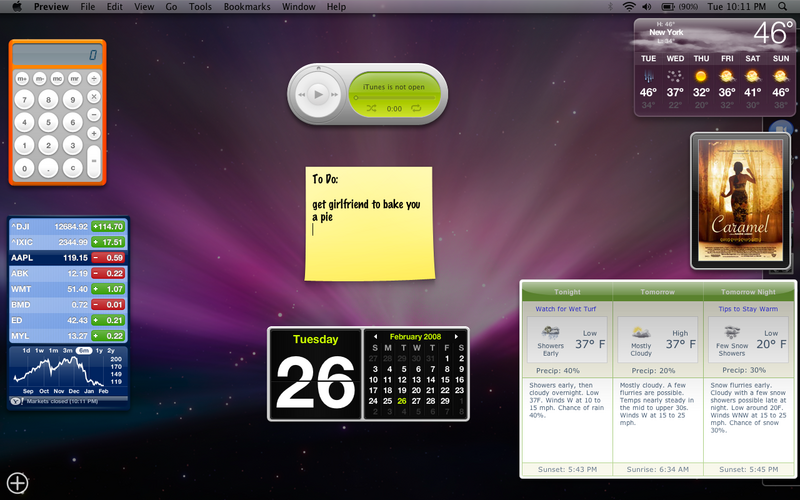
😀funny note!😀
i'd post a screenshot, but my dashboard is down...🙁

eXan
macrumors 601
It might be cool for people to post screenshots of their dashboard, so you can see how everything is laid out....just a thought
MacBook.
iMac is basically the same, except for the space between widgets is bigger due to larger screen.
Attachments

davidjearly
macrumors 68020
MacBook.
iMac is basically the same, except for the space between widgets is bigger due to larger screen.
eXan, what is the name of your translator widget ?
thanks,
w.
eXan
macrumors 601
eXan, what is the name of your translator widget ?
thanks,
w.
"Translation". It comes with Mac OS X 😉
"Translation". It comes with Mac OS X 😉
Duh... As you can tell, just got my MBA and still in "discovery" mode ! 🙂
Thanks.
eXan
macrumors 601
Duh... As you can tell, just got my MBA and still in "discovery" mode ! 🙂
Thanks.
haha, np 😉

martinmartin
macrumors 6502
This is mine:

How do you get the scrolling bars in your webpage widgets?
davidjearly
macrumors 68020
How do you get the scrolling bars in your webpage widgets?
They aren't webclip widgets. These are actual widgets that I develop.
They are all available to download here.