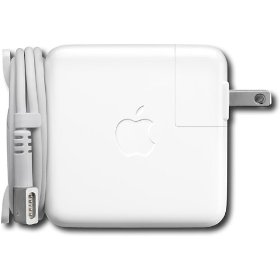
I have no clue at all what Apple means by its "Cord management system". All I can find on Google are the pages saying the computer cords come with it. What is it?
Woah! I've never noticed those! Thanks 😛 . Also another question....where are the speakers exactly...I see these little holes above the escape key (laser cut! yay!)...I would think those are the speakers but I hear sound from both sides. I don't think it's the mic either, or is it? What are those little holes and where are the speakers?
Which Mac are you talking about? On the MBP's, the speakers are under the holes to the sides of the keyboard. On the MB's, the speakers are on the back (only fully visible with lid closed. The Mic (at least on the plastic MB) is to the left of the iSight camera. I imagine it is the same on the new ones...
Looks just like the ones that came with my G4 PowerBook and my new MacBook. The retractable pieces that hold the cord have a tendency to break off if you're not careful, but I guess that the size of the adapter is a limiting factor.