
Got a tip for us?
Let us know
Become a MacRumors Supporter for $50/year with no ads, ability to filter front page stories, and private forums.
CPU A vs CPU B Temperature difference of 10 degrees
- Thread starter rueyloon
- Start date
- Sort by reaction score
You are using an out of date browser. It may not display this or other websites correctly.
You should upgrade or use an alternative browser.
You should upgrade or use an alternative browser.

Tutor
macrumors 65816
Hello
hi, I have a DIY upgraded 2009 Mac Pro with 2 quad 3.33 chip.
The temperature is now running at
75 and 68 degrees celsius, usually they show around 10 degrees difference.
Should I re-seat them ? or this is till within normal ?
thanks
Are these temps measured under heavy load? If so, they're a tad high. If not, then both temps are ridiculously high and the heat sinks probably need to be re-seated with Arctic Silver, if the front and rear fans are working properly. I'd also recommend that you use SMC Fan Control. The fact that the CPUs have different temps isn't unusual because one is closer to the intake fan (at the front of the system) than is the other (the one closest to the rear of the system); thus, the front one should usually display the lower temp. When the CPU closest to the intake fan displays the higher temp that is usually indicative of a problem, particularly poor seating and/or use of inferior thermal compounds.

Macsonic
macrumors 68000
Hi rueyloon. It is normal that CPU A runs warmer than CPU B at around 6-10 degrees celsius. I have used many Mac Pros from 2006 to 2012 models and the temperatures on the 2 CPUs are always not the same. The 75c degrees reading, is that at full load when you are doing some video editing?Hello
hi, I have a DIY upgraded 2009 Mac Pro with 2 quad 3.33 chip.
The temperature is now running at
75 and 68 degrees celsius, usually they show around 10 degrees difference.
Should I re-seat them ? or this is till within normal ?
thanks

it is under video compression
I just installed iStat menu, I think it is interfering with the fan speed.
I just noticed, that the fun isn't loud as it should be, and after changing some of the iStat menu settings, the fan is now running....., the temperature went down 10 degrees in a matter of seconds.
Think I need to uninstall it.
I just installed iStat menu, I think it is interfering with the fan speed.
I just noticed, that the fun isn't loud as it should be, and after changing some of the iStat menu settings, the fan is now running....., the temperature went down 10 degrees in a matter of seconds.
Think I need to uninstall it.
Tutor
macrumors 65816
it is under video compression
I just installed iStat menu, I think it is interfering with the fan speed.
I just noticed, that the fun isn't loud as it should be, and after changing some of the iStat menu settings, the fan is now running....., the temperature went down 10 degrees in a matter of seconds.
Think I need to uninstall it.
Just watch temps closely for a while under differing conditions.
Macsonic
macrumors 68000
it is under video compression
I just installed iStat menu, I think it is interfering with the fan speed.
I just noticed, that the fun isn't loud as it should be, and after changing some of the iStat menu settings, the fan is now running....., the temperature went down 10 degrees in a matter of seconds.
Think I need to uninstall it.
If your temperature is at 75c under light load or idle, its quite high. You're 3.33ghz cpu will run warmer compared to your former 2.26ghz cpus. Faster cpus uses more energy so they run hotter. Just observe further and see how things goes.


flowrider
macrumors 604
I've given this topic a lot of thought. That is the reason I run dual 4 core CPUs rather than 6 core. For me, I feel CPU speed is more important than the number of cores. I run dual X5677, 4 core CPUs (3.46 GHz) I would have installed X5687 (3.6 GHz), but can not find anyone with a Mac Pro that's been successful in using these. Geekbench has no results on a Mac with the X5687s. I felt that a 4 core CPU (X5677) would run cooler than then equivalent 6 Core (X5690).
My X5677s run 115° F (CPU A) and 105° F (CPU B) at rest. That's 46° and 41° C.
During normal light duty A runs in the 120° and B runs between 110 and 115° F.
Under load CPU A can come close to 150° and CPU B 130° F. So 66° and 54° C respectively.
For the OP, I assume your running W5590s, if so your are running hotter than the Maximum Operating Temperature of 67° as specified by Intel. IMO, something is wrong with your installation.
I was also running W5590s in my 5,1 before replacing them with the X5677s and I would sometimes get temperatures that would approach 150° F (66°C) in CPU A but never exceeded it.
Lou
My X5677s run 115° F (CPU A) and 105° F (CPU B) at rest. That's 46° and 41° C.
During normal light duty A runs in the 120° and B runs between 110 and 115° F.
Under load CPU A can come close to 150° and CPU B 130° F. So 66° and 54° C respectively.
For the OP, I assume your running W5590s, if so your are running hotter than the Maximum Operating Temperature of 67° as specified by Intel. IMO, something is wrong with your installation.
I was also running W5590s in my 5,1 before replacing them with the X5677s and I would sometimes get temperatures that would approach 150° F (66°C) in CPU A but never exceeded it.
Lou
Last edited:
I've given this topic a lot of thought. That is the reason I run dual 4 core CPUs rather than 6 core. For me, I feel CPU speed is more important than the number of cores. I run dual X5677, 4 core CPUs (3.46 GHz) I would have installed X5687 (3.6 GHz), but can not find anyone with a Mac Pro that's been successful in using these. Geekbench has no results on a Mac with the X5687s. I felt that a 4 core CPU (X5677) would run cooler than then equivalent 6 Core (X5690).
My X5677s run 115° F (CPU A) and 105° F (CPU B) at rest. That's 46° and 41° C.
During normal light duty A runs in the 120° and B runs between 110 and 115° F.
Under load CPU A can come close to 150° and CPU B 130° F. So 66° and 54° C respectively.
For the OP, I assume your running W5590s, if so your are running hotter than the Maximum Operating Temperature of 67° as specified by Intel. IMO, something is wrong with your installation.
I was also running W5590s in my 5,1 before replacing them with the X5677s and I would sometimes get temperatures that would approach 150° F (66°C) in CPU A but never exceeded it.
Lou
Hi,
this is very interesting, I'am always looking for infos about the X5677 in a MP. Do you have installed a pair of it in a MP4,1 or 5,1? Is there someone who tested a X5687 in a MP?
Thanks
Tutor
macrumors 65816
Hi,
this is very interesting, I'am always looking for infos about the X5677 in a MP. Do you have installed a pair of it in a MP4,1 or 5,1? Is there someone who tested a X5687 in a MP?
Thanks
My recollection (which could, of course, be faulty) is that someone has tried to install them in a MacPro, but wasn't successful. Moreover, I checked Geekbench and found only two systems running with X5687s. One is a Hackintosh (a Windows system running OSX) running one of those CPUs [ http://browser.primatelabs.com/geekbench2/1154911 ] and the other is a Windows system running Windows [ http://browser.primatelabs.com/geekbench3/548144 ] running two of those CPUs.


RoastingPig
macrumors 68000
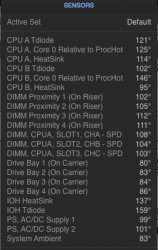
i wonder if my temperatures are good...rite now i am watching a flash video and doing some mild browsing.
I am about a 20 degrees Fahrenheit difference between Cpu A and Cpu B. I wonder if Cpu A gets used more because the application im currently using do not utilize the extra cores on CPU B. But when i put on a full load the difference between a and b can be anywhere between 5-10 degrees fahrenheit. My CPUS are the x5690's. At idel my cpus are about 8-10 degrees difference...cpu B is always the cooler one even tho it sits in the back and catches hot air from cpu a
I am about a 20 degrees Fahrenheit difference between Cpu A and Cpu B. I wonder if Cpu A gets used more because the application im currently using do not utilize the extra cores on CPU B. But when i put on a full load the difference between a and b can be anywhere between 5-10 degrees fahrenheit. My CPUS are the x5690's. At idel my cpus are about 8-10 degrees difference...cpu B is always the cooler one even tho it sits in the back and catches hot air from cpu a
Attachments
Last edited:

Gav Mack
macrumors 68020
I'd say they are about 10c higher than they should be though cpu 2 is always cooler than cpu 1.
Personally I would re seat them, though I have also found that caked dust on the heat pipes inside the heatsinks can make the temperatures artificially higher despite your paste bond being good. A proper air line blast out with short sharp blasts rather than a weedy can of compressed air usually does the trick.
Personally I would re seat them, though I have also found that caked dust on the heat pipes inside the heatsinks can make the temperatures artificially higher despite your paste bond being good. A proper air line blast out with short sharp blasts rather than a weedy can of compressed air usually does the trick.
RoastingPig
macrumors 68000
I'd say they are about 10c higher than they should be though cpu 2 is always cooler than cpu 1.
Personally I would re seat them, though I have also found that caked dust on the heat pipes inside the heatsinks can make the temperatures artificially higher despite your paste bond being good. A proper air line blast out with short sharp blasts rather than a weedy can of compressed air usually does the trick.
so should a properly seated and air blasted heat sink pair of cpus temperatures always be within 10 degrees of eachother?
...................
Update:
did a reseat and air blasted the fans and everything on the heatsink and im really liking the improvements on the temperatures
Last edited:
Gav Mack
macrumors 68020
CPU A vs CPU B Temperature difference of 10degrees
Could have been either a reseat or the air line required - though in a lot of cases they simply need a big blow out. The w3680 I put in my 4,1 last week is still a bit higher than I would like so in the next couple of days my processor board is taking a trip to my brothers high powered airline at his workshop as the weedy cans are not up to getting all the crud out.
Even if you think they are pretty clean inside when you see the amount of gunk come out after a proper blow the temps will drop considerably. Those copper pipes inside work best when cleared totally of muck!
Like with laptops and every other cooling system i baffle the airline with a towel that stops any blow back and move the line across and up and down - but remember it's short sharp bursts that are all that is required unlike an aerosol can which simply doesn't have the pressure or volume of a compressor driven one!
Could have been either a reseat or the air line required - though in a lot of cases they simply need a big blow out. The w3680 I put in my 4,1 last week is still a bit higher than I would like so in the next couple of days my processor board is taking a trip to my brothers high powered airline at his workshop as the weedy cans are not up to getting all the crud out.
Even if you think they are pretty clean inside when you see the amount of gunk come out after a proper blow the temps will drop considerably. Those copper pipes inside work best when cleared totally of muck!
Like with laptops and every other cooling system i baffle the airline with a towel that stops any blow back and move the line across and up and down - but remember it's short sharp bursts that are all that is required unlike an aerosol can which simply doesn't have the pressure or volume of a compressor driven one!
Last edited:
RoastingPig
macrumors 68000
Could have been either a reseat or the air line required - though in a lot of cases they simply need a big blow out. The w3680 I put in my 4,1 last week is still a bit higher than I would like so in the next couple of days my processor board is taking a trip to my brothers high powered airline at his workshop as the weedy cans are not up to getting all the crud out.
Even if you think they are pretty clean inside when you see the amount of gunk come out after a proper blow the temps will drop considerably. Those copper pipes inside work best when cleared totally of muck!
Like with laptops and every other cooling system i baffle the airline with a towel that stops any blow back and move the line across and up and down - but remember it's short sharp bursts that are all that is required unlike an aerosol can which simply doesn't have the pressure or volume of a compressor driven one!
i used the air compressor in the garage. i felt as it was a little too strong and could of broke something but everything turned out great
Gav Mack
macrumors 68020
i used the air compressor in the garage. i felt as it was a little too strong and could of broke something but everything turned out great
Hence why short sharp bursts are key. The fans aren't designed for the huge amount of airflow from a proper air line so you have to be careful. Blown till no more muck comes out certainly shifts the gunk inside totally away from the heatpipe rods inside and then you have a heatsink which essentially functions as it should when brand new.
I was impatient doing my own hex core but if I have dual sockets to upgrade I always factor in a trip to the workshop to blast them out properly first!
What are your idle/max temps on the chips now as a comparison from beforehand? The 1st CPU is always hotter than the 2nd CPU but you should be seeing a comparable drop in both if they were similarly crudded up inside.
Last edited:

SEJU
macrumors member
X5690 Temperature readings
Hello,
I recently upgraded my 2010 MAC PRO 2 x 2,4 QUAD with two X5690 XEON CPUs. I have bought them on eBay and they were used (Server??). Although I have a higher difference in CPU temperature than 6-10˚C (around 10-15˚C when idle) CPU temperature is still in an acceptable range.
But under heavy load CPU A gets up to 88˚C or 191˚F and CPU B 55-60˚C or 131-140˚F with a difference in temperature of about 30˚C. Furthermore both heatsinks seam not to heat up properly.
Is this normal?
Are the CPUs behaving appropriately?
Could someone with a similar setup please confirm my temperature readings?
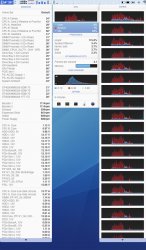
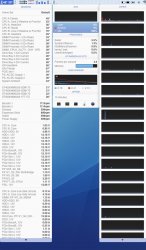
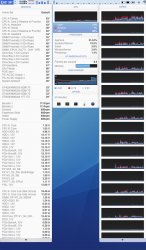
I made some screenshots under different usages with temperature readings and CPU utilization.
Intel specifies 78,5˚C as Tcase. So under heavy load CPU A is 10˚C above this value.
Is that save?
This time i got my CPUs installed. I noticed that the guy who installed them did not clean the heatsinks from thermal grease. There was still a slight film of grease. He said it were the same grease and that it would spread easier. The CPUs were clean. I did not say anything, because it was a professional place and they assemble server for a living.
1 > STARTUP
2 > 10 min after STARTUP, some internet
3 > LIGHT USE, Aperture and Photoshop open, Aperture doing some Photosync
4 > FULL, HANDBRAKE converting iPhone Video to MP4 after 5 minutes
5 > FULL, HANDBRAKE converting iPhone Video to MP4 after 1 hour
Thank you very much!
Hello,
I recently upgraded my 2010 MAC PRO 2 x 2,4 QUAD with two X5690 XEON CPUs. I have bought them on eBay and they were used (Server??). Although I have a higher difference in CPU temperature than 6-10˚C (around 10-15˚C when idle) CPU temperature is still in an acceptable range.
But under heavy load CPU A gets up to 88˚C or 191˚F and CPU B 55-60˚C or 131-140˚F with a difference in temperature of about 30˚C. Furthermore both heatsinks seam not to heat up properly.
Is this normal?
Are the CPUs behaving appropriately?
Could someone with a similar setup please confirm my temperature readings?
I made some screenshots under different usages with temperature readings and CPU utilization.
Intel specifies 78,5˚C as Tcase. So under heavy load CPU A is 10˚C above this value.
Is that save?
This time i got my CPUs installed. I noticed that the guy who installed them did not clean the heatsinks from thermal grease. There was still a slight film of grease. He said it were the same grease and that it would spread easier. The CPUs were clean. I did not say anything, because it was a professional place and they assemble server for a living.
1 > STARTUP
2 > 10 min after STARTUP, some internet
3 > LIGHT USE, Aperture and Photoshop open, Aperture doing some Photosync
4 > FULL, HANDBRAKE converting iPhone Video to MP4 after 5 minutes
5 > FULL, HANDBRAKE converting iPhone Video to MP4 after 1 hour
Thank you very much!
Attachments
-
 MAC PRO 2010 2x3,46 Hex Xenon - 01 IDLE - STARTUP.jpg161.5 KB · Views: 712
 -
 MAC PRO 2010 2x3,46 Hex Xenon - 02 IDLE - 10MIN.jpg144.6 KB · Views: 961
 -
 MAC PRO 2010 2x3,46 Hex Xenon - 03 LIGHT USAGE.jpg150.6 KB · Views: 653
 -
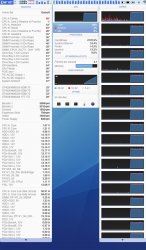 MAC PRO 2010 2x3,46 Hex Xenon - 04 FULL - 5MIN.jpg148.9 KB · Views: 782
 -
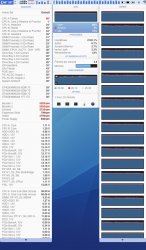 MAC PRO 2010 2x3,46 Hex Xenon - 05 FULL - 1HOUR.jpg156.4 KB · Views: 760

h9826790
macrumors P6
Even though I didn't own a dual processor board yet, those numbers looks very wrong to me.
1) Fan speed too high, which most likely cause by not properly installed heatsink (or poor thermal paste application). However, since I don't have the dual heatsink setup, can't tell what's the normal fan speed.
2) Heatsink A temperature too low. I've try that on my 4,1 with W3690. I maxed out all the cores, let it warmed up.
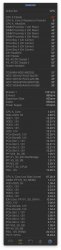
For your reference, these are my temperatures. (Noted: My ambient temp is higher)
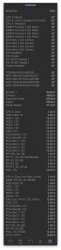
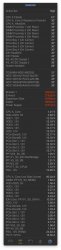
During idle (with few low demand apps opened), my heatsink may be warmed up to only 1C below the CPU core temperature (with booster fan speed manual set at 900RPM, and all other remain at stock setting).
Under full load, and let the native fan profile to take care the heat, the heatsink will go up to 66C (CPU over 80C, same as yours).
I then manually spin up the fan to max speed, the heatsink stable at 45C within 1 minute, and the CPU temperature reduced to 61C. I have no way to make the heatsink only 6C above ambient temp.
3) Tcase max has no directly relationship to the core max. Practically, we can't measure the Tcase max in our Mac Pro, and the Tcase max should be always lower than the core max. My W3690 is even worse on Tcase max (just 68C), but as you can see, I can warm up the core to above 80C without any problem. It's the Apple's way to balance heat and fan noise. The native fan speed will keep your CPU run at it's max temperature with the possible lowest fan speed. So, that >80C not necessary means that your CPU is overheated.
My own suggestion is DO NOT stress your CPU now. Your fan already run at max speed, but still can't cool down the CPU. I suspect that your CPU A is already thermal throttled, which is the only way to protect itself. You better reseat the heatsink, and carefully apply the thermal paste again. (You may run "pmset -g thermlog" in terminal to check if the CPU speed is still stay at 100%)
1) Fan speed too high, which most likely cause by not properly installed heatsink (or poor thermal paste application). However, since I don't have the dual heatsink setup, can't tell what's the normal fan speed.
2) Heatsink A temperature too low. I've try that on my 4,1 with W3690. I maxed out all the cores, let it warmed up.
For your reference, these are my temperatures. (Noted: My ambient temp is higher)
During idle (with few low demand apps opened), my heatsink may be warmed up to only 1C below the CPU core temperature (with booster fan speed manual set at 900RPM, and all other remain at stock setting).
Under full load, and let the native fan profile to take care the heat, the heatsink will go up to 66C (CPU over 80C, same as yours).
I then manually spin up the fan to max speed, the heatsink stable at 45C within 1 minute, and the CPU temperature reduced to 61C. I have no way to make the heatsink only 6C above ambient temp.
3) Tcase max has no directly relationship to the core max. Practically, we can't measure the Tcase max in our Mac Pro, and the Tcase max should be always lower than the core max. My W3690 is even worse on Tcase max (just 68C), but as you can see, I can warm up the core to above 80C without any problem. It's the Apple's way to balance heat and fan noise. The native fan speed will keep your CPU run at it's max temperature with the possible lowest fan speed. So, that >80C not necessary means that your CPU is overheated.
My own suggestion is DO NOT stress your CPU now. Your fan already run at max speed, but still can't cool down the CPU. I suspect that your CPU A is already thermal throttled, which is the only way to protect itself. You better reseat the heatsink, and carefully apply the thermal paste again. (You may run "pmset -g thermlog" in terminal to check if the CPU speed is still stay at 100%)
Last edited:
SEJU
macrumors member
1) Fan speed too high, which most likely cause by not properly installed heatsink (or poor thermal paste application). However, since I don't have the dual heatsink setup, can't tell what's the normal fan speed.
My fan speeds when IDLE or under light load are normal for two CPU machines.
BOOSTER 1 - ca. 1100 rpm
BOOSTER 2 - ca. 1100 rpm
EXHAUST - ca. 600 rpm
EXPANSION SLOT - ca. 800 rpm
INTAKE - ca. 600 rpm
POWER SUPPLY - ca. 600 rpm
I had the same values with my original CPUs. I experience the FANS at their max speed only since I installed the X5690 and under heavy load.
2) Heatsink A temperature too low. I've try that on my 4,1 with W3690. I maxed out all the cores, let it warmed up.
For your reference, these are my temperatures. (Noted: My ambient temp is higher)
View attachment 523068View attachment 523069View attachment 523070
During idle, my heatsink only 2C below the CPU core temperature.
Under full load, and let the native fan profile to take care the heat, the heatsink will go up to 66C (CPU over 80C, same as yours).
I then manually spin up the fan to max speed, the heatsink stable at 45C with CPU temperature reduce to 61C. I have no way to make the heatsink only 6C above ambient temp.
That is interesting. In fact I was wondering why my heatsink gets colder after 1 hour of use .... Although that is when the fans are at their maximum. Anyway on CPU A I have 40C difference between CPU and heatsink, that is very strange! You have 16C difference under heavy load, but my CPU B matches your 16C temp difference. Maybe it is just the heatsink of CPU A which needs to be reinstalled?!
3) Tcase max has no directly relationship to the core max. Practically, we can't measure the Tcase max in our Mac Pro, and the Tcase max should be always lower than the core max. My W3690 is even worse on Tcase max (just 68C), but as you can see, I can warm up the core to above 80C without any problem. It's the Apple's way to balance heat and fan noise. The native fan speed will keep your CPU run at it's max temperature with the possible lowest fan speed. So, that >80C not necessary means that your CPU is overheated.
My own suggestion is DO NOT stress your CPU now. The fan already run at max speed, but still can't cool down the CPU. I suspect that your CPU already thermal throttled, which is the only way to protect itself. You better reseat the heatsink, and carefully apply the thermal paste again. (You may run "pmset -g thermlog" in terminal to check if the CPU speed is still stay at 100%)
Both voltage and amperage of CPU A in relation to CPU B go down under heavy load. I do not know what it means and thought it were a sign of throttling, but I read that the Gulftown and Westmere had no Thermal Monitoring Technologies. http://ark.intel.com/products/52576/Intel-Xeon-Processor-X5690-12M-Cache-3_46-GHz-6_40-GTs-Intel-QPI
After 5 min of running Handbrake I get not thermal warning:
pmset -g thermlog
Note: No thermal warning level has been recorded
2015-01-04 15:54:39 +0100 CPU Power notify
CPU_Scheduler_Limit = 100
CPU_Available_CPUs = 24
CPU_Speed_Limit = 100
I think your cooling system has been designed for a 130 Watt CPU, whereas mine for 2 x 95 Watt and not 2 x 130. This might explain why your system runs colder than mine. But the temperature difference between CPU A and heatsink A remains odd.
I will not stress the CPU in the next time, buy a torque key 0.4-1.0 Nm and try to reinstall the heatsink. (the missing torque key was the reason I did not do it myself this time .....)
It would still be interesting to have temperature and fan speeds from dual X5690 Mac Pros.
And thank you very much for your data and explanations.
h9826790
macrumors P6
I should make it more clear. The fan speed is too high when the CPU under stress for a prolong period of time. And they cool down the heatsink very effectively, but not the CPU. It means the heat was trapped at the CPU, but can transfer to the heatsink properly.
From your screen capture, the fan speed maxed out when you ran handbrake for an hour, but not 5 min after that. So I guess that's why the CPU speed was still at 100%. Your Mac Pro should increase the fan speed before it throttle the CPU. However, at time = 5min, as the screen capture shows, the problem already started, the temperature difference between the CPU and heatsink getting bigger and bigger, fan running faster and faster, but the CPU should still work at 100% speed until the fan run at max speed.
You are right, my heatsink is decided for 130W CPU. However, as you said, by just comparing your CPU A and B's heatsinks performance, you can tell something is very wrong already. And your CPU B's heatsink actually perform similar to mine, that's means your heatsink should able to handle 130W CPU quite well.
If I were you, I will only reseat heatsink A. The heatsink B works well at this moment, I won't try to fix something that is working properly.
From your screen capture, the fan speed maxed out when you ran handbrake for an hour, but not 5 min after that. So I guess that's why the CPU speed was still at 100%. Your Mac Pro should increase the fan speed before it throttle the CPU. However, at time = 5min, as the screen capture shows, the problem already started, the temperature difference between the CPU and heatsink getting bigger and bigger, fan running faster and faster, but the CPU should still work at 100% speed until the fan run at max speed.
You are right, my heatsink is decided for 130W CPU. However, as you said, by just comparing your CPU A and B's heatsinks performance, you can tell something is very wrong already. And your CPU B's heatsink actually perform similar to mine, that's means your heatsink should able to handle 130W CPU quite well.
If I were you, I will only reseat heatsink A. The heatsink B works well at this moment, I won't try to fix something that is working properly.
Last edited:

lexR
macrumors regular
had Handbrake running for an hour last night and temps stayed on 59+55ºC for cpu A and B respectively.
i like the CPU's running cooler and i set the fans with a preset i made via SMC fan control for about 50-60% boost to all fans.
X5690 12 core 4.1>5.1 cMP
----------
It would still be interesting to have temperature and fan speeds from dual X5690 Mac Pros.
And thank you very much for your data and explanations.
Screen shot uploaded
SEJU
macrumors member
Image
had Handbrake running for an hour last night and temps stayed on 59+55ºC for cpu A and B respectively.
i like the CPU's running cooler and i set the fans with a preset i made via SMC fan control for about 50-60% boost to all fans.
X5690 12 core 4.1>5.1 cMP
Ok! Thank you very much, that means that cpu tasks in handbrake are indeed distributed evenly between both CPUs and that my heatsinks really need to be reinstalled!
lexR
macrumors regular
Ok! Thank you very much, that means that cpu tasks in handbrake are indeed distributed evenly between both CPUs and that my heatsinks really need to be reinstalled!
No worries, with no control over fans via SMC they sit at 33+30ºC when browsing and actually right now, once you've reset your heat sinks with new thermal paste and maybe given your system a ''blow through'' you may get a benefit from installing a fan control app like SMC that you can set presets for and keep your CPU's cooler than the system would left to its own devices...