Become a MacRumors Supporter for $50/year with no ads, ability to filter front page stories, and private forums.
If you need a new Mac, I do think the 2018 model is the best one out there right now. I just think people need to know all the positive and negatives. There are negatives, but an informed consumer can then make the decision if its worth it.

For me, I still think its worth it, the machine is well built, and does everything I want it too.

Thank you.

I'll probably get one but I'll wait till it comes installed with Mojave.
 
Yep I pretty much agree. I would hate to have to listen to fan noise because I was doing mundane tasks... That would pretty much rule out the machine on that (no matter how fast it is). I'd probably sacrifice performance by going for an Air just so as to not have a machine which heats up, is noisy and I am guessing kills it's battery trying to do minor tasks.
[doublepost=1536145293][/doublepost]

You are not wrong, but people are exhibiting issues and it's not because everyone are using crypto sites. Most users are probably going from comparable experiences between new and old machines doing the same thing.

Lack of fans is one of the reasons the Air is slow. If you can't cool it you can't run it hard enough to make it hot.
 
Lack of fans is one of the reasons the Air is slow. If you can't cool it you can't run it hard enough to make it hot.

But you have to ask if transferring photos should make your CPU this toasty - and this is the Pro with two fans.
 
But you have to ask if transferring photos should make your CPU this toasty - and this is the Pro with two fans.

And this is why I am saying that this is software's responsibility. If you start doing CPU work, it will try to go as fast as it can. I don't think it's reasonable to demand that a computer stays cool and quiet if you load one or more of its cores 100% and make it boost to its upper limit. However, the software can instead choose to put less priority on a secondary task — which will then take longer but won't result in high CPU loads.
 
And this is why I am saying that this is software's responsibility. If you start doing CPU work, it will try to go as fast as it can. I don't think it's reasonable to demand that a computer stays cool and quiet if you load one or more of its cores 100% and make it boost to its upper limit. However, the software can instead choose to put less priority on a secondary task — which will then take longer but won't result in high CPU loads.

If doing the same thing on a 2015 MacBook Pro doesn’t cause this issue, you can see the problem though right? “But mah 2 extra corezz!” Isn’t really a good response to unhappy customers.
 
I'd say it is complicated... CPUs now aren't as "clean" as they used to be... Although we're not in the ARM SOC world where they throw everything plus the kitchen sink on the die.

A modern Intel chip has a lot built in including the CPU, GPU, Memory Controller, and more. You can't look at just CPU utilization as the only source of heat generation on a modern Intel chip. Additionally, Graphics Acceleration is used a lot more now due to there being something included on the CPU die standard. You may have a lot of heat being generated by the on die PCH for PCIe or USB data being pushed across.

I think it is really hard to compare heat generation across different CPU generations with Intel. It is more apples to oranges due to them moving more and more onto the die.
 
  • Like
Reactions: macintoshmac
I think comparing a 2012 MacBook to a current generation, even a 2015 should be taken with a grain of salt. Like LogicalApex said above, Intel has crammed so much into these modern processors, from the graphics (which is 5x faster than the HD 4000 of 2012), to the PCH, south bridge controllers, USB controllers, memory controllers, going from LPDDR3 to DDR4, increase in resistor counts, etc. Just for ***** and giggles, a colleague of mine has a surface book 2 i5-7300U with 8GB of memory and a 256GB SSD. I ran Cinebench on it. It maxed out its turbo boost of 3.5gHz, but couldn't sustain it for more than 15 seconds before throttling back to 2.6. Heat was around 90C, and watts was around 30 while sustaining the 3.5gHz Turbo. Now this is a fanless system, but if you read Microsoft forums, or watch Surface Book 2 videos, there are all kinds of throttling issues with them. I use Surface Books as comparisons cause I feel they offer the best of the Windows laptops (other the MateBook Pro X is really nice for a laptop only, however even though they stole the Mac design, they should have stole the design with 2 fans, not the single fan which goes full speed as soon as its pushed and sounds like a hair dryer).

Right now typing this, my system is idling at 43C, and Im not limiting it with Volta. Its plugged in. Under Cinebench its goes to around 93-96C. Inside the house is 73F or 22C. Now if I load the photos app and start looking at photos, the temps increase into the 50's, and same can be said if watching youtube.

I think I'm more amazed out how well the 15" cools compared to the 13" 2018. For all whats added in the 15" compared to the 13", along with the faster memory, dGPU, extra 2 cores, the additional 4 hyper threaded cores, the faster processor and the higher Turbo clocks, I think they did a pretty good job. Here's a picture of my previous 13" 2018 i5 and my 1st 2018 15" 2.6gHz (both had the supplement update 1 installed).

IMG_1116.jpg IMG_1117.jpg
 
Last edited:
If a mobile cpu that's 4/5-generation removed from today's best truly is more efficient at transferring data, then I don't know what to say or even think, I reserve judgement until more thin and light laptops with same CPUs exhibit similar phenomena. I'll say this though, today's ssds are heaps faster than ones used in 2012 machines, so data/s processed is naturally higher and could drive up temps quicker.

All said, this makes the impending launch of the new Air all the more intriguing. If Apple could nail the thermals and acoustics side of it (I believe they'll be powerful enough for most with improved battery life as an additional purchase incentive) I could see it becoming a best-seller surpassing the sales of the Pro line, especially if the MSRP difference is large enough.
 
I think I'm more amazed out how well the 15" cools compared to the 13" 2018. For all whats added in the 15" compared to the 13", along with the faster memory, dGPU, extra 2 cores, the additional 4 hyper threaded cores, the faster processor and the higher Turbo clocks, I think they did a pretty good job. Here's a picture of my previous 13" 2018 i5 and my 1st 2018 15" 2.6gHz (both had the supplement update 1 installed).

View attachment 779873 View attachment 779874
Are you trying to say that 15 inch was not warmer than 13 inch?
If so, these results are quite surprising...
 
If doing the same thing on a 2015 MacBook Pro doesn’t cause this issue, you can see the problem though right?

Is it indeed the case though? 100% single-core utilization will make a laptop run hot, no matter whether it’s a 2015 or 2018 model. If you see high utilization with the 2018 but don’t see it in the 2015, I’d speculate on a software bug.
[doublepost=1536221991][/doublepost]
All said, this makes the impending launch of the new Air all the more intriguing. If Apple could nail the thermals and acoustics side of it (I believe they'll be powerful enough for most with improved battery life as an additional purchase incentive) I could see it becoming a best-seller surpassing the sales of the Pro line, especially if the MSRP difference is large enough.

Don’t hold your breath too much. They will be using overclocked 2 year old CPUs, since Intel hasn’t made anything new.

As to thermals and accoustics: if you don’t want your laptop to run hot, it has either to be loud or heavy. Unless you tone down the performance to where heat doesn’t matter anymore.
 
It has everything to do with cooling, or if you will, thermal management.

I can do x, y, and z on my 2012 rMBP and it does not get hot. I do the same exact thing on my 2018 MBP, and I'm in the 80c range.


We're not talking about high loads, that's the thing.

I don't know why, but my rMBP 2012 got really hot when doing intensive work. I'd say that the 2018 rMBP runs cooler than my old laptop.
 
Is it indeed the case though? 100% single-core utilization will make a laptop run hot, no matter whether it’s a 2015 or 2018 model. If you see high utilization with the 2018 but don’t see it in the 2015, I’d speculate on a software bug.
[doublepost=1536221991][/doublepost]

Don’t hold your breath too much. They will be using overclocked 2 year old CPUs, since Intel hasn’t made anything new.

As to thermals and accoustics: if you don’t want your laptop to run hot, it has either to be loud or heavy. Unless you tone down the performance to where heat doesn’t matter anymore.

1. Yep that is what I am getting at, I don't think it is normal for machines to do this and it is a software bug (rather than say a user doing rogue stuff) as my Mid 2014 didn't do this during dev/VM tasks.

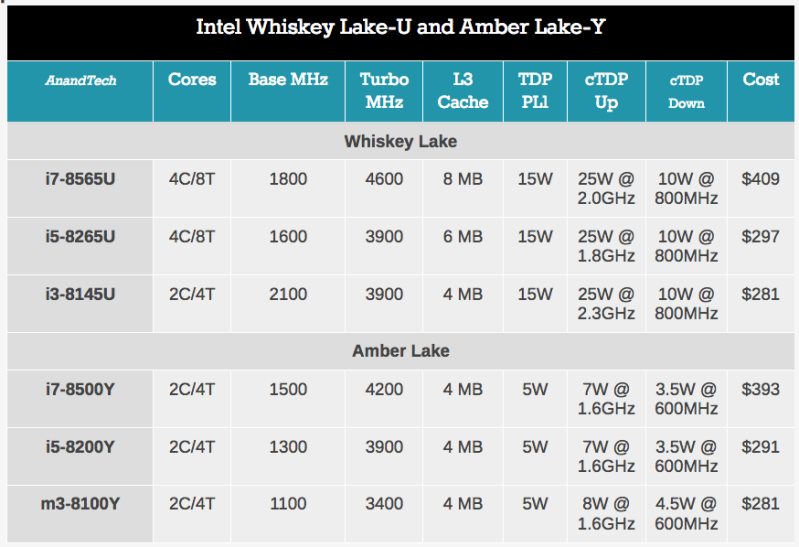
2. Wouldn't Apple use the new Whiskey Lake CPU's, seeing as at the IFA we had quite a lot of manufacturers adopting them for the upcoming release circa October if not earlier? I'd be very surprised if Apple didn't. Similarly, I presume they will use the new Amber Lake CPU's to upgrade the 12" MacBook.
 
Is it indeed the case though? 100% single-core utilization will make a laptop run hot, no matter whether it’s a 2015 or 2018 model. If you see high utilization with the 2018 but don’t see it in the 2015, I’d speculate on a software bug.
[doublepost=1536221991][/doublepost]

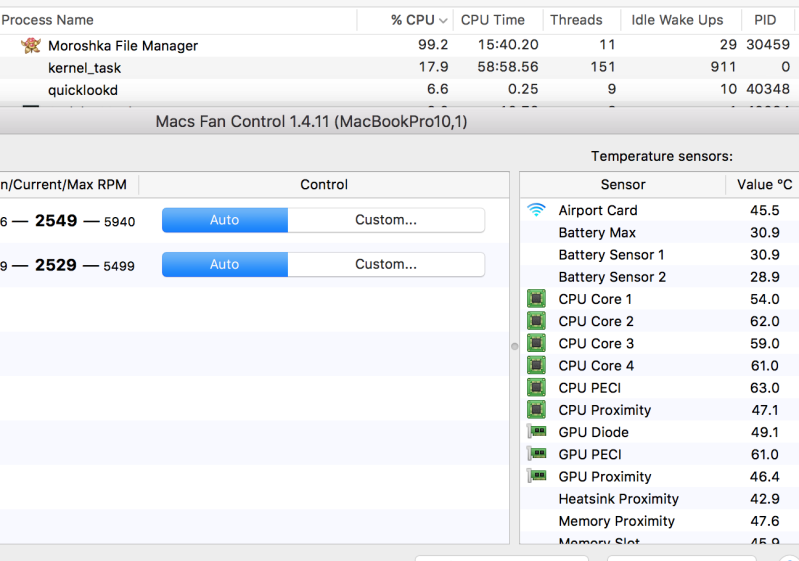
Just for fun, I ran a test of copying 2000 files with a total size of ~ 4gb five times. Here're the thermals during the 5th run. File manager used is rather old and not optimized for a newer OS like Sierra. Ambient temp is 28c, machine on my lap. Hardly ideal.

264557b.jpg


Don’t hold your breath too much. They will be using overclocked 2 year old CPUs, since Intel hasn’t made anything new.

As to thermals and accoustics: if you don’t want your laptop to run hot, it has either to be loud or heavy. Unless you tone down the performance to where heat doesn’t matter anymore.

I was thinking something along the lines of

59zrq0.jpg


Agreed for heavy use. For light usage, it shouldn't get hot imo. My machine certainly doesn't, and it's got a 45TDP CPU.
 
it shouldn't get hot imo.
That's the point of contention, doing simple things with this MBP, causes more heat then prior generations. To me that points to poor thermal design on being able to evacuate the heat effectively.

I know a lot people blame Intel, because its their chips causing the heat, no argument, but and is a bit but. Intel gives Apple, Dell, HP, etc, etc copies of the CPU way in advance and this gives the manufacturers time to design a laptop around the new chipsets. Sadly, the likes of Dell and Apple chose to do nothing and just slapped the 6 core processor into the same generation design. Both Apple and Dell are now dealing with high temps.

Overall, I'm happy with my MBP, its a solid laptop, and I don't have buyers remorse but that doesn't stop me from pointing out that Apple rested on their laurels and were lazy.
 
Just curious... Is there any difference between 13 and 15 inch model in this aspect? (13 inch also has dual fans, which supposedly should be enough to cool a CPU only.).
And is there any difference in the temps if you play with the fans.
 
Just curious... Is there any difference between 13 and 15 inch model in this aspect? (13 inch also has dual fans, which supposedly should be enough to cool a CPU only.).
And is there any difference in the temps if you play with the fans.

The lack of dGPU and smaller form factor is interesting. I think all my MacBook Pro (2011-2018) have fired up the fans on some load. Especially web video in 1080p or more while connected to a external monitor with 4K or more. Without a 4K monitor, they are generally silent, especially on their own just using the Intel GPU combined with bursts of AMD Radeon on heavy tasks.

I am very interested in data on the MacBook Pro 13" and will consider it a safe buy if the fans aren't always on when connected to an external screen.
 
1. Yep that is what I am getting at, I don't think it is normal for machines to do this and it is a software bug (rather than say a user doing rogue stuff) as my Mid 2014 didn't do this during dev/VM tasks.

Just for fun, I ran a test of copying 2000 files with a total size of ~ 4gb five times. Here're the thermals during the 5th run.

My 2018 15" with i9 CPU also doesn't get warm when doing light tasks like copying files or typing in text. As you would expect from a computer.

Wouldn't Apple use the new Whiskey Lake CPU's

I refuse to see Whiskey Lake and Amber Lake as new CPUs. Its another facelift of old tech, with some minor changes and hopefully some slight process improvements. My point is that these CPUs won't run any "cooler" then the old ones, since not much has changed.

That's the point of contention, doing simple things with this MBP, causes more heat then prior generations

You can't make claims like these without offering any evidence. So far, the only evidence you have shown comes from your Lightroom usage, where at least one of the CPU cores is maxed out. That is far from "doing simple things".

As to the original post of this thread, we have no idea what this person was doing. I very much doubt that it was simply copying fotos. Probably using some sort of proprietary camera software that does compression/processign while transferring pictures.
 
I refuse to see Whiskey Lake and Amber Lake as new CPUs. Its another facelift of old tech, with some minor changes and hopefully some slight process improvements. My point is that these CPUs won't run any "cooler" then the old ones, since not much has changed.

I don't know about it running cooler but although they are the same 14nm architecture, there is definitely some things to look forward to:

- Some of the spectre/meltdown issues have been resolved on the hardware level
- Integrated Gigabit WiFi (which promises faster speeds and may even fix a lot of hibernation issues)
- Built in audio DSP (Voice activation, Cortana/Alexa etc, a bit like how the T2 chip handles Siri)
- Integration of USB 3.1/TB3 (some controller will still be required but this is still a good step I would imagine)
- Improved battery life

For me the integrated WiFi/better battery life might be the biggest selling feature, as that will hopefully result in better user experiences. Not sure if not having to rely on some of the software fixes (with the security fixes) could make it perform better as well.

Also, has heat been a huge problem on quad-core 15W laptops recently? I haven't had any personal experience as I am using the dual core 15W laptops at present.
 
Are you trying to say that 15 inch was not warmer than 13 inch?
If so, these results are quite surprising...

I'm saying the difference is about 1-2 degrees. The 15" holds its turbo clock longer. Having owned both and being able to test both, these were my findings. Same setups on both machines, same software loaded on both.

Its a modern day processor that runs faster than anything else up till this point, with more transistors crammed into the die. I can understand moving large chunks of files would cause the CPU to run hotter. Its still a process being performed and the controller is integrated into the CPU, which then offloads to the T2 chip. Lots of working parts in tandem.
 
  • Like
Reactions: macintoshmac
Its my opinion but I have, scroll up and you see that I'm simply browsing in LR causes high temps, even with CPU utilization down.

Maflynn, with all due respect its a bit like talking to a wall. Again: the stats you have posted on LR show very high CPU utilisation. You are interpreting the readings wrong and I have written at least three posts explaining in detail where you are wrong. Your screenshots show at least 100% CPU utilization (just not in multicore operation).

You are like a person who complains about getting out of breath when going grocery shopping, and then it turns out that they were running like a maniac the entire way. Context matters. Whether you consider something "light work" is irrelevant. What the software does and how much resources it allocates is what's important.
 
I can understand moving large chunks of files would cause the CPU to run hotter.
yes and no. I agree the CPU runs hotter, but isn't it up the computer make to craft a thermal solution to address the temperature of the cpus? Design the computer for efficient cooling, so that mundane operations do not cause temps to spike like they are?

We consumers have some tools to help mitigate the effects of heating, and I'm employing them, but ultimate, when computer makers are obsessed with thinness, it makes cooling the laptop even more difficult.

Maflynn, with all due respect its a bit like talking to a wall
I feel the same, you tend to bend over backwards defending apple. Its everyone's fault but apple when discussing topics like this.

the stats you have posted on LR show very high CPU utilisation.
You consider 20% and under CPU very high utilization? 😱
2018-09-05_07-11-59.png
 
Last edited:
  • Like
Reactions: macintoshmac
You consider 20% and under CPU very high utilization? 😱

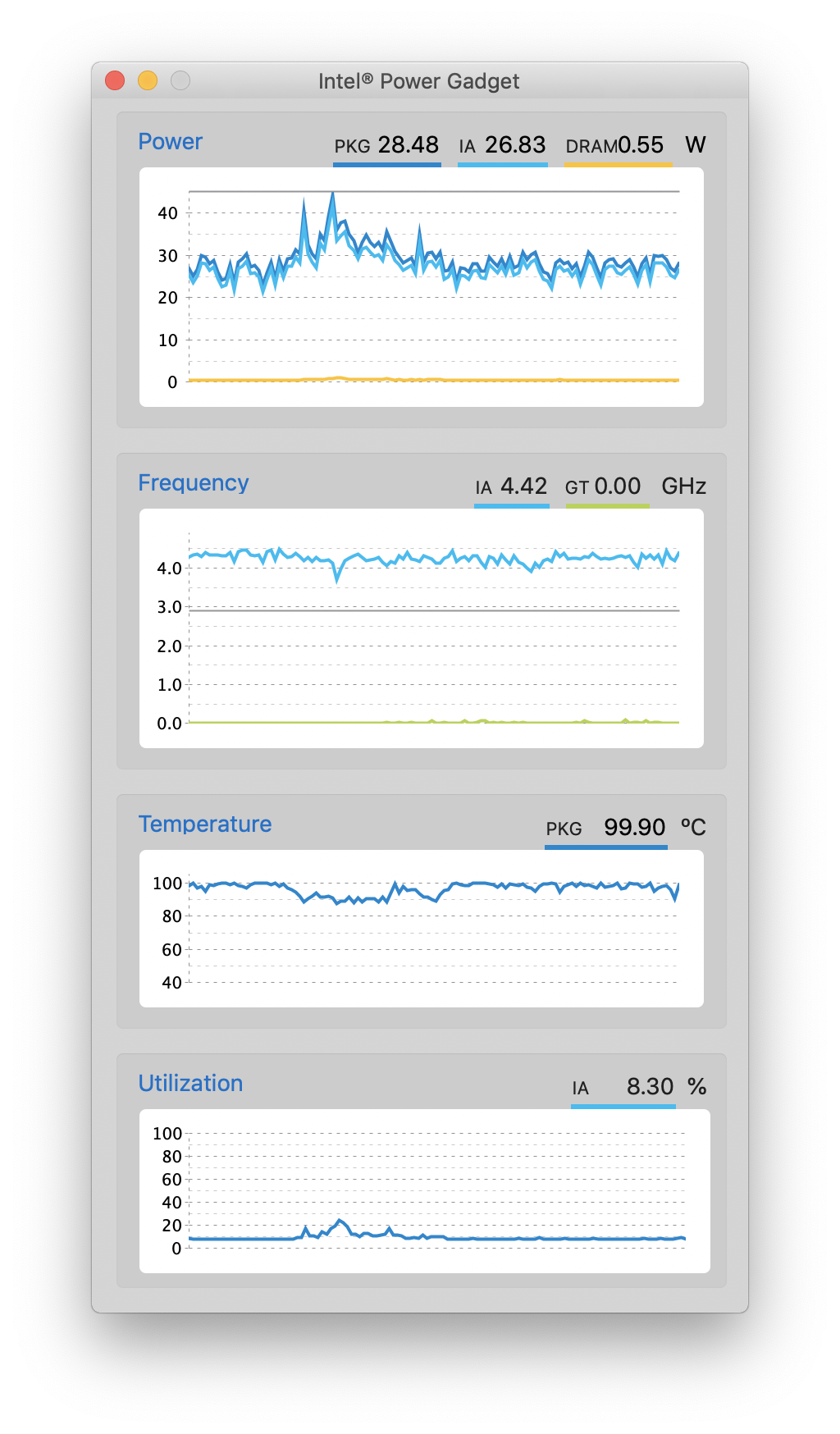
Again, you don't understand how PowerGadget reports utilization! In PowerGadtet, 100% is full load across all the cores, of which you have 12! So your 20% is actually two fully loaded cores or 200% (if 100% corresponds to full core)! Which you can also see from the fact that your CPU draws 30 watts of power and your clocks are at 3.6Ghz! That is a clear-cut 100% low-multitask CPU utilisation scenario! Your CPU is running on 60% of its TDP and boosting as hard as it can. This simply doesn't happen in a "light" workload!

And as to why LR pushes your CPU so hard in a "simple task", you'll have to ask Adobe, they programmed the thing.

P.S. Here, just for you, this is a single-thread workload with 100% CPU utilisation. Created by running a single CPU-time demanding thread. Note how PowerGadget reports 8% CPU utilisation, which is very misleading.

1RxGzHw.png
 
Last edited:
Register on MacRumors! This sidebar will go away, and you'll see fewer ads.