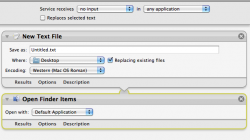
You can create a service using Automator, which will create a new, empty text file of whatever file name you like.
The simplest form is :
- Open Automator and specify "Service" as the project type.
- Then set the following options [at the top] "Service receives: no input" in "any application" (or, specific if you want it to be a service only for certain applications.
- Now add the "New Text File" Action. You can specify the file name, where it lives, and whether to replace existing files.
Once saved, the Service should appear in any (or all) applications you specify. When you run it, a new, blank, text file will be saved in the Finder. If you want it to open automatically in TextEdit or whatever by adding the Open Finder Items action right after the previous one. Save again.
You could make it an application, also, if you like - it just depends on how you want it to be implemented. But, you mentioned "Finder" accessible.
To remove a saved service you can navigate to your ~/Library/Services folder and delete it. Attached is the Automator Service described above.
Hope it helps out. It's also a small intro to Automator - the OP might find other uses for their idea, maybe at some fancy thinks like asking user input for file name and the like; or sequential file names. Just a thought.