Hi,
if you want to encrypt an email you send to someone else, you need his certificate.
If you want that people encrypt email they send to you, in this case they need your certificate.
A certificate is issued by a Certification Authority. You can also generate a self signed certificate but in this case it will not be trusted by other people, hence useless unless you need it for testing 😉
Works well with just about all major mail clients I've used on Macs/Windows/Linux for the past 10+ years. There are other certificate authorities that sells similar products but I'm only personally familiar with Verisign's offerings.
If you want PGP certificates, you'll probably need to install a plug-in for it and generate a new key and then register it at a public keyserver (or give out to people you'd send encrypted emails to). Much less common.
If you want to encrypt your stored email messages for your own viewing rather than when emailing a message to someone else, then you might want to either use FileVault or get a commercial PGP software that does file/folder/volume encryption.
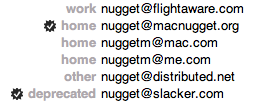
You can confirm whether or not OS X recognizes your key and other people's certs by looking at the email addresses in Address Book:
The little checked seals indicate the presence of a matching certificate in your keychain.
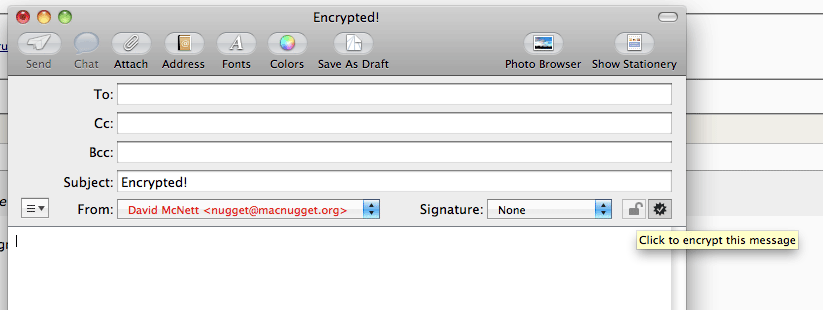
Then, if that's all solid, in email you should see two new icons when sending an email from an address which has a valid certificate:
See the two new buttons next to the signature selector? If you have a valid certificate for yourself the right side button will be enabled and allows you to choose to sign your email or not.
If your recipient has a valid certificate, the left side button will be enabled and allows you to choose to encrypt the email or not.