Become a MacRumors Supporter for $50/year with no ads, ability to filter front page stories, and private forums.

doox00

macrumors regular
Original poster
New to Mac, how do you create desktop shortcuts and rename folders? Also is there a way to add/remove items from the taskbar launcher thing on the bottom?

thanks
 
Make shortcuts: highlight whatever you want to make a shortcut to, press Command + L (or select "Make Alias" from the File menu).

Rename: Highlight what you want to rename, press "Enter". You should be able to enter text.

Add/Remove from Dock: Click and drag it off the dock, then release.
 
Make shortcuts: highlight whatever you want to make a shortcut to, press Command + L (or select "Make Alias" from the File menu).

Rename: Highlight what you want to rename, press "Enter". You should be able to enter text.

Add/Remove from Dock: Click and drag it off the dock, then release.

easy enough, thanks! 🙂

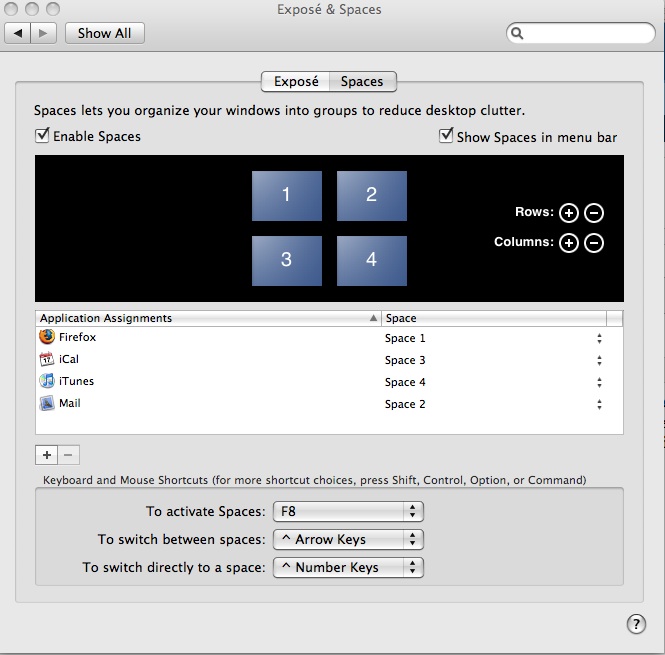
Also, how do you designate which space an app opens up on?
 
System Preferences > Exposé & Spaces > Spaces > Application Assignments

spaces-preferences-pane.jpg


from http://macinjay.wordpress.com/2007/11/29/mac-os-x-leopard-spaces/
 
System Preferences -> Spaces

You can add what are called "Application Assignments" there by clicking the "+" button.
 
Ran into a problem with spaces. I have two installs of an application, I run two instances of it, one from each location. Problem is adding it in spaces (selecting the first instance from one location and the 2nd instance from the other location) is it only adds one of them, it will not allow me to put both in there because of same name/executable? Anyway to get both of these added in there?
 
Register on MacRumors! This sidebar will go away, and you'll see fewer ads.