

Hi. Ive recently began adding to my iTunes library quite heavily, and due to my need for organization, I am asking for help. Ha. So here it goes;
I want to change all the artwork of my movies in iTunes to the rounded-corner type found in SlipCover. My goal is to just edit the pre-existing artwork, hence why ive used a script to extract all my current album art into a folder on my desktop.

Now this is where I get stuck. What needs to happen is this: 1. One artwork file needs to be opened in Slipcover. 2. The iTunes Round case has to be selected.
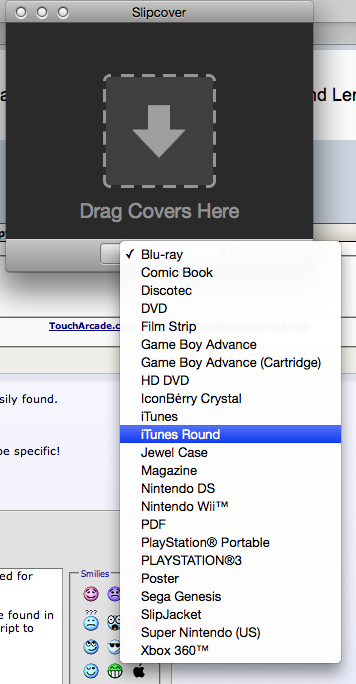
3. The newly created artwork needs to be saved to a folder. 4. The entire process must be repeated until all the artwork has been styled in SlipCover.
Now, Ive never used Automator, and honestly, I have no idea if it can even accomplish what I want. Anyone willing to guide me through creating a workflow that can do all this?
Thanks,
xXriderXx7
I want to change all the artwork of my movies in iTunes to the rounded-corner type found in SlipCover. My goal is to just edit the pre-existing artwork, hence why ive used a script to extract all my current album art into a folder on my desktop.
Now this is where I get stuck. What needs to happen is this: 1. One artwork file needs to be opened in Slipcover. 2. The iTunes Round case has to be selected.
3. The newly created artwork needs to be saved to a folder. 4. The entire process must be repeated until all the artwork has been styled in SlipCover.
Now, Ive never used Automator, and honestly, I have no idea if it can even accomplish what I want. Anyone willing to guide me through creating a workflow that can do all this?
Thanks,
xXriderXx7