
Become a MacRumors Supporter for $50/year with no ads, ability to filter front page stories, and private forums.

jwroycechoi

macrumors newbie
Original poster
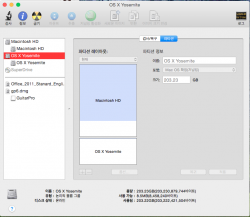
Hi, I installed Yosemite in a separate disk partition, and i got a new logical volume group.
Currently not using it and i want to delete it.
But in the disk utility, somehow my partition is not working ('-' button not working)
Any way i could delete this logical volume group? (either through disk utility or terminal)
I tried it by booting into a restore drive, but same thing there too.

-- attached a screenshot of my disk utility, currently i am using 'Macintosh HD', and i want to delete the 'OS X Yosemite' volume group --

Thx
 

Attachments

  • ???? 2014-08-01 ?? 4.00.47.png
    ???? 2014-08-01 ?? 4.00.47.png
    104 KB · Views: 1,958
Had this exact issue.

Boot into the Mavericks installer, then open Disk Utility. Click on the Yosemite partition, then erase it. You should be able to remove it now, which will also rename your storage medium from "Yosemite" to its proper name.
 
Had this exact issue.

Boot into the Mavericks installer, then open Disk Utility. Click on the Yosemite partition, then erase it. You should be able to remove it now, which will also rename your storage medium from "Yosemite" to its proper name.

Thx! Feeling relieved that u experienced the same thing. But the prob is i do not know how to boot with Mavericks installer. I installed Yosemite to both partition volumes. So dont think i have any Mavericks left in my system. Do i have to download an install file or sth from the internet?
 
Erasing the yosemite partition erase also the new volume.

I've actually solved the issue after playing around with Disk Utility for a bit.

Simply format the partition with Disk Utility and then it will allow you to delete the partition. Then the primary partition can be resized back to the full size.
 
Register on MacRumors! This sidebar will go away, and you'll see fewer ads.