Become a MacRumors Supporter for $50/year with no ads, ability to filter front page stories, and private forums.

akadmon

Suspended
Original poster
With the addition of a third monitor to my setup, desk space has become an issue. Do any of you use an articulating arm to support a 30" ACD? I'm looking for a device that clamps to the desk (no holes to drill). The only thing that looks remotely acceptable is the Ergotron MX, but there are a number of reviews that make me question whether it will be able to support a monitor as large and heavy as the 30" ACD.

 
I have three MX stands holding up three 30" ACDs. They work great. Drilled holes in my desk to mount them. Highly recommended.
 
Both. You get the choice 🙂 Mine is clamped down (and holding up the 30" Dell without any problems) but I could drill a hole in my desk and mount it the way Bwa has mounted them. The arm comes with everything you need to do this. It even supports VESA 100mm stuff.
 
Got the Ergotron MX and it's working. Had to tighten both the arm and the tilt adjustment screws way down for my 30" ACD to stay put (as delivered, the monitor is way too heavy for the arm and the tilt spring). Also had to put in about 1" of extra "padding" between the clamp and the desk in order to be able to pivot the monitor 90 degrees with zero tilt (otherwise it tilts backward). So yes, the arm works for the 30" ACD, but it's not ideal. There is nothing in the manual about the screw adjustments. I'm not surprised some people give up on the MX when they try to support their 30" ACD. I found out about the adjustments from a Korean video on Youtube.
 
I've been using Ergotron stands and arms for a long time; I never even looked at the MX directions, but I have run into the screw adjustment issue and been puzzled with LX arms in years past when I first tried those--so I suppose I am not too surprised to hear that was frustrating.

I haven't tried to rotate mine 90 degrees. The main thing I don't like about the MX is that it's not very "vertical" on the lower part of the arm. I suppose they did this to avoid "extraneous arm" out the back, which is a cosmetic issue I have with my LX arms.
 
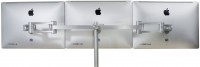
Try monitors in motion. Look at the Boa product line.

http://www.monitorsinmotion.com/store/product/3

new_web_21_1292643922.jpg
 
There is nothing in the manual about the screw adjustments. I found out about the adjustments from a Korean video on Youtube.
Then you clearly haven't read the manual nor the website at all because the information you claim is lacking is on both! They warn about the limited motion range when using a large display on their website and clearly state that pivoting with a 30" is not available (they call it portrait/landscape mode). The part about the screw adjustments is on the last page of the manual (page 8; step 5). There is also a part about fixing the pivot function (it's on page 5; step 2).

For manual see: http://www.ergotron.com/Portals/0/tp/G/MX/888-45-155-W.pdf
For website see: http://www.ergotron.com/Products/tabid/65/PRDID/56/Default.aspx
 
Register on MacRumors! This sidebar will go away, and you'll see fewer ads.