
This has got to be the silliest noob question, but I can't figure it out. I have my Mac set to show the disk size, but I only get this
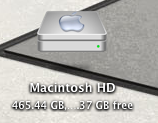
I don't know how much free space I have if it only shows ... I've tried changing the size, but I can't figure out how to allocate more space. Changing the font size and Icon size, doesn't make a difference. Anyone?
I don't know how much free space I have if it only shows ... I've tried changing the size, but I can't figure out how to allocate more space. Changing the font size and Icon size, doesn't make a difference. Anyone?
