H hndn macrumors regular Original poster Jan 22, 2010 #1 Hi, Just happened today: there are several folders on my desktop, when I click open a "Mgmt 339" folder, it appears an entire desktop instead of open just "Mgmt 339" folder. Thanks for your help. Attachments Picture 1 23-48-47.jpg 45.2 KB · Views: 130
Hi, Just happened today: there are several folders on my desktop, when I click open a "Mgmt 339" folder, it appears an entire desktop instead of open just "Mgmt 339" folder. Thanks for your help.
BlueRevolution macrumors 603 Jan 22, 2010 #2 See the "View" buttons on your toolbar? Click the leftmost button.
H hndn macrumors regular Original poster Jan 22, 2010 #3 BlueRevolution said: See the "View" buttons on your toolbar? Click the leftmost button. Click to expand... hhmm I don't get it? 😕
BlueRevolution said: See the "View" buttons on your toolbar? Click the leftmost button. Click to expand... hhmm I don't get it? 😕
0 0858131 Cancelled Jan 22, 2010 #4 The "view" buttons in the center of the Finder window allow you to choose how you want to see the files and folders displayed.
The "view" buttons in the center of the Finder window allow you to choose how you want to see the files and folders displayed.
H hndn macrumors regular Original poster Jan 23, 2010 #5 ziggyonice said: The "view" buttons in the center of the Finder window allow you to choose how you want to see the files and folders displayed. Click to expand... What I meant was when I click on a specific folder located on desktop, I just want that specific folder to open, not an entire desktop.
ziggyonice said: The "view" buttons in the center of the Finder window allow you to choose how you want to see the files and folders displayed. Click to expand... What I meant was when I click on a specific folder located on desktop, I just want that specific folder to open, not an entire desktop.
-aggie- macrumors P6 Jan 23, 2010 #6 hndn said: What I meant was when I click on a specific folder located on desktop, I just want that specific folder to open, not an entire desktop. Click to expand... It looks like from your pic that the files in that folder are shown, so what do you mean?
hndn said: What I meant was when I click on a specific folder located on desktop, I just want that specific folder to open, not an entire desktop. Click to expand... It looks like from your pic that the files in that folder are shown, so what do you mean?
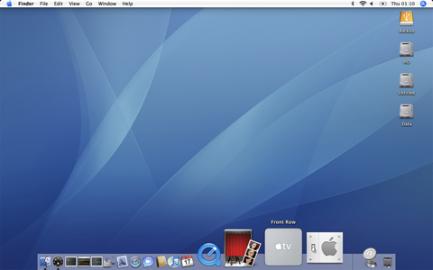
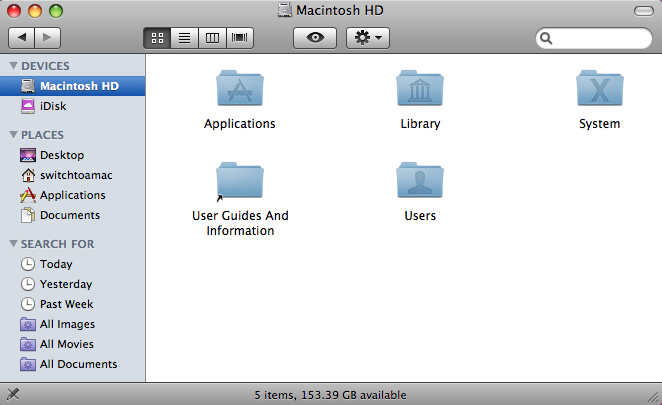
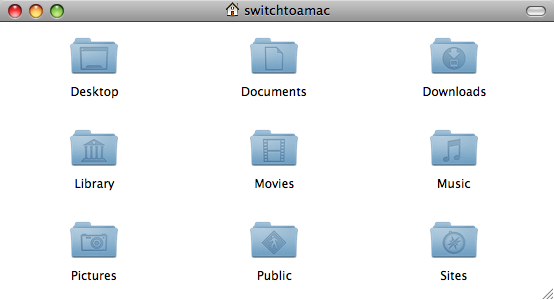
0 0858131 Cancelled Jan 23, 2010 #7 hndn said: What I meant was when I click on a specific folder located on desktop, I just want that specific folder to open, not an entire desktop. Click to expand... I think I may understand what you're getting at — but I think you're using the wrong word usage here. This is the Desktop. There is only one Desktop. This is a Finder window. You can have many open at one time. Now, what I *think* you're looking for is this. If you click this button in the upper-right corner of a Finder window... It shows just the contents of that individual folder, without the sidebar, toolbar, etc. So now, it looks like this... Does this sound about right?
hndn said: What I meant was when I click on a specific folder located on desktop, I just want that specific folder to open, not an entire desktop. Click to expand... I think I may understand what you're getting at — but I think you're using the wrong word usage here. This is the Desktop. There is only one Desktop. This is a Finder window. You can have many open at one time. Now, what I *think* you're looking for is this. If you click this button in the upper-right corner of a Finder window... It shows just the contents of that individual folder, without the sidebar, toolbar, etc. So now, it looks like this... Does this sound about right?
BlueRevolution macrumors 603 Jan 23, 2010 #8 hndn said: What I meant was when I click on a specific folder located on desktop, I just want that specific folder to open, not an entire desktop. Click to expand... Just take my word for it and click the button, okay?
hndn said: What I meant was when I click on a specific folder located on desktop, I just want that specific folder to open, not an entire desktop. Click to expand... Just take my word for it and click the button, okay?
H hndn macrumors regular Original poster Jan 23, 2010 #9 BlueRevolution said: Just take my word for it and click the button, okay? Click to expand... Alright, I take your word hehe I know it sounds confusing, thanks all for your input. Much appreciated. Have a good weekend.
BlueRevolution said: Just take my word for it and click the button, okay? Click to expand... Alright, I take your word hehe I know it sounds confusing, thanks all for your input. Much appreciated. Have a good weekend.
Gregg2 macrumors 604 Jan 23, 2010 #10 hndn said: Alright, I take your word hehe Click to expand... Arghhhh! So, did that help???
H hndn macrumors regular Original poster Jan 23, 2010 #11 Gregg2 said: Arghhhh! So, did that help??? Click to expand... 🙂 BIG HELP