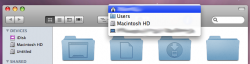
If u hold the cmd button/right click and hit the top of the window in Safari where the text is it lets u go back to each path, also it works in finder which I knew about but never thought u could for Safari.
since we are at it. Let me reintroduce my previous addon suggestion for firefox called Locationbar ^2. Which has many functions, among them, moving mice from left side (or press a key when moving mice to urlbar, or you can define in the options) entering the urlbar, each segments of the url will be linkified, and you can click any section of the url and jumping around the levels of the current website.
If u hold the cmd button/right click and hit the top of the window in Safari where the text is it lets u go back to each path, also it works in finder which I knew about but never thought u could for Safari.
Not exactly, that only shows u previous pages. If you load something that is bookmarked or google something, the back button will only show previous pages, however the thing I found lets you got to each path.