Become a MacRumors Supporter for $50/year with no ads, ability to filter front page stories, and private forums.

ramparts

macrumors regular
Original poster
All of my programs are subjecting me to red underlines whenever they think I've misspelled something (or, more likely, used a technical term, or a word in another language, or a name, etc.).

Is there any way to disable this "feature" systemwide?
 
All of my programs are subjecting me to red underlines whenever they think I've misspelled something (or, more likely, used a technical term, or a word in another language, or a name, etc.).

Is there any way to disable this "feature" systemwide?

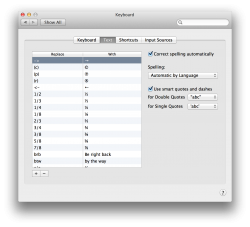
In System Preferences → Keyboard → Text, uncheck 'Correct spelling automatically'.
 

Attachments

  • Screen Shot 2014-09-17 at 17.58.42.png
    Screen Shot 2014-09-17 at 17.58.42.png
    262.9 KB · Views: 158
Register on MacRumors! This sidebar will go away, and you'll see fewer ads.