Become a MacRumors Supporter for $50/year with no ads, ability to filter front page stories, and private forums.
A 2008 iMac is now approaching 18 years old.
The internal drive may run, or it may be "done".

We need to know
- what year is the son's MacBook Pro?
- what version of the OS is running on it?
Write this info down on paper so you won't forget when you post.

Unless you're unable to afford it, it's time to be looking for a replacement Mac.
If not "new", the perhaps "newER".
Apple refurbished can be a good choice.

Have you looked at the m4 Mini ...?
 
You could also look into a iPad Pro. That is what I did with my Mom, since all she needs to do is surf the web and do email and texting (Apple ID linked to phone.)

A M4 mini would also be good. But I like the iPad since Mom can either snap to the keyboard thing and use it like a computer or lounge in the chair and use it iPad style.
 
You could also look into a iPad Pro. That is what I did with my Mom, since all she needs to do is surf the web and do email and texting (Apple ID linked to phone.)

A M4 mini would also be good. But I like the iPad since Mom can either snap to the keyboard thing and use it like a computer or lounge in the chair and use it iPad style.
Good suggestion thankyou… I will
Have a look at an iPad Pro soon
 
A 2008 iMac is now approaching 18 years old.
The internal drive may run, or it may be "done".

We need to know
- what year is the son's MacBook Pro?
- what version of the OS is running on it?
Write this info down on paper so you won't forget when you post.

Unless you're unable to afford it, it's time to be looking for a replacement Mac.
If not "new", the perhaps "newER".
Apple refurbished can be a good choice.

Have you looked at the m4 Mini ...?
Thankyou, I’ve jus screenshot this and yes think it may be time to invest in something new… I’ve just got all my photos on the iMac and wanted to keep until I knew I had something I could use as an alternative
 
This is uber-easy! The good thing is, no searching, digging around looking for the macOS version and separate USB builder as @MacInTO is suggesting. Sure that works, but this works waaaaaaaay better. Your son just has to agree to installing the "helper" then click on the 10.11.6 Installer, after a USB of 8GB or larger is plugged into the secondary machine, Mist will download and build, bing, bang, done! Mist is regularly updated and up to date for the most current macOS you can download as a standalone firmware (directly from Apple servers) or building an installer. 🤠

Is your goal to simply decommission this machine or rebuild it and use it for the very very limited things you can do with it at the point? Safari is so ancient it will virtually not work with any modern website, Chrome and Firefox are the same at this point too.

Sure, putting in an SSD would be awesome, but in a 2008 machine - why?! Swapping HDD for SSD isn't easy or at all straight forward for someone lacking the right tools or knowledge of the internal connectors, especially the LCD and I would HIGHLY recommend against it unless you've a great attention to detail, cautious, aren't like a bull in a china shop. 🤣

You'd be better off installing Linux Mint for a more modern OS and it's the closest/easiest comparable to Windows 10/11 look and feel and supports modern browsers, Office compatible softwares, with likely OOBE in hardware compatibility.

Otherwise, sanitize your HDD data and be sure the unit is responsibly recycled.
Hi, thankyou for this, I’m going to have a try at doing this and see how it goes, fingers crossed
 
This is uber-easy! The good thing is, no searching, digging around looking for the macOS version and separate USB builder as @MacInTO is suggesting. Sure that works, but this works waaaaaaaay better. Your son just has to agree to installing the "helper" then click on the 10.11.6 Installer, after a USB of 8GB or larger is plugged into the secondary machine, Mist will download and build, bing, bang, done! Mist is regularly updated and up to date for the most current macOS you can download as a standalone firmware (directly from Apple servers) or building an installer. 🤠

Is your goal to simply decommission this machine or rebuild it and use it for the very very limited things you can do with it at the point? Safari is so ancient it will virtually not work with any modern website, Chrome and Firefox are the same at this point too.

Sure, putting in an SSD would be awesome, but in a 2008 machine - why?! Swapping HDD for SSD isn't easy or at all straight forward for someone lacking the right tools or knowledge of the internal connectors, especially the LCD and I would HIGHLY recommend against it unless you've a great attention to detail, cautious, aren't like a bull in a china shop. 🤣

You'd be better off installing Linux Mint for a more modern OS and it's the closest/easiest comparable to Windows 10/11 look and feel and supports modern browsers, Office compatible softwares, with likely OOBE in hardware compatibility.

Otherwise, sanitize your HDD data and be sure the unit is responsibly recycled.
So just to clarify with my little knowledge… download “helper” onto a usb on my son’s iPad and then plug that into my iMac and go from there?
 
This is uber-easy! The good thing is, no searching, digging around looking for the macOS version and separate USB builder as @MacInTO is suggesting. Sure that works, but this works waaaaaaaay better. Your son just has to agree to installing the "helper" then click on the 10.11.6 Installer, after a USB of 8GB or larger is plugged into the secondary machine, Mist will download and build, bing, bang, done! Mist is regularly updated and up to date for the most current macOS you can download as a standalone firmware (directly from Apple servers) or building an installer. 🤠

Is your goal to simply decommission this machine or rebuild it and use it for the very very limited things you can do with it at the point? Safari is so ancient it will virtually not work with any modern website, Chrome and Firefox are the same at this point too.

Sure, putting in an SSD would be awesome, but in a 2008 machine - why?! Swapping HDD for SSD isn't easy or at all straight forward for someone lacking the right tools or knowledge of the internal connectors, especially the LCD and I would HIGHLY recommend against it unless you've a great attention to detail, cautious, aren't like a bull in a china shop. 🤣

You'd be better off installing Linux Mint for a more modern OS and it's the closest/easiest comparable to Windows 10/11 look and feel and supports modern browsers, Office compatible softwares, with likely OOBE in hardware compatibility.

Otherwise, sanitize your HDD data and be sure the unit is responsibly recycled.
 

Attachments

  • IMG_8567.jpeg
    IMG_8567.jpeg
    742.2 KB · Views: 66
  • IMG_8566.jpeg
    IMG_8566.jpeg
    811.9 KB · Views: 59
  • IMG_8567.jpeg
    IMG_8567.jpeg
    742.2 KB · Views: 35
There must be something I’ve missed ?
 

Attachments

  • IMG_8571.jpeg
    IMG_8571.jpeg
    834.9 KB · Views: 63
  • IMG_8569.jpeg
    IMG_8569.jpeg
    872.3 KB · Views: 67
So just to clarify with my little knowledge… download “helper” onto a usb on my son’s iPad and then plug that into my iMac and go from there?
Mist can't create what you need for your iMac, using an iPad. This has to be done on either a different iMac or on some MacBook. The "helper" allows the macOS download to be accessed and to help in creating the bootable installer.
 
Mist can't create what you need for your iMac, using an iPad. This has to be done on either a different iMac or on some MacBook. The "helper" allows the macOS download to be accessed and to help in creating the bootable installer.
Sorry it is a Mac book pro my son has but think we hvnt done the part when we make it readable? Got a bit confused
 
Thankyou, I’ve jus screenshot this and yes think it may be time to invest in something new… I’ve just got all my photos on the iMac and wanted to keep until I knew I had something I could use as an alternative
I think with your extensive photo library; unless it lives in the cloud with Apple, then the M4 Mini is probably your best bet for something new. Also if you do a lot of photo editing; the M4 Mini will probably be better suited.
 
I think with your extensive photo library; unless it lives in the cloud with Apple, then the M4 Mini is probably your best bet for something new. Also if you do a lot of photo editing; the M4 Mini will probably be better suited.
Thankyou… that’s great advice as I have no idea the difference between them all
 
Hi, thankyou for this, I’m going to have a try at doing this and see how it goes, fingers crossed
Hello… finally got round to putting 10.11.6 onto a usb drive via mist helper and my Mac still won’t run it? Server 403 error keeps happening?
 
Hello… finally got round to putting 10.11.6 onto a usb drive via mist helper and my Mac still won’t run it? Server 403 error keeps happening?
It sounds like you are still doing Internet recovery. For the USB installer, hold down the option key while powering up the Mac until you see the USB drive on the screen.

A USB installer should not require the Internet. I just installed Mojave from a USB drive on two different Macs last week and did not connect to the Internet for the installation process each time.
 
Hello… finally got round to putting 10.11.6 onto a usb drive via mist helper and my Mac still won’t run it? Server 403 error keeps happening?
For simplicity sake, with your iMac off, and the Mist created USB plugged in, power on your iMac, immediately press and hold the Opt/Alt (Option Key) until you get a list of drives, and one of them should be the orange colored USB you created, select that, within a few moments, you should see the traditional macOS loading progress bar. Once it gets fully loaded, you can run Disk Utility to hopefully get your HDD formatted from there and even install macOS if you're so inclined. 🤠
 
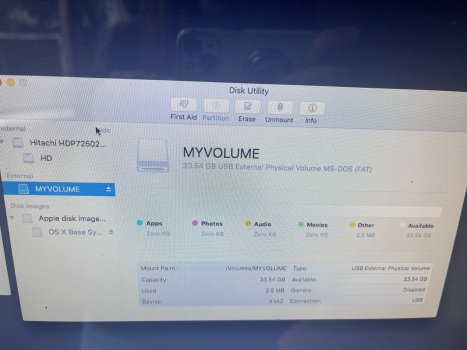
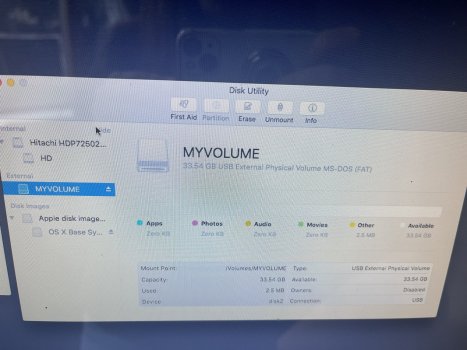
What I noticed is that the USB is in FAT 32 format and it shouldn't be.
Also, click on that HD Drive and then erase it.
Before that make sure you have a bootable USB Drive. You can do it in Disk Utility.
https://support.apple.com/en-us/101578
or boot into macOS:
Go into Applications -> Right click on the install file-> Show Package contents -> Open Contents folder -> Shared Support -> Open InstallESD.dmg by double clicking on it.
Go to Disk Utility -> On your USB Drive right click and restore -> Source -> OS X Install ESD (Drag and drop it from Disk Utility) Destination -> Your USB Stick.
Make sure the USB Stick stick is in macOS format like Mac OS Extended Journal first.
And click Restore.
Screenshot 2026-02-06 at 16.24.41.png

Then when you boot up your broken Mac boot it up from the USB drive and then erase the HD hard drive from disk utility and press cmd + Q on disk utility and reinstall macOS.
 
Register on MacRumors! This sidebar will go away, and you'll see fewer ads.