
Got a tip for us?
Let us know
Become a MacRumors Supporter for $50/year with no ads, ability to filter front page stories, and private forums.
MBP 1,1-10,2 Display Issue, MacBook Pro Mid 2012
- Thread starter rocketbuc
- Start date
- Sort by reaction score
You are using an out of date browser. It may not display this or other websites correctly.
You should upgrade or use an alternative browser.
You should upgrade or use an alternative browser.

Fishrrman
macrumors Nehalem
Bad display or GPU.
It might be time to start thinking of "replacement".
You'd be amazed at "how far things have come along" in the past 11 years.
It might be time to start thinking of "replacement".
You'd be amazed at "how far things have come along" in the past 11 years.


MBAir2010
macrumors G3
that happened to my powerbook G4 in 2007, I replaced the screen, which worked.
but the line was wider and had blue and purple glowing from the outside.
I'm typing this on the same same MacBook now, and now remember
that line could be a faulty ribbon port being loose or as Fisherrman said a faulty GPU Graphic card.
what you could do is connect a HDMI or external display to see if the line appears on that screen.
or even use "screen sharing" on another MacBook or Mac to see if that line is there.
Im using my MBP now since the new MBA M1 is busy streaming to the tv.
therefore the MBP 2012 Monterey still has a purpose in 2023.
I hope this helped!
but the line was wider and had blue and purple glowing from the outside.
I'm typing this on the same same MacBook now, and now remember
that line could be a faulty ribbon port being loose or as Fisherrman said a faulty GPU Graphic card.
what you could do is connect a HDMI or external display to see if the line appears on that screen.
or even use "screen sharing" on another MacBook or Mac to see if that line is there.
Im using my MBP now since the new MBA M1 is busy streaming to the tv.
therefore the MBP 2012 Monterey still has a purpose in 2023.
I hope this helped!

nathan_reilly
macrumors 6502

PBG4 Dude
macrumors 603
Yeah failed GPUs usually color the whole screen or are black.I would think that the display or the connecting cable are suspect. I think a failed GPU would be a bit more visually intense. Try external monitors as suggested above.
OP definitely try connecting an external display to see if that works as expected.
nathan_reilly
macrumors 6502
Frankly I think you have one beautiful Mac there...My parents owned an antiglare model of the same vintage and it served them well for many years. Seeing pics of yours made me do some quick browsing to see what I would pay to get one these days and they for sure are still in demand.
MBAir2010
macrumors G3
i'm ready to give mine away yesterday, then realized the same these MacBook Pros can still perform well.Frankly I think you have one beautiful Mac there...My parents owned an antiglare model of the same vintage and it served them well for many years. Seeing pics of yours made me do some quick browsing to see what I would pay to get one these days and they for sure are still in demand.
my problem was OCPL and Monterey Failing big time yesterday with many freezings and data lost.
so im installing Catalina now on a second drive, 1TB OWC 6-G drive (took 3 minutes to move a 36GB folder!) and hopefully that will cause problems with the MBO.
the other drive has Mojave and creative suit 4 for graphic design.
I hope the OP screen problem is a nice easy fix!
nathan_reilly
macrumors 6502
I'm running Open Core with Monterey on a 2012 Mac Pro, this scares me. I've never had a problem but I've heard of folks with issues that are truly terrifying. Did you have any warning signs? Did you update anything?i'm ready to give mine away yesterday, then realized the same these MacBook Pros can still perform well.
my problem was OCPL and Monterey Failing big time yesterday with many freezings and data lost.
so im installing Catalina now on a second drive, 1TB OWC 6-G drive (took 3 minutes to move a 36GB folder!) and hopefully that will cause problems with the MBO.
the other drive has Mojave and creative suit 4 for graphic design.
I hope the OP screen problem is a nice easy fix!
Typed this on my 2013 Macbook Pro with Catalina!
MBAir2010
macrumors G3
There were no warning signs, yesterday everything just froze, I was converting tv shows from a dvd.I'm running Open Core with Monterey on a 2012 Mac Pro, this scares me. I've never had a problem but I've heard of folks with issues that are truly terrifying. Did you have any warning signs? Did you update anything?
Typed this on my 2013 Macbook Pro with Catalina!
then I stopped this project but even just using the MacBook Pro after a minute or so, everything would freeze.
I do have a dual boot 2 drives but who doesn't now?
last Thursday I installed OCLP Monterey on a new SSD 1TB and had trouble since the first boot.
finally everything worked great yesterday then the freezing happened.
I had to reinstall Catalina after unsuccessful attempts to get anything to work.
now I'm typing this on the MacBook Air M1 while Catalina is on the MBPro 12 which no problems.

Dear @Fishrrman. I purchased a MacBook Air M2 at launch, so this is no longer my primary computer. Despite its age though, the MacBook Pro is still quite fast (SSD, 16 GB RAM) and has been running flawlessly.Bad display or GPU.
It might be time to start thinking of "replacement".
You'd be amazed at "how far things have come along" in the past 11 years.
I also like the anti-glare screen better than the new one on my MacBook Air M2. Would have paid extra to get such a screen again on the new machine.Frankly I think you have one beautiful Mac there...My parents owned an antiglare model of the same vintage and it served them well for many years. Seeing pics of yours made me do some quick browsing to see what I would pay to get one these days and they for sure are still in demand.
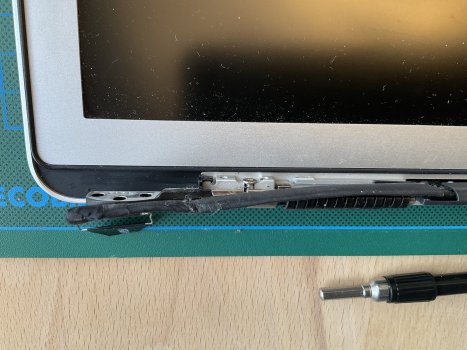
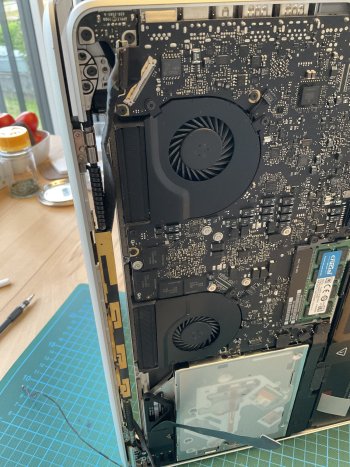
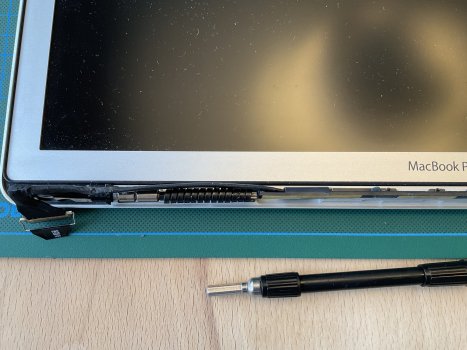
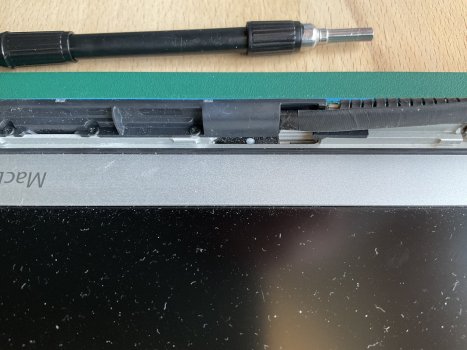
MBAir2010
macrumors G3
BECAREFUL!
make sure the battery Cable is alway dislodge when putting all this back together.
I saw a co worker zap the screen in 2012 repair job, of a 2008 MacBook pro
we (owner and them me) had to buy the customer a new MacBook Air then.
I laughed when I heard the zap-
then was suspended for a month because I did not warn the co-worker
(since obviously my cape should have flew me to their bench in a nano second)
meaning they bought the customer a new MacBook from my would be salary.
anyways Im glad there is some solutions to the MacBook pro which still packs a punch!
make sure the battery Cable is alway dislodge when putting all this back together.
I saw a co worker zap the screen in 2012 repair job, of a 2008 MacBook pro
we (owner and them me) had to buy the customer a new MacBook Air then.
I laughed when I heard the zap-
then was suspended for a month because I did not warn the co-worker
(since obviously my cape should have flew me to their bench in a nano second)
meaning they bought the customer a new MacBook from my would be salary.
anyways Im glad there is some solutions to the MacBook pro which still packs a punch!
Thank you @MBAir2010! I just tested it with the case open and only the display connected. This is when I forgot to disconnect the battery again! Thank you for the reminder!BECAREFUL!
make sure the battery Cable is alway dislodge when putting all this back together.
I saw a co worker zap the screen in 2012 repair job, of a 2008 MacBook pro
we (owner and them me) had to buy the customer a new MacBook Air then.
I laughed when I heard the zap-
then was suspended for a month because I did not warn the co-worker
(since obviously my cape should have flew me to their bench in a nano second)
meaning they bought the customer a new MacBook from my would be salary.
anyways Im glad there is some solutions to the MacBook pro which still packs a punch!
nathan_reilly
macrumors 6502
By process of elimination we are looking more likely at a display replacement at this point, amirite boys?

Candidoo
macrumors newbie
Do you have other ideas what I could still try on the hardware side?
Hi Rocketbuc, Hi there,
I've the same issue as you with a MBP Mid-2012 15" I7 2.6GHz, mine is not unibody as yours.At the beginning 4 year ago there were two lines , sometimes they were gone sometimes they came back. fter I've got a big problem on the screen and no more display, then I open the MBP last year in august and the I dislodged the cable and re plug the display cable and it came back from resuscitation.
Now i've got more lines maybe 16 lines , I wrote now with the MBP, it's still worked , I love this machine.
I think about try to re-open ...but.. not sure to do it because it works...
If somebody knows if it's easy to put back some thermal pate on the CPU, It could bring the CPU as new, because I think that it's really a good machine even it's an old machine ;-)
Thanks by advance for your reply