Become a MacRumors Supporter for $50/year with no ads, ability to filter front page stories, and private forums.

romeboards

macrumors newbie
Original poster
Aug 2, 2009
8
0
Hey guys, I just bought a new LG display that has a 1920x1080 23" display. I am hooking it up to my Mac Pro via HDMI to a mini displayport to hdmi adapter. However, the highest resolution its giving me is 1440x900, with black bars on either side of the display. When I try to change the settings, I get two different resolution choices:
Picture1-1.png


Any help on how I can get my mac to display properly? It would be greatly appreciated!
 
ah, yeah I see what the problem is. When the Macbook Pro is closed (and a USB keyboard/mouse is attached) the external display gives a proper 1920x1080, but when its open the external display is only 1440x900 because its mirroring the displays. So is there any way for the external display to show 1920x1080 when the Macbook Pro is open so I can still use the keyboard and trackpad?
 
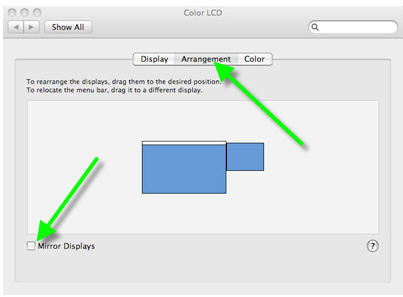
I think you need to go to the arrangement tab and drag the white bar to your external screen icon. That should set your external as the primary screen with the dock and such and make your laptop screen a secondary. This should allow you to keep the resolution at 1920x1080 and your lid open on your lap top.
 
ah, yeah I see what the problem is. When the Macbook Pro is closed (and a USB keyboard/mouse is attached) the external display gives a proper 1920x1080, but when its open the external display is only 1440x900 because its mirroring the displays. So is there any way for the external display to show 1920x1080 when the Macbook Pro is open so I can still use the keyboard and trackpad?

mac_pref.jpg


checked Mirror Displays - mirrors the internal screen to the external one
unchecked Mirror Displays - does extend the available desktop to an external screen


MacMoveMenuBarExternalDisplay.jpg


Will make the external the primary screen, the Dock will also be on the screen where the Menu Bar is.
 
Register on MacRumors! This sidebar will go away, and you'll see fewer ads.