
Become a MacRumors Supporter for $50/year with no ads, ability to filter front page stories, and private forums.

northernmonkeyz

macrumors member
Original poster
Hi,
I really don't know much about the Apple TV other than someone told me I can stream movies etc to my TV.
This is what I am after....
I have a Mac Mini upstairs with a lot on non iTunes downloaded content....I have loads of movies and TV shows from other sources.

I want to be able to stream these downstairs to my HDTV.
Is this what I need to be able to do this?

I read a lot about jailbreaking etc but I don't think thats doable in ATV 3?

I also saw someone on Youtube who was streaming movies etc from the internet and also using XBMC. He also had thinks like subscription sports tv that he seemed to be able to stream without paying for the service.

How was he doing this?

If ATV is not right for me then please let me know so I can save my £'s....I am in the UK if that makes any difference?

Cheers,
Al
 
If your Mac Mini can play the files then you should be able to Airplay them directly from the Mini to the ATV.
Just load them into iTunes on the Mini, turn on Home Sharing, make sure the ATV and the Mini are on the same network, and you'll be able to browse the library on the Mini from the ATV and stream whatever you like.

If the files can't be loaded into iTunes then you can still use a 3rd-party streaming program like Plex or something but you might be better off with an ATV competitor like a Roku or a WD Live or something.
 
take a look at roku. Similar to the appletv, but more channels (or apps) available. You loose access to the iTunes Store and the ability to airplay from your other apple devices though.

You will need to check out the available channels on both aTV and roku in the UK, as it will vary from the US, if you've seen a US advert, some of that stuff may not be available.

Also look at plex. It's similar to xbmc. You point it at your tv and movie folders and then it scans them and goes and grabs the metadata for your media. The advantage plex has is that it's client/server. So you run a central server (the mini upstairs) that stores and catalogues all your media, then the client runs on lots of things (roku, iOS, android, mac, windows desktop, Linux, etc) the sever will even convert on the fly. So if the movie you want to watch isn't in a format your iphone can play, it will be converted as you watch, and streamed to your phone.

Xbmc on a jail broken aTV 2 will not be able to play files unless they are compatible with the video player in the aTV (see apple's specs for compatible formats).
There is a plex client for the jail broken aTV 2 though.

If you go with the aTV, There is also airplay mirroring from your mac, this is a poor option for watching full screen video as even with a wired gig-e connection it will drop frames and stutter, wireless will be worse.

Also airflick, will convert and send your videos to the aTV with regular airplay (not mirroring) so it will be smoother.
With both of these, you will need a way to remotely control your mac.
 
What app are u using on the mini to play those files? if iTunes/Qtime then you are ready to expand your Apple ecosystem, meaning an Apple TV addition will be easy. However if not the ATV transition would be a bit painful and perhaps one of those other boxes Rokus, WDS may serve you better.

Do you have a recent TV, or replacing the TV soon? Because the new TV may already have DLNA built-in in which case all you need is to run a DLNA server on the mini and ur good to go. The Blue Ray player too may already have DLNA.

I have only addressed streaming your current media, nothing about Internet contents.
 
A Roku is not going to cut it if the OP wants to stream off the Mac Mini, as stated. I own both a Roku and ATV, for streaming from another Apple device the only way to go is an ATV as far as ease of use and setup go. That said, for non-apple content the Roku is a good less expensive option from the ATV, particularly if you mainly stream netflix or Amazon Prime.
 
If your Mac Mini can play the files then you should be able to Airplay them directly from the Mini to the ATV.
Just load them into iTunes on the Mini, turn on Home Sharing, make sure the ATV and the Mini are on the same network, and you'll be able to browse the library on the Mini from the ATV and stream whatever you like.

If the files can't be loaded into iTunes then you can still use a 3rd-party streaming program like Plex or something but you might be better off with an ATV competitor like a Roku or a WD Live or something.

Hi,
Thanks for the reply.
The Mini is playing all files but alas only through VLC.
When I read that people are getting Sky channels etc, how is this possible?

----------

A Roku is not going to cut it if the OP wants to stream off the Mac Mini, as stated. I own both a Roku and ATV, for streaming from another Apple device the only way to go is an ATV as far as ease of use and setup go. That said, for non-apple content the Roku is a good less expensive option from the ATV, particularly if you mainly stream netflix or Amazon Prime.

I actually have Netflix app on my Tivo box so not too worried about that.
My main usage would be to play MKV, MOV, MP4 etc on my TV without having to put them on a USB stick.
I am also quite intrigued about all of these channels people say that can get on the ATV.....

----------

Is it true that ATV3 cant be Jailbroken?
 
Is it true that ATV3 cant be Jailbroken?

Yep, no jailbreak yet for the ATV3.
The jailbroken ATV2 can add new "channels" via XBMC or other jailbreak apps but I can't say that I've ever seen Sky.

For the files you want to play, your only option would be a streaming app to stream from your Mini to an i-Device and then airplay from the i-Device to the ATV.
It's the long-way-round and not ideal.

Or you could convert all your movies to iTunes-friendly formats.
Takes a while but then you're good to go going forward.
 
Yep, no jailbreak yet for the ATV3.
The jailbroken ATV2 can add new "channels" via XBMC or other jailbreak apps but I can't say that I've ever seen Sky.

For the files you want to play, your only option would be a streaming app to stream from your Mini to an i-Device and then airplay from the i-Device to the ATV.
It's the long-way-round and not ideal.

Or you could convert all your movies to iTunes-friendly formats.
Takes a while but then you're good to go going forward.

Thanks for replying.
Can you confirm that I have this correct…..
If I take my movies and convert them to either .mp4, .mov, .m4v and then load them into my Itunes library, I can then browse on Apple TV and play them on my TV downstairs?
If this is correct do I still need to have the movie playing on my Mini to see it on my TV in another room?
 
Thanks for replying.
Can you confirm that I have this correct…..
If I take my movies and convert them to either .mp4, .mov, .m4v and then load them into my Itunes library, I can then browse on Apple TV and play them on my TV downstairs?
If this is correct do I still need to have the movie playing on my Mini to see it on my TV in another room?

Yes.
Look at the specs for the appletv. It has what it will play
Look at iflicks. It will convert your files and then tag them so they import into iTunes correctly

You do no have to be watching them on the mini, the aTV will just grab the file out of your library and play it.

Or ...
Get a roku and use plex. No conversion needed. You can still keep your full resolution files, and plex will convert as needed for whatever you are playing on.
Plex also supports DLNA so most new smart TVs or blu-ray players will be able to talk directly to plex.
 
I am also quite intrigued about all of these channels people say that can get on the ATV.....

Don't get too excited.

If you think all these channels that they are giving you FREE on the ATV is too good to be true you would be right.

The FREE stuff are just teasers to me, usually not full programs, The Sky's News, which I used to watch is sad - sad - sad. WSJ is better but again you won't get a full hour of the program, just a few minutes snippets, that's all.

The good stuff, HBO etc... you have to be already subscribed to a cable service in order to view those.

But look, the ATV is a $99 box, it does what you want with your current media, the rest are, perhaps, entertaining sideshows.
 
Don't get too excited.

If you think all these channels that they are giving you FREE on the ATV is too good to be true you would be right.

The FREE stuff are just teasers to me, usually not full programs, The Sky's News, which I used to watch is sad - sad - sad. WSJ is better but again you won't get a full hour of the program, just a few minutes snippets, that's all.

The good stuff, HBO etc... you have to be already subscribed to a cable service in order to view those.

But look, the ATV is a $99 box, it does what you want with your current media, the rest are, perhaps, entertaining sideshows.


Hi,
Thanks for the great info.
I came across this guy on ebay and he is promising loads of channels....is this a load of rubbish?
http://item.mobileweb.ebay.co.uk/viewitem?sbk=1&nav=SEARCH&itemId=200998505029

I would like to have a device that will play the football games, movies channels etc, is a Roku a better option for channels like 1Channel, Icefilms etc?
 
I came across this guy on ebay and he is promising loads of channels....is this a load of rubbish?
His picture shows the XBMC UI (and he claims the aTV is jailbroken).
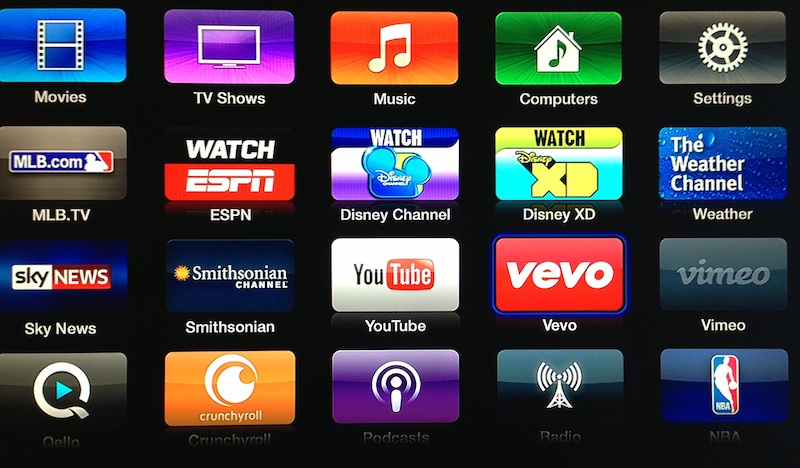
That's different from aTV's native UI and available channels:
apple_tv_vevo_more.jpg

PS The available channels are wildly different based on your region!
 
His picture shows the XBMC UI (and he claims the aTV is jailbroken).
That's different from aTV's native UI and available channels:
Image
PS The available channels are wildly different based on your region!
So I need a jailbroken one to get anything other than netflix and a few others?
 
His picture shows the XBMC UI (and he claims the aTV is jailbroken).
That's different from aTV's native UI and available channels:
Image
PS The available channels are wildly different based on your region!

im not saying its not installed, but this picture doesn't prove that it is

----------

So I need a jailbroken one to get anything other than netflix and a few others?

you need to be jailbroken to get xbmc going, otherwise you get content based on your location. or you can use a "spoofer" to open access to content from the us
 
So I need a jailbroken one to get anything other than netflix and a few others?
I can't tell you what channel selection could you get from XBMC, compared to stock appleTV. In my location there are none worth watching, so I use mine only for AirPlaying my personal media collection.
 
Why not.

A Roku is not going to cut it if the OP wants to stream off the Mac Mini, as stated. I own both a Roku and ATV, for streaming from another Apple device the only way to go is an ATV as far as ease of use and setup go. That said, for non-apple content the Roku is a good less expensive option from the ATV, particularly if you mainly stream netflix or Amazon Prime.

Using plex server on the mac mini and plex client on the roku is going to be cheaper and much less of a hassle than hacking and apple tv or trying to airplay it on your mac mini and then run down and watch it on the tv. Plex runs on a number of small affordable devices. I'm using it on google tv. In addition I can stream outside of my local network.

so.... +1 to the person who first mentioned Plex
 
A Raspberry Pi running XBMC can be used for streaming. Both RaspBMC and OpenElec varieties of XBMC come with AirPlay support built in.
 
Register on MacRumors! This sidebar will go away, and you'll see fewer ads.