
Got a tip for us?
Let us know
Become a MacRumors Supporter for $50/year with no ads, ability to filter front page stories, and private forums.
iPhone Do Not Disturb Keeps Turning Itself On (iPhone 7 Plus)
- Thread starter Perene
- Start date
- Sort by reaction score
You are using an out of date browser. It may not display this or other websites correctly.
You should upgrade or use an alternative browser.
You should upgrade or use an alternative browser.
You have it completely disabled, including scheduled section as well as Bedtime section? Do you have any other devices connected?Is this a bug that hasn't been fixed yet? It happened with iPhone 7 Plus using the last iOS 12
How do I fix this? It's disabled, but at 6 PM keeps turning ON

nancyinak
macrumors newbie
[doublepost=1537720830][/doublepost]I’m having the same problem since I updated to iOS 12. I haven’t changed any of the settings, it’s set to go on at 10pm and off at 6am. Now it just randomly comes on throughout the day. I’ve missed calls and texts, not realizing the DND ghost turned it on. I hope it’s just a bug and Apple will push out a fix.Is this a bug that hasn't been fixed yet? It happened with iPhone 7 Plus using the last iOS 12
How do I fix this? It's disabled, but at 6 PM keeps turning ON

As far as I know everything was disabled. I think the only way to fix this bug is to configure a specific period for DND such as 3:00 to 3:02 AM, then it will be enabled but not bother you when you don't expect. And since it will be ON in a moment you will not use the phone (and for just 2 minutes) it will render the feature useless.You have it completely disabled, including scheduled section as well as Bedtime section? Do you have any other devices connected?
I believe you can schedule it to be on and off at the same time and that will basically turn it off at that time if it was on for some reason.As far as I know everything was disabled. I think the only way to fix this bug is to configure a specific period for DND such as 3:00 to 3:02 AM, then it will be enabled but not bother you when you don't expect. And since it will be ON in a moment you will not use the phone (and for just 2 minutes) it will render the feature useless.

Adambmichaels
macrumors newbie
I am having the same issue with my iPhone 7 plus. For me, there is nothing to indicate that DND is actually switched on (no icon), but the behavior is most def DND behavior and I can't disengage it.

Y
all - was having same problem. New phone w ios12. For whatever reason, dnd was set to ‘on’ in the alarm app when I had the ‘bedtime alarm’ on, which I use every night. Turned dnd toggle to off in the alarm app, fixed the issue.I am having the same issue with my iPhone 7 plus. For me, there is nothing to indicate that DND is actually switched on (no icon), but the behavior is most def DND behavior and I can't disengage it.

specksbacon
macrumors newbie
Apparently, in the Clock app, on the Bedtime tab, in Options there's an option "Do Not Disturb During Bedtime." (https://tidbits.com/2018/09/19/inside-ios-12-do-not-disturb-learns-to-turn-itself-off/) This setting isn't reflected in the DND settings for some reason. It's probably your culprit.
That was something that was brought up and it seems like it's not involved in this case based on the response: https://forums.macrumors.com/thread...tself-on-iphone-7-plus.2141361/#post-26551412Apparently, in the Clock app, on the Bedtime tab, in Options there's an option "Do Not Disturb During Bedtime." (https://tidbits.com/2018/09/19/inside-ios-12-do-not-disturb-learns-to-turn-itself-off/) This setting isn't reflected in the DND settings for some reason. It's probably your culprit.
Apple asked me the following in the bug report...
******
Do you use a bedtime alarm? Do you have Do not Disturb while driving on? What is its setting?
Please provide your response or results by updating your bug report. If uploading files, please compress first.
******
I'll look into it...
******
Do you use a bedtime alarm? Do you have Do not Disturb while driving on? What is its setting?
Please provide your response or results by updating your bug report. If uploading files, please compress first.
******
I'll look into it...

interconnect
macrumors regular
I have this same problem. Despite having a schedule for 11pm to 6am, DND is on outside of those hours. Like right now it is 6:37pm and it is on when it shouldn't be. Bedtime is off in Settings->DND, and "DND During Bedtime" is off in Clock/Bedtime app.
OK, here's what I found out:
Do not Disturb while driving on = enable manually (in other words = disabled). All the rest from what I saw it's off.
Bedtime alarm is on (I guess that's what it is).
Pictures (in portuguese):
https://imgur.com/a/ZXGpWr6
Waiting now for another reply from this bug report.
Do not Disturb while driving on = enable manually (in other words = disabled). All the rest from what I saw it's off.
Bedtime alarm is on (I guess that's what it is).
Pictures (in portuguese):
https://imgur.com/a/ZXGpWr6
Waiting now for another reply from this bug report.
My bug report was closed:

I hope this is fixed in a future version...
Apparently they are working on it, and it was closed because someone already complained about this.Engineering has determined that your bug report (44714800) is a duplicate of 44796030 and will be closed.
The open or closed status of the original report your bug was duplicated to appears in a text box within the bug detail section of the bug reporter user interface. For security and privacy reasons, we don't provide access to the original bug yours was duped to.
An example of what the top of bug reporter's bug detail section with your bug and the duplicate bug's info looks like is included below:
-----------------------------------------------------------------------------------------------------------------------------------------------------------------------------
44714800
Do Not Disturb Keeps Turning Itself On
Created on Sep 23, 2018 6:38 PM for [Product Name] [ OPEN ] [ DUPLICATE OF 44796030 | OPEN ]
-----------------------------------------------------------------------------------------------------------------------------------------------------------------------------
Please note: "[Product Name]" above will be populated with the name of the Product you selected when the bug was initially created.
If you have any questions or concerns, please update your report directly at this link: https://bugreport.apple.com/.
Apple Developer Support
Worldwide Developer Relations
I hope this is fixed in a future version...

Dgodsgift
macrumors newbie
Thanks! This fixed the problem!Apparently, in the Clock app, on the Bedtime tab, in Options there's an option "Do Not Disturb During Bedtime." (https://tidbits.com/2018/09/19/inside-ios-12-do-not-disturb-learns-to-turn-itself-off/) This setting isn't reflected in the DND settings for some reason. It's probably your culprit.
[doublepost=1540869705][/doublepost]
Is this a bug that hasn't been fixed yet? It happened with iPhone 7 Plus using the last iOS 12
How do I fix this? It's disabled, but at 6 PM keeps turning ON
Apparently, in the Clock app, on the Bedtime tab, in Options there's an option "Do Not Disturb During Bedtime." (https://tidbits.com/2018/09/19/inside-ios-12-do-not-disturb-learns-to-turn-itself-off/) This setting isn't reflected in the DND settings for some reason. It's probably your culprit.
[doublepost=1537720830][/doublepost]
I’m having the same problem since I updated to iOS 12. I haven’t changed any of the settings, it’s set to go on at 10pm and off at 6am. Now it just randomly comes on throughout the day. I’ve missed calls and texts, not realizing the DND ghost turned it on. I hope it’s just a bug and Apple will push out a fix.
I think I have fixed this problem with my iPhone I went to Clock. Bedtime. Options. Turned off the dnd at bedtime. It seems to have fixed the really random dnd that was happening throughout the day.
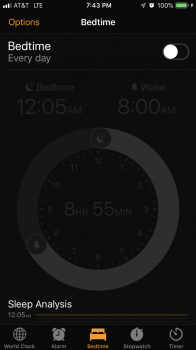
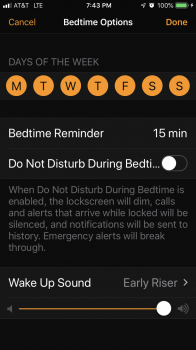
As has been discussed in some previous replies in the thread.I think I have fixed this problem with my iPhone I went to Clock. Bedtime. Options. Turned off the dnd at bedtime. It seems to have fixed the really random dnd that was happening throughout the day. View attachment 801068View attachment 801069