
Got a tip for us?
Let us know
Become a MacRumors Supporter for $50/year with no ads, ability to filter front page stories, and private forums.
Do programs in iMac (with lion) always stay open...evern after restarting?
- Thread starter rsted222
- Start date
- Sort by reaction score
You are using an out of date browser. It may not display this or other websites correctly.
You should upgrade or use an alternative browser.
You should upgrade or use an alternative browser.

dangerfish
macrumors 6502a
No, that's not true. But clicking the red X does not close the program like it would in Windows. You need to quit the program from the menu or hit CMD Q.

GGJstudios
macrumors Westmere
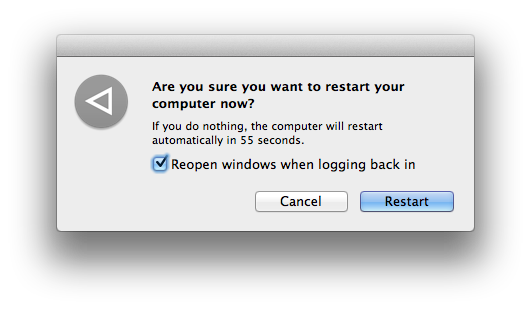
No, they don't stay running. Lion has a feature that will restart whatever apps were open at the time you shut down or restarted, but you can uncheck this box to turn it off.Someone told me today that all the programs that are opened in your computer ALWAYS stay running...even if you restart.
That might explain why my new iMac seems to be getting a bit slower.
Is this true and is there a solution?
Thanks in advance.
GGJstudios
macrumors Westmere
The iPhone runs on iOS, which is a different operating system than Mac OS X.He was telling me that it was like your iphone and when you leave an app, it still runs in the background...even after restarting. This is true for the iPhone, so he had me believing.
maybe he was referring to this:
http://arstechnica.com/apple/reviews/2011/07/mac-os-x-10-7.ars/8#process-model
http://arstechnica.com/apple/reviews/2011/07/mac-os-x-10-7.ars/8#process-model
He was telling me that it was like your iphone and when you leave an app, it still runs in the background...even after restarting. This is true for the iPhone, so he had me believing.
Well, to that extent, he's partially right. Like on an iPhone where an app isn't closed until you close it from the bar at the bottom (that you can access by pressing the home button twice), similarly, in the current version of OS X, programs remain open unless you specifically close them from the dock and now will reopen automatically upon reboot unless you specify otherwise.

KingJosh
macrumors 6502
I hate it how it auto opens everything that wasn't closed on a boot again unless you untick that box. I know it sounds dumb but adding an extra click to your workflow every time you shut down is stupid compared to going to your login management and adding applications to your start up list just once. eh os x is on the decline.
GGJstudios
macrumors Westmere
That's only true for multi-window apps, such as iTunes, Safari, Word, Mail, etc. For single-window apps like Dictionary, Photo Booth, and System Preferences, the app quits when you close the window.Well, to that extent, he's partially right. Like on an iPhone where an app isn't closed until you close it from the bar at the bottom (that you can access by pressing the home button twice), similarly, in the current version of OS X, programs remain open unless you specifically close them from the dock and now will reopen automatically upon reboot unless you specify otherwise.

iSayuSay
macrumors 68040
No, they don't stay running. Lion has a feature that will restart whatever apps were open at the time you shut down or restarted, but you can uncheck this box to turn it off.
Also, if you close the apps before you shut down/restart, they won't open again until you launch them.
More like an enforced feature rather than option. I mean you couldn't permanently turn off "Reopen Windows after logging back in" option. It always ticked by default. Why?? It's frustrating for me since I mustn't forget to un tick it or quitting all apps every time I need to restart.
Letting those apps reopen after restart always make boot time longer since it has to reopen them. Damn Lion.

skottichan
macrumors 65816
Or just disable Resume and Restore?
http://osxdaily.com/2011/07/18/disable-mac-os-x-lion-resume-window-restore/
It's just a check box in General.
http://osxdaily.com/2011/07/18/disable-mac-os-x-lion-resume-window-restore/
It's just a check box in General.
GGJstudios
macrumors Westmere
I agree there should be an option to turn that off in System Preferences.More like an enforced feature rather than option. I mean you couldn't permanently turn off "Reopen Windows after logging back in" option. It always ticked by default. Why??
I believe that's a different feature than "Reopen Windows after logging back in", which that check box doesn't affect.Or just disable Resume and Restore?
skottichan
macrumors 65816
I believe that's a different feature than "Reopen Windows after logging back in", which that check box doesn't affect.
Ah gotcha, wasn't 100% sure.
Disregard. 🙂
More like an enforced feature rather than option. I mean you couldn't permanently turn off "Reopen Windows after logging back in" option. It always ticked by default. Why?? It's frustrating for me since I mustn't forget to un tick it or quitting all apps every time I need to restart.
Letting those apps reopen after restart always make boot time longer since it has to reopen them. Damn Lion.
Just wait for Mountain Lion 🙂 It seems to fix that by permanently remembering your choice.
Cyril
iSayuSay
macrumors 68040
Just wait for Mountain Lion 🙂 It seems to fix that by permanently remembering your choice.
Cyril
Well .. let's hope so. I believe the reason that most people restarting their computer (Mac or Windows) is to get a refreshed session of their OS, not to have bloated and RAM-chewing apps reopened from previous operations. Another reason for restarting would be applying critical updates.
So I don't see Apple's logic to enforcing such feature without allowing user to permanently turn it off via System Preferences on Lion. Hope they realize this mistake. Not everyone fond of resuming apps after restart. It really affects re-boot time when OS need to reopen so many apps.