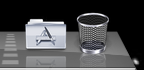
I have the same issue, but with only one folder. Changing from Folder to view to Stacks view and back again fixes it, but always reverts to a blank folder on restart.
Mine does not do that. Here is what I did, to change the icon of my applications stack.
In the Dock, select the folder - Right Click and set the "Display as" to Stack
Copy the Icon you want to set as your stack icon and paste it into the Applications folder
Rename the icon file so that it has a space infront of the file name.
For Eg: I have a icon file named "Applications.icns" I renamed it to " Applications.icns"
Close the appications folder
From dock, right-click on the applications stack and make sure that "Sort by" is set to "NAME"
Using this technique the icons do not automatically default back to the original folder icon 🙂
Hope this helps. Let me know if you have any questions.
I'm not sure how i got it to work, but now the folder icon doesn't change upon power up or restart. the only thing i did was update to 10.5.7. maybe that fixed the situation.